
#Scuola, aumenti e arretrati in arrivo per docenti e ATA.
Qui tutti i dettagli ➡️mim.gov.

Ministero dell'Istruzione
#Scuola, aumenti e arretrati in arrivo per docenti e ATA. Qui tutti i dettagli ➡️https://www.mim.gov.Telegram
Assessing SIEM effectiveness

A SIEM is a complex system offering broad and flexible threat detection capabilities. Due to its complexity, its effectiveness heavily depends on how it is configured and what data sources are connected to it. A one-time SIEM setup during implementation is not enough: both the organization’s infrastructure and attackers’ techniques evolve over time. To operate effectively, the SIEM system must reflect the current state of affairs.
We provide customers with services to assess SIEM effectiveness, helping to identify issues and offering options for system optimization. In this article, we examine typical SIEM operational pitfalls and how to address them. For each case, we also include methods for independent verification.
This material is based on an assessment of Kaspersky SIEM effectiveness; therefore, all specific examples, commands, and field names are taken from that solution. However, the assessment methodology, issues we identified, and ways to enhance system effectiveness can easily be extrapolated to any other SIEM.
Methodology for assessing SIEM effectiveness
The primary audience for the effectiveness assessment report comprises the SIEM support and operation teams within an organization. The main goal is to analyze how well the usage of SIEM aligns with its objectives. Consequently, the scope of checks can vary depending on the stated goals. A standard assessment is conducted across the following areas:
- Composition and scope of connected data sources
- Coverage of data sources
- Data flows from existing sources
- Correctness of data normalization
- Detection logic operability
- Detection logic accuracy
- Detection logic coverage
- Use of contextual data
- SIEM technical integration into SOC processes
- SOC analysts’ handling of alerts in the SIEM
- Forwarding of alerts, security event data, and incident information to other systems
- Deployment architecture and documentation
At the same time, these areas are examined not only in isolation but also in terms of their potential influence on one another. Here are a couple of examples illustrating this interdependence:
- Issues with detection logic due to incorrect data normalization. A correlation rule with the condition
deviceCustomString1 not contains <string>triggers a large number of alerts. The detection logic itself is correct: the specific event and the specific field it targets should not generate a large volume of data matching the condition. Our review revealed the issue was in the data ingested by the SIEM, where incorrect encoding caused the string targeted by the rule to be transformed into a different one. Consequently, all events matched the condition and generated alerts. - When analyzing coverage for a specific source type, we discovered that the SIEM was only monitoring 5% of all such sources deployed in the infrastructure. However, extending that coverage would increase system load and storage requirements. Therefore, besides connecting additional sources, it would be necessary to scale resources for specific modules (storage, collectors, or the correlator).
The effectiveness assessment consists of several stages:
- Collect and analyze documentation, if available. This allows assessing SIEM objectives, implementation settings (ideally, the deployment settings at the time of the assessment), associated processes, and so on.
- Interview system engineers, analysts, and administrators. This allows assessing current tasks and the most pressing issues, as well as determining exactly how the SIEM is being operated. Interviews are typically broken down into two phases: an introductory interview, conducted at project start to gather general information, and a follow-up interview, conducted mid-project to discuss questions arising from the analysis of previously collected data.
- Gather information within the SIEM and then analyze it. This is the most extensive part of the assessment, during which Kaspersky experts are granted read-only access to the system or a part of it to collect factual data on its configuration, detection logic, data flows, and so on.
The assessment produces a list of recommendations. Some of these can be implemented almost immediately, while others require more comprehensive changes driven by process optimization or a transition to a more structured approach to system use.
Issues arising from SIEM operations
The problems we identify during a SIEM effectiveness assessment can be divided into three groups:
- Performance issues, meaning operational errors in various system components. These problems are typically resolved by technical support, but to prevent them, it is worth periodically checking system health status.
- Efficiency issues – when the system functions normally but seemingly adds little value or is not used to its full potential. This is usually due to the customer using the system capabilities in a limited way, incorrectly, or not as intended by the developer.
- Detection issues – when the SIEM is operational and continuously evolving according to defined processes and approaches, but alerts are mostly false positives, and the system misses incidents. For the most part, these problems are related to the approach taken in developing detection logic.
Key observations from the assessment
Event source inventory
When building the inventory of event sources for a SIEM, we follow the principle of layered monitoring: the system should have information about all detectable stages of an attack. This principle enables the detection of attacks even if individual malicious actions have gone unnoticed, and allows for retrospective reconstruction of the full attack chain, starting from the attackers’ point of entry.
Problem: During effectiveness assessments, we frequently find that the inventory of connected source types is not updated when the infrastructure changes. In some cases, it has not been updated since the initial SIEM deployment, which limits incident detection capabilities. Consequently, certain types of sources remain completely invisible to the system.
We have also encountered non-standard cases of incomplete source inventory. For example, an infrastructure contains hosts running both Windows and Linux, but monitoring is configured for only one family of operating systems.
How to detect: To identify the problems described above, determine the list of source types connected to the SIEM and compare it against what actually exists in the infrastructure. Identifying the presence of specific systems in the infrastructure requires an audit. However, this task is one of the most critical for many areas of cybersecurity, and we recommend running it on a periodic basis.
We have compiled a reference sheet of system types commonly found in most organizations. Depending on the organization type, infrastructure, and threat model, we may rearrange priorities. However, a good starting point is as follows:
- High Priority – sources associated with:
- Remote access provision
- External services accessible from the internet
- External perimeter
- Endpoint operating systems
- Information security tools
- Medium Priority – sources associated with:
- Remote access management within the perimeter
- Internal network communication
- Infrastructure availability
- Virtualization and cloud solutions
- Low Priority – sources associated with:
- Business applications
- Internal IT services
- Applications used by various specialized teams (HR, Development, PR, IT, and so on)
Monitoring data flow from sources
Regardless of how good the detection logic is, it cannot function without telemetry from the data sources.
Problem: The SIEM core is not receiving events from specific sources or collectors. Based on all assessments conducted, the average proportion of collectors that are configured with sources but are not transmitting events is 38%. Correlation rules may exist for these sources, but they will, of course, never trigger. It is also important to remember that a single collector can serve hundreds of sources (such as workstations), so the loss of data flow from even one collector can mean losing monitoring visibility for a significant portion of the infrastructure.
How to detect: The process of locating sources that are not transmitting data can be broken down into two components.
- Checking collector health. Find the status of collectors (see the support website for the steps to do this in Kaspersky SIEM) and identify those with a status of
Offline,Stopped,Disabled, and so on. - Checking the event flow. In Kaspersky SIEM, this can be done by gathering statistics using the following query (counting the number of events received from each collector over a specific time period):
SELECT count(ID), CollectorID, CollectorName FROM `events` GROUP BY CollectorID, CollectorName ORDER BY count(ID)It is essential to specify an optimal time range for collecting these statistics. Too large a range can increase the load on the SIEM, while too small a range may provide inaccurate information for a one-time check – especially for sources that transmit telemetry relatively infrequently, say, once a week. Therefore, it is advisable to choose a smaller time window, such as 2–4 days, but run several queries for different periods in the past.
Additionally, for a more comprehensive approach, it is recommended to use built-in functionality or custom logic implemented via correlation rules and lists to monitor event flow. This will help automate the process of detecting problems with sources.
Event source coverage
Problem: The system is not receiving events from all sources of a particular type that exist in the infrastructure. For example, the company uses workstations and servers running Windows. During SIEM deployment, workstations are immediately connected for monitoring, while the server segment is postponed for one reason or another. As a result, the SIEM receives events from Windows systems, the flow is normalized, and correlation rules work, but an incident in the unmonitored server segment would go unnoticed.
How to detect: Below are query variations that can be used to search for unconnected sources.
SELECT count(distinct, DeviceAddress), DeviceVendor, DeviceProduct FROM [code]eventsGROUP BY DeviceVendor, DeviceProduct ORDER BY count(ID)[/code]SELECT count(distinct, DeviceHostName), DeviceVendor, DeviceProduct FROM [code]eventsGROUP BY DeviceVendor, DeviceProduct ORDER BY count(ID)[/code]
We have split the query into two variations because, depending on the source and the DNS integration settings, some events may contain either a DeviceAddress or DeviceHostName field.
These queries will help determine the number of unique data sources sending logs of a specific type. This count must be compared against the actual number of sources of that type, obtained from the system owners.
Retaining raw data
Raw data can be useful for developing custom normalizers or for storing events not used in correlation that might be needed during incident investigation. However, careless use of this setting can cause significantly more harm than good.
Problem: Enabling the Keep raw event option effectively doubles the event size in the database, as it stores two copies: the original and the normalized version. This is particularly critical for high-volume collectors receiving events from sources like NetFlow, DNS, firewalls, and others. It is worth noting that this option is typically used for testing a normalizer but is often forgotten and left enabled after its configuration is complete.
How to detect: This option is applied at the normalizer level. Therefore, it is necessary to review all active normalizers and determine whether retaining raw data is required for their operation.
Normalization
As with the absence of events from sources, normalization issues lead to detection logic failing, as this logic relies on finding specific information in a specific event field.
Problem: Several issues related to normalization can be identified:
- The event flow is not being normalized at all.
- Events are only partially normalized – this is particularly relevant for custom, non-out-of-the-box normalizers.
- The normalizer being used only parses headers, such as
syslog_headers, placing the entire event body into a single field, this field most often beingMessage. - An outdated default normalizer is being used.
How to detect: Identifying normalization issues is more challenging than spotting source problems due to the high volume of telemetry and variety of parsers. Here are several approaches to narrowing the search:
- First, check which normalizers supplied with the SIEM the organization uses and whether their versions are up to date. In our assessments, we frequently encounter auditd events being normalized by the outdated normalizer,
Linux audit and iptables syslog v2for Kaspersky SIEM. The new normalizer completely reworks and optimizes the normalization schema for events from this source. - Execute the query:
SELECT count(ID), DeviceProduct, DeviceVendor, CollectorName FROM `events` GROUP BY DeviceProduct, DeviceVendor, CollectorName ORDER BY count(ID)This query gathers statistics on events from each collector, broken down by the DeviceVendor and DeviceProduct fields. While these fields are not mandatory, they are present in almost any normalization schema. Therefore, their complete absence or empty values may indicate normalization issues. We recommend including these fields when developing custom normalizers.
To simplify the identification of normalization problems when developing custom normalizers, you can implement the following mechanism. For each successfully normalized event, add a Name field, populated from a constant or the event itself. For a final catch-all normalizer that processes all unparsed events, set the constant value: Name = unparsed event. This will later allow you to identify non-normalized events through a simple search on this field.
Detection logic coverage
Collected events alone are, in most cases, only useful for investigating an incident that has already been identified. For a SIEM to operate to its full potential, it requires detection logic to be developed to uncover probable security incidents.
Problem: The mean correlation rule coverage of sources, determined across all our assessments, is 43%. While this figure is only a ballpark figure – as different source types provide different information – to calculate it, we defined “coverage” as the presence of at least one correlation rule for a source. This means that for more than half of the connected sources, the SIEM is not actively detecting. Meanwhile, effort and SIEM resources are spent on connecting, maintaining, and configuring these sources. In some cases, this is formally justified, for instance, if logs are only needed for regulatory compliance. However, this is an exception rather than the rule.
We do not recommend solving this problem by simply not connecting sources to the SIEM. On the contrary, sources should be connected, but this should be done concurrently with the development of corresponding detection logic. Otherwise, it can be forgotten or postponed indefinitely, while the source pointlessly consumes system resources.
How to detect: This brings us back to auditing, a process that can be greatly aided by creating and maintaining a register of developed detection logic. Given that not every detection logic rule explicitly states the source type from which it expects telemetry, its description should be added to this register during the development phase.
If descriptions of the correlation rules are not available, you can refer to the following:
- The name of the detection logic. With a standardized approach to naming correlation rules, the name can indicate the associated source or at least provide a brief description of what it detects.
- The use of fields within the rules, such as
DeviceVendor,DeviceProduct(another argument for including these fields in the normalizer),Name,DeviceAction,DeviceEventCategory,DeviceEventClassID, and others. These can help identify the actual source.
Excessive alerts generated by the detection logic
One criterion for correlation rules effectiveness is a low false positive rate.
Problem: Detection logic generates an abnormally high number of alerts that are physically impossible to process, regardless of the size of the SOC team.
How to detect: First and foremost, detection logic should be tested during development and refined to achieve an acceptable false positive rate. However, even a well-tuned correlation rule can start producing excessive alerts due to changes in the event flow or connected infrastructure. To identify these rules, we recommend periodically running the following query:
SELECT count(ID), Name FROM `events` WHERE Type = 3 GROUP BY Name ORDER BY count(ID)
In Kaspersky SIEM, a value of 3 in the Type field indicates a correlation event.
Subsequently, for each identified rule with an anomalous alert count, verify the correctness of the logic it uses and the integrity of the event stream on which it triggered.
Depending on the issue you identify, the solution may involve modifying the detection logic, adding exceptions (for example, it is often the case that 99% of the spam originates from just 1–5 specific objects, such as an IP address, a command parameter, or a URL), or adjusting event collection and normalization.
Lack of integration with indicators of compromise
SIEM integrations with other systems are generally a critical part of both event processing and alert enrichment. In at least one specific case, their presence directly impacts detection performance: integration with technical Threat Intelligence data or IoCs (indicators of compromise).
A SIEM allows conveniently checking objects against various reputation databases or blocklists. Furthermore, there are numerous sources of this data that are ready to integrate natively with a SIEM or require minimal effort to incorporate.
Problem: There is no integration with TI data.
How to detect: Generally, IoCs are integrated into a SIEM at the system configuration level during deployment or subsequent optimization. The use of TI within a SIEM can be implemented at various levels:
- At the data source level. Some sources, such as NGFWs, add this information to events involving relevant objects.
- At the SIEM native functionality level. For example, Kaspersky SIEM integrates with CyberTrace indicators, which add object reputation information at the moment of processing an event from a source.
- At the detection logic level. Information about IoCs is stored in various active lists, and correlation rules match objects against these to enrich the event.
Furthermore, TI data does not appear in a SIEM out of thin air. It is either provided by external suppliers (commercially or in an open format) or is part of the built-in functionality of the security tools in use. For instance, various NGFW systems can additionally check the reputation of external IP addresses or domains that users are accessing. Therefore, the first step is to determine whether you are receiving information about indicators of compromise and in what form (whether external providers’ feeds have been integrated and/or the deployed security tools have this capability). It is worth noting that receiving TI data only at the security tool level does not always cover all types of IoCs.
If data is being received in some form, the next step is to verify that the SIEM is utilizing it. For TI-related events coming from security tools, the SIEM needs a correlation rule developed to generate alerts. Thus, checking integration in this case involves determining the capabilities of the security tools, searching for the corresponding events in the SIEM, and identifying whether there is detection logic associated with these events. If events from the security tools are absent, the source audit configuration should be assessed to see if the telemetry type in question is being forwarded to the SIEM at all. If normalization is the issue, you should assess parsing accuracy and reconfigure the normalizer.
If TI data comes from external providers, determine how it is processed within the organization. Is there a centralized system for aggregating and managing threat data (such as CyberTrace), or is the information stored in, say, CSV files?
In the former case (there is a threat data aggregation and management system) you must check if it is integrated with the SIEM. For Kaspersky SIEM and CyberTrace, this integration is handled through the SIEM interface. Following this, SIEM event flows are directed to the threat data aggregation and management system, where matches are identified and alerts are generated, and then both are sent back to the SIEM. Therefore, checking the integration involves ensuring that all collectors receiving events that may contain IoCs are forwarding those events to the threat data aggregation and management system. We also recommend checking if the SIEM has a correlation rule that generates an alert based on matching detected objects with IoCs.
In the latter case (threat information is stored in files), you must confirm that the SIEM has a collector and normalizer configured to load this data into the system as events. Also, verify that logic is configured for storing this data within the SIEM for use in correlation. This is typically done with the help of lists that contain the obtained IoCs. Finally, check if a correlation rule exists that compares the event flow against these IoC lists.
As the examples illustrate, integration with TI in standard scenarios ultimately boils down to developing a final correlation rule that triggers an alert upon detecting a match with known IoCs. Given the variety of integration methods, creating and providing a universal out-of-the-box rule is difficult. Therefore, in most cases, to ensure IoCs are connected to the SIEM, you need to determine if the company has developed that rule (the existence of the rule) and if it has been correctly configured. If no correlation rule exists in the system, we recommend creating one based on the TI integration methods implemented in your infrastructure. If a rule does exist, its functionality must be verified: if there are no alerts from it, analyze its trigger conditions against the event data visible in the SIEM and adjust it accordingly.
The SIEM is not kept up to date
For a SIEM to run effectively, it must contain current data about the infrastructure it monitors and the threats it’s meant to detect. Both elements change over time: new systems and software, users, security policies, and processes are introduced into the infrastructure, while attackers develop new techniques and tools. It is safe to assume that a perfectly configured and deployed SIEM system will no longer be able to fully see the altered infrastructure or the new threats after five years of running without additional configuration. Therefore, practically all components – event collection, detection, additional integrations for contextual information, and exclusions – must be maintained and kept up to date.
Furthermore, it is important to acknowledge that it is impossible to cover 100% of all threats. Continuous research into attacks, development of detection methods, and configuration of corresponding rules are a necessity. The SOC itself also evolves. As it reaches certain maturity levels, new growth opportunities open up for the team, requiring the utilization of new capabilities.
Problem: The SIEM has not evolved since its initial deployment.
How to detect: Compare the original statement of work or other deployment documentation against the current state of the system. If there have been no changes, or only minimal ones, it is highly likely that your SIEM has areas for growth and optimization. Any infrastructure is dynamic and requires continuous adaptation.
Other issues with SIEM implementation and operation
In this article, we have outlined the primary problems we identify during SIEM effectiveness assessments, but this list is not exhaustive. We also frequently encounter:
- Mismatch between license capacity and actual SIEM load. The problem is almost always the absence of events from sources, rather than an incorrect initial assessment of the organization’s needs.
- Lack of user rights management within the system (for example, every user is assigned the administrator role).
- Poor organization of customizable SIEM resources (rules, normalizers, filters, and so on). Examples include chaotic naming conventions, non-optimal grouping, and obsolete or test content intermixed with active content. We have encountered confusing resource names like
[dev] test_Add user to admin group_final2. - Use of out-of-the-box resources without adaptation to the organization’s infrastructure. To maximize a SIEM’s value, it is essential at a minimum to populate exception lists and specify infrastructure parameters: lists of administrators and critical services and hosts.
- Disabled native integrations with external systems, such as LDAP, DNS, and GeoIP.
Generally, most issues with SIEM effectiveness stem from the natural degradation (accumulation of errors) of the processes implemented within the system. Therefore, in most cases, maintaining effectiveness involves structuring these processes, monitoring the quality of SIEM engagement at all stages (source onboarding, correlation rule development, normalization, and so on), and conducting regular reviews of all system components and resources.
Conclusion
A SIEM is a powerful tool for monitoring and detecting threats, capable of identifying attacks at various stages across nearly any point in an organization’s infrastructure. However, if improperly configured and operated, it can become ineffective or even useless while still consuming significant resources. Therefore, it is crucial to periodically audit the SIEM’s components, settings, detection rules, and data sources.
If a SOC is overloaded or otherwise unable to independently identify operational issues with its SIEM, we offer Kaspersky SIEM platform users a service to assess its operation. Following the assessment, we provide a list of recommendations to address the issues we identify. That being said, it is important to clarify that these are not strict, prescriptive instructions, but rather highlight areas that warrant attention and analysis to improve the product’s performance, enhance threat detection accuracy, and enable more efficient SIEM utilization.
Keebin’ with Kristina: the One With the Ultimate Portable Split

What do you look for in a travel keyboard? For me, it has to be split, though this condition most immediately demands a carrying solution of some kind. Wirelessness I can take or leave, so it’s nice to have both options available. And of course, bonus points if it looks so good that people interrupt me to ask questions.

You’ll see a couple of really neat features, like swing-out tenting feet, a trackpoint, rotary encoders, and the best part of all — a carrying case that doubles as a laptop stand. Sweet!
Eight years in the making, this is the fifth in a series, thus the name: the P stands for Portability; the S for Split. [kleshwong] believes that 36 keys is just right, as long as you have what you need on various layers.
So, do what you can in the like/share/subscribe realm so we can all see the GitHub come to pass, would you? Here’s the spot to watch, and you can enjoy looking through the previous versions while you wait with your forks and stars.
youtube.com/embed/DrDmi9TS-7Q?…
Via reddit
Loongcat40 Has Custom OLED Art
I love me a monoblock split, and I’m speaking to you from one now. They’re split, but you can just toss them across the desk when it’s time to say, eat dinner or carve pink erasers with linoleum tools, and they stay perfectly split and aligned for when you want to pull them back into service.

In between the halves you’ll find a 2.08″ SH1122 OLED display with lovely artwork by [suh_ga]. Yes, that art is baked into the firmware, free of charge.
Loongcat40 is powered by a Raspi Pico and qualifies as a 40%. The custom case is gasket-mounted and 3D-printed.
[Christian Lo] aka [sporewoh] is no stranger to the DIY keyboard game. You may recognize that name as the builder of some very tiny keyboards, so the Loongcat40 is actually kind of huge by comparison.
Via reddit
The Centerfold: WIP Goes with the Flow

Via reddit
Do you rock a sweet set of peripherals on a screamin’ desk pad? Send me a picture along with your handle and all the gory details, and you could be featured here!
Historical Clackers: the Double-Index Pettypet Typewriter
Perhaps the first thing you will notice about the Pettypet after the arresting red color is the matching pair of finger cups. More on this in a minute.
Information is minimal according to The Antikey Chop, and they have collected all that is factual and otherwise about the Pettypet. It debuted in 1930, and was presumably whisked from the world stage the same year.
The Pettypet was invented by someone named Podleci who hailed from Vienna, Austria. Not much else is known about this person. And although the back of the frame is stamped “Patented in all countries — Patents Pending”, the original patent is unknown.
Although it looks like a Bennett, this machine is 25% larger than a Bennett. Those aren’t keycaps, just legends for the two finger cups. You select the character you want, and then press down to print. That cute little red button in the middle is the Spacebar. On the far left, there are two raised Shift buttons, one for capitals and the other for figures.
Somewhat surprisingly, this machine uses a print wheel to apply the type, and a small-looking but otherwise standard two-spool ribbon. There are more cute red buttons on the sides to change the ribbon’s direction. There’s no platen to speak of, just a strip of rubber.
The company name, Pettypet GmbH, and ‘Frankfurt, Germany’ are also stamped into the frame. In addition to this candy-apple red, the Pettypet came in green, blue, and brown. I’d love to see the blue.
Finally, 3D Printed Keyboards That Look Injection-Molded
hackaday.com/wp-content/upload…
Isn’t this lovely? It’s just so smooth! This is a Cygnus printed in PETG and post-processed using only sandpaper and a certain primer filler for car scratches.
About a month ago, [ErgoType] published a guide under another handle. It’s a short guide, and one worth reading. Essentially, [ErgoType], then [FekerFX] sanded it with 400 grit and wiped it down, then applied two coats of primer filler, waiting an hour between coats. Then it gets sanded until smooth.
Finally, apply two more coats, let those dry, and use 1000-grit sandpaper to wet-sand it, adding a drop of soap for a smoother time. Wipe it down again and apply a color primer, then spray paint it and apply a clear coat. Although it seems labor-intensive and time consuming, the results are totally worth it for something you’re going to have your hands on every day.
Got a hot tip that has like, anything to do with keyboards? Help me out by sending in a link or two. Don’t want all the Hackaday scribes to see it? Feel free to email me directly.
The Nokia N900 Updated For 2025

Can a long-obsolete Linux phone from 2009 be of use in 2025? [Yaky] has a Nokia N900, and is giving it a go.
Back in the 2000s, Nokia owned the mobile phone space. They had a smartphone OS even if they didn’t understand app distribution, they had the best cameras, screens, antennas, the lot. They threw it all away with inept management that made late-stage Commodore look competent, Apple and Android came along, and now a Nokia is a rarity. Out of this mess came one good thing though, the N900 was a Linux-based smartphone that became the go-to hacker mobile for a few years.
First up with this N900 is the long-dead battery. He makes a fake battery with a set of supercapacitors and resistors to simulate the temperature sensor, and is then able to power it from an external PSU. This is refined to a better fake battery using the connector from the original. The device also receives a USB-C port, though due to space constraints not the PD identifiers, making it (almost) modern.
Because it was a popular hacker device, it’s possible to upgrade the software on an N900. He’s given it U-Boot, and now it boots Linux form an SD card and functions as an online radio device.
That’s impressive hackability and longevity for a phone, if only we could have more like it.
Surviving the RAM Apocalypse With Software Optimizations

To the surprise of almost nobody, the unprecedented build-out of datacenters and the equipping of them with servers for so-called ‘AI’ has led to a massive shortage of certain components. With random access memory (RAM) being so far the most heavily affected and with storage in the form of HDDs and SSDs not far behind, this has led many to ask the question of how we will survive the coming months, years, decades, or however-long the current AI bubble will last.
One thing is already certain, and that is that we will have to make our current computer systems last longer, and forego simply tossing in more sticks of RAM in favor of doing more with less. This is easy to imagine for those of us who remember running a full-blown Windows desktop system on a sub-GHz x86 system with less than a GB of RAM, but might require some adjustment for everyone else.
In short, what can us software developers do differently to make a hundred MB of RAM stretch further, and make a GB of storage space look positively spacious again?
Just What Happened?
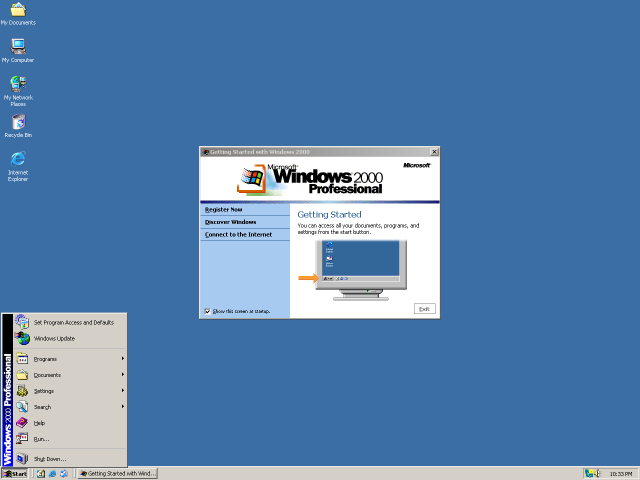
On these systems I could run a browser with many tabs open, alongside an office suite, an IDE, chat applications like IRC and ICQ, an email client, filesharing applications, and much more, without the system breaking a sweat. In the Duron 600 system I would eventually install a Matrox G550 AGP videocard to do some dual-monitor action, like watching videos or consulting documentation while browsing or programming at the same time.
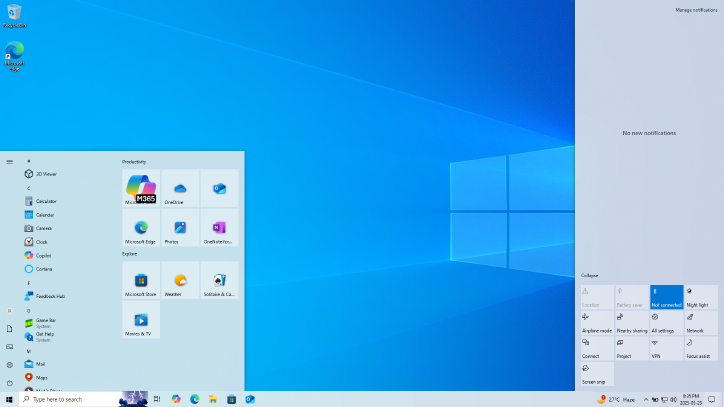
Fast-forward a few decades and you cannot even install Windows on a 1 GB partition, and it requires more RAM than that. A quick check on the Windows 10 system that I’m typing this on shows that currently the Windows folder is nearly 27 GB in size and just the Thunderbird email client is gobbling up over 150 MB of RAM by itself. Compare this to the minimum Windows 2000 system requirements of a Pentium 133 MHz, 32 MB of RAM and 1 GB of free HDD space.
This raises the question of what the reason is for this increase, when that email client in the early 2000s had effectively the same features in a much smaller package, and Windows 2000 is effectively the same as Windows 7, 10 and now 11, at its core when it comes to its feature set.
The same is true for ‘fast and light’ options like Linux, which I had once running on a 486DX2-66 system, a system on which the average Linux distribution today won’t even launch the installer, unless you go for a minimalistic distro like Alpine Linux, which requires a mere 128 MB of RAM. Where does all this demand for extra RAM and disk storage come from? Is it just all lazy waste and bloat that merely fills up the available space like a noxious gas?
Asking The Right Questions
Storage and RAM requirements for software are linked in the sense that much of an application’s code and related resources are loaded into RAM at some point, but there is also the part of RAM that gets filled with data that the application generates while running. This gives us a lens to find out where the higher requirements come from.
In the case of Windows, the increase in minimum storage space requirements from 1 GB to 32 GB for Windows 10 can be explained by something that happened when Windows Vista rolled around along with changes to WinSxS, which is Windows’ implementation of side-by-side assembly.
By putting all core OS files in a single WinSxS folder and hard-linking them to various locations in the file system, all files are kept in a single location, with their own manifest and previous versions kept around for easy rollback. In Windows 2000, WinSxS was not yet used for the whole OS like this, mostly just to prevent ‘DLL Hell’ file duplication issues, but Vista and onwards leaned much more heavily into this approach as they literally dumped every single OS file into this folder.
While that by itself isn’t such an issue, keeping copies of older file versions ensured that with each Windows Update cycle the WinSxS folder grew a little bit more. This was confirmed in a 2008 TechNet blog post, and though really old files are supposed to be culled now, it clearly has ensured that a modern Windows installation grows to far beyond that of pre-Vista OSes.
Thus we have some idea of why disk storage size requirements are increasing, leading us to the next thing, which is the noticeable increase in binary size. This can be put down for a large part on increased levels of abstractions, both in system programming languages, as well as scripting languages and frameworks.
Losing Sight Of The Hardware
Over the past decades we have seen a major shift away from programming languages and language features that work directly with the hardware to ones that increasingly abstract away the hardware. This shift was obvious in the 90s already, with for example Visual Basic continuing the legacy of BASIC with a similar mild level of abstraction before Java arrived on the scene with its own virtual hardware platform that insisted that hardware was just an illusion that software developers ought to not bother with.
Subsequently we saw .NET, JavaScript, Python, and kin surge to the foreground, offering ‘easier programming’ and ‘more portable code’, yet at the same time increasing complexity, abstraction levels, as well as file sizes and memory usage. Most importantly, these languages abandoned the concept of programming the underlying hardware with as few levels of indirection as possible. This is something which has even become part of languages like C and C++, with my own loathing for this complexity and abstraction in C++ being very palpable.
In the case of a language like Python, it’s known to be exceedingly slow due to its architecture, which results in the atrocious CPython runtime as well as better, but far more complex alternatives. This is a software architecture that effectively ignores the hardware’s architecture, which thus results in bringing in a lot of unnecessary complexity. Languages such as JavaScript also make this mistake, with a heavy runtime that requires features such as type-checking and garbage collection that add complexity, while needing more code to enable features like Just-In-Time compilation to keep things still somewhat zippy.
With Java we even saw special JVM processor extensions being added to ARM processor with Jazelle direct bytecode execution (DBX) to make mobile games on cellphones programmed in J2ME not run at less than 1 FPS. Clearly if the software refuses to work with the hardware, the hardware has to adapt to the software.
By the time that you’re a few levels of abstraction, various ‘convenient frameworks’ and multiple layers of indirection down the proverbial rabbit hole, suddenly your application’s codebase has ballooned by a few 100k LoC, the final binary comes in at 100+ MB and dial-up users just whimper as they see the size of the installer. But at least now we know why modern-day Thunderbird uses more RAM than what an average PC would have had installed around 1999.
Not All Hope Is Lost
There’s no need to return to the days of chiseling raw assembly into stone tables like in the days when the 6502 and Z80 still reigned supreme. All we need to do to make the most of the RAM and storage we have, is to ask ourselves at each point whether there isn’t a more direct and less complex way. What this looks like will depend on the application, but the approach that I like to use with my own projects is that of the chronically lazy developer who doesn’t like writing more code than absolutely necessary, hates complexity because it takes effort and whose eyes glaze over at overly verbose documentation.
One could argue that there’s considerable overlap between KISS and laziness, in the sense that a handful of source files accompanied by a brief Makefile is simultaneously less work and less complex than a MB+ codebase that exceeds the capabilities of a single developer with a basic editor like Notepad++ or Vim. This incidentally is why I do not use IDEs but prefer to only rely on outrageously advanced features such as syntax highlighting and auto-indent. Using my brain for human-powered Intellisense makes for a good mental exercise.
I also avoid complex file formats like XML and their beefy parsers, preferring to instead use the INI format that’s both much easier to edit and parse. For embedding scripting languages I use the strongly-typed AngelScript, which is effectively scriptable C++ and doesn’t try any cute alternative architectures like Python or Lua do.
Rather than using bulky, overly bloated C++ frameworks like Boost, I use the much smaller and less complex Poco libraries, or my NPoco fork that targets FreeRTOS and similar embedded platforms. With my remote procedure call (RPC) framework NymphRPC I opted for a low-level, zero copy approach that tries to stick as closely to the CPU and memory system’s capabilities as feasible to do the work with the fewest resources possible.
While I’m not trying to claim that my approach is the One True Approach
Sure, I could probably have done something with MicroPython or so, but at the cost of a lot more storage and with far less performance. Which gets us back again to why modern day PCs need so much RAM and storage. It’s not a bug, but a feature of the system many of us opted for, or were told was the Modern Way
libxml2 Narrowly Avoids Becoming Unmaintained

In an excellent example of one of the most overused XKCD images, the libxml2 library has for a little while lost its only maintainer, with [Nick Wellnhofer] making good on his plan to step down by the end of the year.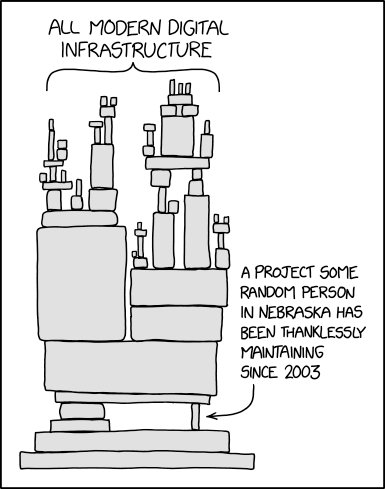
While this might not sound like a big deal, the real scope of this problem is rather profound. Not only is libxml2 part of GNOME, it’s also used as dependency by a huge number of projects, including web browsers and just about anything that processes XML or XSLT. Not having a maintainer in the event that a fresh, high-risk CVE pops up would obviously be less than desirable.
As for why [Nick] stepped down, it’s a long story. It starts in the early 2000s when the original author [Daniel Veillard] decided he no longer had time for the project and left [Nick] in charge. It should be said here that both of them worked as volunteers on the project, for no financial compensation. This when large companies began to use projects like libxml2 in their software, and were happy to send bug reports. Beyond a single Google donation it was effectively unpaid work that required a lot of time spent on researching and processing potential security flaws sent in.
Of note is that when such a security report comes in, the expectation is that you as a volunteer software developer drop everything you’re working on and figure out the cause, fix and patched-by-date alongside filing a CVE. This rather than you getting sent a merge request or similar with an accompanying test case. Obviously these kind of cases seems to have played a major role in making [Nick] burn out on maintaining both libxml2 and libxslt.
Fortunately for the project two new developers have stepped up to take over as maintainers, but it should be obvious that such churn is not a good sign. It also highlights the central problem with the conflicting expectations of open source software being both totally free in a monetary fashion and unburdened with critical bugs. This is unfortunately an issue that doesn’t seem to have an easy solution, with e.g. software bounties resulting in mostly a headache.
Attacco DDoS contro La Poste francese: NoName057(16) rivendica l’operazione
Secondo quanto appreso da fonti interne di RedHotCyber, l’offensiva digitale che sta creando problemi al Sistema Postale Nazionale in Francia è stata ufficialmente rivendicata dal collettivo hacker filo-russo NoName057(16).
Gli analisti confermano che l’azione rientra in una strategia di disturbo mirata a colpire i servizi essenziali dei paesi europei, utilizzando la tecnica del sovraccarico dei server per mettere in ginocchio la logistica nazionale.

Il blocco operativo sta interessando in modo critico la gestione della Banque Postale, la branca finanziaria del gruppo. Gli utenti si trovano nell’impossibilità di accedere ai propri conti tramite home banking, un disservizio che, unito alle difficoltà nei pagamenti digitali, sta creando forti tensioni proprio nel pieno della stagione degli acquisti natalizi.
Nonostante il caos generato sui portali web, i vertici de La Poste hanno diffuso una nota rassicurante riguardante la protezione dei dati sensibili. Al momento, non risulterebbero evidenze di esfiltrazione di informazioni personali o violazioni dei database dei clienti, suggerendo che l’attacco sia stato concepito principalmente per generare disservizi e non per il furto di identità.
La situazione più complessa si registra nel settore della logistica e delle spedizioni. Il sistema di monitoraggio dei pacchi risulta offline, rendendo impossibile per i cittadini tracciare i propri ordini. In molte aree, incluse diverse zone della capitale Parigi, il ritiro e l’invio delle merci sono stati parzialmente sospesi, provocando un accumulo di spedizioni nei depositi.
Le autorità d’oltralpe leggono questo incidente come l’ennesimo capitolo della cosiddetta “guerra ibrida“ russa.
Solo dieci giorni fa, il Ministero dell’Interno francese era stato bersaglio di un’intrusione informatica simile, a conferma di un inasprimento del conflitto digitale che mira a destabilizzare la fiducia dei cittadini nelle istituzioni pubbliche.

Per chi si reca fisicamente negli uffici postali, l’esperienza è segnata da lunghe attese e procedure manuali. Molte filiali hanno dovuto interrompere le operazioni di sportello per problemi tecnici con i sistemi, tornando a modalità di lavoro analogiche che rallentano drasticamente l’erogazione di ogni servizio, dalle raccomandate ai servizi di sportello finanziario.
Questo attacco DDoS (Distributed Denial of Service) ha colpito con una tempistica chirurgica, sfruttando il picco di traffico che precede il Natale. L’obiettivo dei NoName sembra essere l’ottenimento del massimo impatto mediatico e sociale, colpendo un simbolo della quotidianità francese in un momento di massima vulnerabilità logistica per l’intero Paese.

Mentre gli esperti di sicurezza lavorano per ripristinare la piena funzionalità dei sistemi, resta alta l’allerta per possibili nuove ondate di attacchi. La resilienza delle infrastrutture critiche francesi è ora sotto esame, evidenziando la necessità di protocolli di difesa più robusti contro gruppi organizzati che operano con finalità di propaganda politica attraverso il sabotaggio informatico.
L'articolo Attacco DDoS contro La Poste francese: NoName057(16) rivendica l’operazione proviene da Red Hot Cyber.
86 milioni di brani Spotify senza abbonamento: la minaccia degli attivisti di Anna’s Archive
Gli attivisti e pirati informatici di Anna’s Archive hanno riferito di aver rastrellato quasi l’intera libreria musicale del più grande servizio di streaming, Spotify. Affermano di aver raccolto metadati per 256 milioni di tracce e di aver scaricato direttamente i file audio: 86 milioni di brani, per un totale di circa 300 TB.
Anna’s Archive è un meta-motore di ricerca per biblioteche underground, lanciato nel 2022 da un’attivista anonima di nome Anna, poco dopo i tentativi delle forze dell’ordine di chiudere Z-Library. Il progetto aggrega contenuti provenienti da Z-Library, Sci-Hub, Library Genesis (LibGen), Internet Archive e altre fonti. Gli attivisti descrivono il loro lavoro come “preservare la conoscenza e la cultura umana”.
I membri di Anna’s Archive hanno annunciato la creazione del primo “archivio per la conservazione della musica”. Secondo gli attivisti, hanno recentemente scoperto un modo per effettuare lo scraping di massa di Spotify e hanno deciso di sfruttare questa opportunità per archiviare i contenuti.
“Qualche tempo fa, abbiamo scoperto un modo per estrarre dati da Spotify su larga scala. Abbiamo visto in questa un’opportunità per creare un archivio musicale incentrato principalmente sulla conservazione dei contenuti”, ha scritto la band sul proprio blog. “Certo, Spotify non ha tutta la musica del mondo, ma è un ottimo inizio.”
Secondo gli attivisti, tutte le raccolte musicali esistenti, sia fisiche che digitali, presentano gravi carenze. Questi archivi si concentrano principalmente su artisti popolari, puntano alla massima qualità audio (ad esempio, FLAC lossless), il che aumenta le dimensioni dei file, e non dispongono di un elenco centralizzato di torrent. Anna’s Archive ha deciso di colmare queste lacune.
Vale la pena notare che l’Archivio si concentra tipicamente su libri e articoli accademici, poiché il testo possiede la più alta densità di informazioni. Tuttavia, la missione del gruppo – la conservazione della conoscenza e della cultura umana – non fa distinzioni tra i diversi tipi di media. “A volte si presenta l’opportunità di preservare contenuti non testuali. Questo è esattamente uno di questi casi”, osservano gli attivisti.
Si dice che il dump di metadati risultante contenga informazioni sul 99,9% di tutte le tracce presenti sulla piattaforma, ovvero circa 256 milioni di composizioni. Questo lo rende il più grande database di metadati musicali pubblicamente disponibile al mondo. A titolo di confronto, i concorrenti dispongono di un numero di dischi compreso tra 50 e 150 milioni, mentre MusicBrainz ha solo 5 milioni di codici ISRC univoci, rispetto ai 186 milioni di Anna’s Archive.
Tuttavia, i metadati da soli non erano sufficienti. Gli attivisti hanno archiviato i file audio di 86 milioni di tracce. Sebbene ciò rappresenti solo il 37% del numero totale di brani disponibili su Spotify, queste tracce rappresentano il 99,6% di tutti gli streaming sulla piattaforma. In altre parole, c’è una probabilità del 99,6% che qualsiasi traccia ascoltata da un utente sia finita nell’archivio degli attivisti.
Per ordinare i brani è stata utilizzata la metrica di popolarità di Spotify, un valore numerico da 0 a 100 calcolato in base al numero di ascolti e alla loro pertinenza. I brani con popolarità superiore a 0 sono stati conservati nella loro qualità originale Ogg Vorbis a 160 kbps. I brani meno popolari sono stati transcodificati in Ogg Opus a 75 kbps. Sebbene la differenza non sia evidente per la maggior parte degli ascoltatori, aiuta a risparmiare spazio.
L’intero archivio sarà distribuito tramite torrent nel formato Anna’s Archive Containers (AAC), lo standard proprietario per la distribuzione dei file. La pubblicazione sarà suddivisa in diverse fasi: tutti i metadati raccolti sono già stati pubblicati, seguiti dalla pubblicazione dei brani stessi (ordinati per popolarità, dal più popolare al meno popolare), metadati aggiuntivi, copertina dell’album e patch per il ripristino dei file originali.
Gli attivisti hanno aggiunto quanti più metadati possibili a ciascun file: titolo della traccia, URL, codice ISRC, UPC, copertina dell’album, dati di replaygain e altre informazioni. I file Spotify originali non contenevano metadati, quindi il gruppo li ha incorporati nei file Ogg senza ricodificare l’audio.
I rappresentanti di Spotify hanno dichiarato ai media che si era effettivamente verificata una violazione dei dati. Hanno sottolineato che l’azienda aveva già identificato e bloccato gli account coinvolti nello scraping illegale e aveva implementato nuove misure di sicurezza per prevenire attacchi simili in futuro.
“Spotify ha identificato e sospeso account senza scrupoli utilizzati per lo scraping illegale. Abbiamo implementato nuove misure di sicurezza contro tali attacchi e stiamo monitorando attivamente le attività sospette. Ci impegniamo a supportare gli artisti nella lotta alla pirateria fin dal primo giorno e collaboriamo attivamente con i partner del settore per proteggere i creatori di contenuti e tutelare i loro diritti”, ha dichiarato la portavoce di Spotify, Laura Batey.
Per ora, l’archivio è focalizzato esclusivamente sulla conservazione dei contenuti ed è accessibile solo tramite torrent. Tuttavia, il gruppo ammette che, se ci sarà sufficiente interesse, potrebbe aggiungere la possibilità di scaricare singoli file direttamente dal suo sito web.
L'articolo 86 milioni di brani Spotify senza abbonamento: la minaccia degli attivisti di Anna’s Archive proviene da Red Hot Cyber.
Gazzetta del Cadavere reshared this.


