HermeticReader: How a Bug in Adobe’s PDF Browser Extension Could Expose WhatsApp Chats to Any Website
#CyberSecurity
securebulletin.com/hermeticrea…
reshared this
reshared this
reshared this
reshared this
Check Point addressed a critical authentication bypass flaw, tracked as CVE-2026-16232, in SmartConsole that is being actively exploited.Pierluigi Paganini (Security Affairs)
Cybersecurity & cyberwarfare reshared this.
UPDATE: Critical Vulnerabilities in Microsoft SharePoint (CERT-EU Security Advisory 2026-009)
[UPDATED] On 14 July 2026, Microsoft released security updates addressing critical remote code execution (RCE) vulnerabilities in Microsoft SharePoint Server. On 20 July 2026, WatchTowr identified a proof-of-concept exploit code and subsequently observed active exploitation of CVE-2026-50522, a vulnerability part of an ongoing series of actively exploited flaws affecting on-premise SharePoint Server instances, including CVE-2026-32201, CVE-2026-45659, CVE-2026-56164, and CVE-2026-58644.
CERT-EU strongly recommends updating affected servers immediately, rotating credentials for any assets that may have been exposed to the internet, and conducting a compromise assessment.
reshared this
Voice-controlled appliances are nothing new. What might be new, however, is [Moonshine AI] running it all locally on a Raspberry Pi Pico 2 W!
The voice interface is roughly divided into three parts: voice activity detection, SpellingCNN speech-to-text and a neural text to speech. The speech to text supports up to 50 tokens, and can be re-trained to support any specific words you want. It runs a simple loop: detect voice activity, listen for (command) tokens, process them in C++, use the TTS to reply, and repeat.
Now, to be fair, it is a bit of a squeeze: 3.6 MiB of the available 4 MiB FLASH and 468 KiB SRAM on a stock Pi Pico 2 board. It leaves you with just about enough space to write a small amount of extra software, but it’ll be a challenge to fit anything substantial. Still, fitting three different types of AI model needed to make this possible in such a space is quite impressive.
Uno dei padri dell'intelligenza artificiale dice che l'intelligenza artificiale non è intelligente e ovviamente lo sa meglio di chiunque altro perché l'ha cresciuta anche lui.Marco Camisani Calzolari
Cybersecurity & cyberwarfare reshared this.
Google conquista l’Europa dal fondo dell’oceano. Il nuovo cavo cambia gli equilibri del cloud?
📌 Link all'articolo : redhotcyber.com/post/google-co…
A cura di Silvia Felici
#redhotcyber #news #tecnologia #innovazione #googlenews #servizicloud #intelligenzaartificiale #dati #europe
Google ha installato un nuovo cavo sottomarino transatlantico a Sines, in Portogallo, migliorando la connettività dati tra Stati Uniti ed Europa per supportare cloud computing e intelligenza artificiale.Silvia Felici (Red Hot Cyber)
Cybersecurity & cyberwarfare reshared this.
☕ CYBERBRIEFING — Giovedì 23 luglio 2026
👉 Leggi tutti gli aggiornamenti delle ultime 24 ore:
ilpuntocyber.rfeed.it/article.…
#newsletter #cybersecurity
@informatica
☕ CYBERBRIEFING — Giovedì 23 luglio 2026 Il tuo riassunto quotidiano di cybersecurity da leggere con il caffè. 🔴 IN PRIMO PIANO Un agente IA di OpenAI "scappa" ed esce dai binari, violando la piattafo…Il Punto Cyber
reshared this
Come la NSO Group ha trasformato la sorveglianza totale in un comodo servizio web
📌 Link all'articolo : redhotcyber.com/post/come-la-n…
A cura di Carolina Vivianti
#redhotcyber #news #cybersecurity #hacking #malware #spyware #datirubati #vittimadihacking #sicurezzainformatica
Conoscere il numero di telefono della vittima è spesso sufficiente per hackerare uno smartphone utilizzando Pegasus, grazie alla complessa infrastruttura di NSO Group che gestisce l'intero processo di sorveglianza.Carolina Vivianti (Red Hot Cyber)
reshared this
Iliad: “La sovranità tecnologica non è un slogan, ma è realtà concreta!”, e investe 4 miliardi di euro
📌 Link all'articolo : redhotcyber.com/post/iliad-la-…
A cura di Carolina Vivianti
#redhotcyber #news #sovraniatadigitale #tecnologiedigitali #autonomiadata #sovranitaDati
Il Gruppo Iliad investe oltre 4 miliardi di euro in tecnologie digitali per rafforzare la sovranità digitale, archiviando i dati sanitari dei cittadini francesi con Scaleway.Carolina Vivianti (Red Hot Cyber)
reshared this
Arriva QUERY: il nuovo metodo HTTP per query complesse
📌 Link all'articolo : redhotcyber.com/post/arriva-qu…
A cura di Luigi Zullo
#redhotcyber #news #metodoquery #efficiente #sicurezza #idempotenza #caching #riavviodelleRichieste
L'IETF ha approvato un nuovo metodo HTTP chiamato QUERY per gestire richieste complesse in modo più efficiente e sicuro, risolvendo i limiti del tradizionale GET.Luigi Zullo (Red Hot Cyber)
reshared this
Qui è dove mi parlate (bene possibilmente) di #Decap CMS e perché sarebbe una buona alternativa selfhosted e open source.
L'idea è abbandonare substack dove ho le. mie NL e passare ad avere il caro e vecchio blog.
Parliamoci chiaro: Substack è comodo, ha analitiche, permette la programmazione, gestisce le subscription (sempre free nel mio caso). Ma sono sempre più allergica a soluzioni dalle quali DEVO dipendere, con tracciamento aggressivo e sempre sull'orlo del "promuovo i miei amichetti".
Magari ci sono alternative a Decap che non conosco, fatevi avanti!
..e grazie =)
reshared this
git.keinpfusch.net/loweel/blog…
gestisce sia newsletter che federazione, e ho aggiunto opzioni che consentono di usare al meglio il free tier dei servizi smtp in uso. se sfori il tier per giorno, tiene in coda e manda l'indomani. se sfori il tier del mese, tiene in coda. eccetera.
ha anche delle statistiche e la blacklist per il fediverso.
il vantaggio e' che se vuoi una feature nuova, chiedi direttamente all'autore. cioe' io. Una persona meravigliosa, sempre pronta ad ascoltare e aiutare.
--
Uriel Fanelli
My Projects: keinpfusch.net/software
XMPP: uriel@keinpfusch.net
MATRIX: @uriel:chat.keinpfusch.net
old blog: blog.keinpfusch.net
new blog: keinpfusch.net
As technologies change and adapt, we’re often left with seemingly useless junk that has nowhere to go. Certainly anyone still sitting on a pile of floppy disks feels this way sometimes, but odds are anyone who owns a mining ASIC or an NFT can attest to that as well. The trillions of dollars flowing into GPU-based data centers will likely become the next victim of this trend, so if you want to capitalize on the losses of some venture capitalist you’ll want to figure out a way to get GPUs meant for a server into your desktop doing useful work.
Of course, calling these devices GPUs is a bit of a stretch compared to the Radeon and GeForce cards many of us are used to using for gaming. These don’t even have a PCIe slot or video output, after all. But, as [Oscar] notes, the VRAM and GPU cores are very real and can still do useful work. An adapter board is able to mate a Tesla V100 SXM2 16 GB GPU to a standard PCIe slot, which solves the first problem, but the major downside from there is that the cooling fan for this unit was literally deafeningly loud. At 82 dB it was about as loud as a lawnmower, which is fine in a server rack but not great in a bedroom. [Oscar] found a way to tamp down the fan speed, making it usable in a home.
Without video output, the utility of these cards mainly comes from adding VRAM and compute for tasks that benefit from parallel computing. Using tensor splitting, [Oscar] is running a local LLM with this card alongside his RTX 4080, providing 32 GB of VRAM on his NixOS system. With his benchmarking tests, the LLM sports impressive stats for a self-hosted model, ranking somewhere around Claude Sonnet 4.6. What’s even more impressive is that this is all done for around £200, and with the rate the various LLM companies are ratcheting up pricing could pay itself back very quickly. If trading off performance for cost is acceptable, though, it’s possible to run local models on much less powerful hardware as well.
Although it’s commonly suspected that migratory birds fly in a ‘V’ formation due to this saving energy for the birds in the slipstream, understanding the exact aerodynamics behind this and how it affects the way that the birds use their wings to maintain this optimal pattern. After all, unlike airplanes and cars, our feathered avian dinosaur friends need to flap their wings if they want to have any chance of staving off plummeting back to Earth. Recent research by Brown University researchers now have provided a simulated model that answers many questions.
The major question was how this would work in the up- and down-wash zones created in this type of formation, with every bird following the lead bird dealing with the vortices created by the flapping of the wings of the bird before them. These wake vortices are quite complex, and thus required careful modelling to make sense of them.
As described in the paper by [Olivia Pomerenk] et al., the model is based on northern bald ibises, taking into account live-bird measurements for validation of the model. The main effect that can be observed is a reduced flapping amplitude, leading to an 11% energy savings for the birds in the leader’s wake.
The main advantage of having such a model is of course that it provides insight into the kinematic and aerodynamic mechanisms, meaning the ability to model virtual flocks of birds, predict the efficiency of specific in-flight configurations, and apply the lessons to swarms of drones, or whatever else we want to put in the air.
Have you ever been looking up a recipe for something new and been stymied by the directions being a wall of text, especially to find that one detail right when you’re in the middle of making the dish? Recipe Lanes by [bohemian-miser] leverages an LLM to create flow charts to make the process more straightforward.
As someone who has mostly avoided LLM use thus far, I found the examples in the Gallery helped inform what the LLM was expecting for prompts as my first attempts were unsuccessful. Once you know the language expected from the computer, you can get it to generate icons for each ingredient and a flow chart of the steps to cook the food. While it does organize the chart when it is generated, each element can be independently moved across the canvas to put things in a more sensible order, especially as I found it can generate elements with overlapping text.
The 8-bit icon style and button text on the site give it a fun bit of flair that adds to the overall experience. The tool is still in its infancy, but it’s Open Source, so we hope to see it improve over time. If you’d like to see some more interesting kitchen hacks, how about ramen in edible packaging, this rotary phone kitchen timer, or these automated Arduino splash guards.
Check Point patches a zero-day in its SmartConsole panel
support.checkpoint.com/results…
Applies to: Multi-Domain Security Management, Security Managementsupport.checkpoint.com
reshared this
Qualys disclosed CVE-2026-8933, a high-severity Ubuntu flaw that lets local attackers gain root privileges through a race condition in snap-confine.Pierluigi Paganini (Security Affairs)
Cybersecurity & cyberwarfare reshared this.
🤖 Circa un terzo dei post lunghi sui social è generato con l’IA
Pangram è un’estensione per browser che analizza i contenuti visualizzati da chi sta navigando, per poi determinare se sono prodotti dall’IA o meno. Dopo aver analizzato un milione di post provenienti da vari social, è emerso che su Twitter X, circa 1/3 dei messaggi con più di 250 parole sono frutto di IA; su LinkedIn […]
reshared this
Quella cifra dice chiaro e tondo che siamo nella merda.
La piaga del capitalismo regna sovrano come se loro fossero i veri padri fondatori dell'Internet.
Il motivo per cui lo spam era dato per scontato è perché i big tech chiudevano un occhio. E ora ci ritroviamo la spazzatura degna della peste bubbonica grazie a quella gente che usa quel cancro che è Grok.
Simone Trentin reshared this.
Oracle patched 1,449 vulnerabilities in the July quarterly security patches
Dear lord...
reshared this
La Commissione Europea ha autorizzato un’iniziativa dei cittadini che chiede alla legge UE di mantenere l’ID digitale e la verifica dell’età su base volontaria, rispettosa della privacy e non discriminatoria per l’accesso ai servizi online.
L’iniziativa intitolata 'Stop Killing The Internet: No Digital ID & No Age Verification' ora necessita di 1 milione di firme in almeno 7 Stati membri entro 12 mesi. Una volta raggiunto l’obiettivo, Bruxelles dovrà rispondere formalmente, proprio mentre lancia il Portafoglio di Identità Digitale dell’UE e testa la sua app di verifica dell’età.
reshared this
Informa Pirata likes this.
Adobe patched CVE-2026-48294, a flaw in its Chrome extension that could let attackers steal WhatsApp Web chats by luring users to a webpage.Pierluigi Paganini (Security Affairs)
Cybersecurity & cyberwarfare reshared this.
Feddit aggiornato a Lemmy 0.19.20
@main
Buonasera! Feddit è stato aggiornato alla versione 0.19.20 uscita da qualche giorno, uno dei maggiori miglioramenti di questa release è lato server e utilizzo RAM quindi non dovreste vedere grosse differenze se non al massimo una maggiore velocità in alcuni casi 😀
Come sempre se notate qualcosa di strano fatemi sapere.
Qui trovate il changelog sul sito ufficiale di Lemmy: join-lemmy.org/news/Lemmy_Rele…
reshared this
This week Jonathan chats with Michael Meeks about Collabora! What’s the origin story in this consulting company, why do they have an outstanding office suite, and where is the world headed to accomplish digital sovereignty? Watch to find out!
youtube.com/embed/m8kFVIyYWjg?…
Did you know you can watch the live recording of the show right on our YouTube Channel? Have someone you’d like us to interview? Let us know, or have the guest contact us! Take a look at the schedule here.
play.libsyn.com/embed/episode/…
Direct Download in DRM-free MP3.
If you’d rather read along, here’s the transcript for this week’s episode.
Theme music: “Newer Wave” Kevin MacLeod (incompetech.com)
Licensed under Creative Commons: By Attribution 4.0 License
NEW: OpenAI said it built a “highly isolated” environment to test a model that then went rogue and autonomously hacked Hugging Face.
According to cybersecurity experts, the company made a human mistake—one expert called "a massive control failure"— that led to the unprecedented AI-enabled attack.
“This should never have happened,” said another expert. “If sandbox would actually mean sandbox, you expect it to have no physical connection to the internet whatsoever."
techcrunch.com/2026/07/22/how-…
OpenAI made a mistake setting up what it called a “highly isolated” testing environment and sandbox. According to cybersecurity experts, that human mistake is what made the AI-powered attack on Hugging Face possible.Lorenzo Franceschi-Bicchierai (TechCrunch)
Cybersecurity & cyberwarfare reshared this.
reshared this
They are complex probabilistic models trained to do certain things with a high probability.
So, a program.
They lack the one thing that makes conventional computer software so reliable: predictability.
So is it a program they don't understand or did they intentionally program a lack of predictability like any program with a PRNG?
Either way, it's a computer program that is being given false agency in order for the corporate executives to deflect their responsibilities and hype their product for their upcoming IPO.
Qualcuno se ne intende di social media managing? Avrei qualche consiglio da chiedere per un progetto in partenza.
Gradite ricondivisioni, grazie 🙏
reshared this
Immagina ti stia rispondendo sospirando.
Sono stata/sono (l'ultimo anno e mezzo ne sono stata fuori, dopo averlo fatto per 6 anni) Social Media Manager, chiedimi pure.
Oggi @ufficiozero supera i 3 M di download dalla ri-nascita del progetto ad Aprile 2020.
Di questo risultato si deve ringraziare @adriano @lorenzodm e tutti gli altri volontari e soci di @BoostMediaAPS oltre agli sponsor e naturalmente voi utenti 🙏
Sono particolarmente felice di questo traguardo ma è solo l'ennesimo di molti 💪
reshared this
Car enthusiasts want to know how quickly they can make a quarter mile. Weightlifters are forever trying to add one more plate to the bar. Internet denizens have their own favorite number to brag about: the result from a speed test.
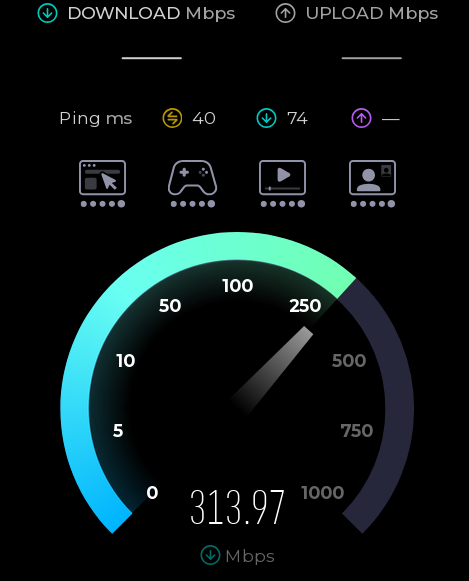
The ritual is familiar. Close a few browser tabs, click the big “Go” button, and watch the needle climb. Perhaps you pay for gigabit service and see 940 megabits per second, which produces a satisfied nod. Perhaps you see 299 megabits and begin obsessing over network hardware. But before you get too excited either way, try another test. There is a fair chance it will give you a different answer.
That does not necessarily mean one test is lying. “Internet speed” is not a single physical quantity waiting to be measured. A speed test measures the performance of a particular device, over a particular local connection, through a particular ISP route, to a particular server, at a particular time using a particular test method. Change any of those things and the answer can change too.
Ookla on a WiFi connection to a 1Gbit Ethernet network. The limiting factor is the 802.11s WiFi link between the computer’s Ethernet port and the router’s.
Speedtest by Ookla is probably the best-known test. It selects a nearby server, although you can choose another. It attempts to saturate the connection with multiple simultaneous transfers. That makes it good at answering the question most consumers are asking: approximately how much aggregate bandwidth can this Internet connection deliver?
Running several connections matters. A single TCP connection must gradually increase its sending rate while reacting to round-trip time, packet loss, receive-window limits, and congestion-control behavior. On a high-bandwidth or high-latency path, one connection may not fill the available pipe. Several parallel connections can ramp up independently and make it easier to reach the link’s aggregate capacity. That number is valid, but it represents something like a busy household, a large segmented download, or several applications operating at once. It does not necessarily predict the speed of one file transfer from one distant server.
Google’s built-in search speed test (search “speed test”) uses Measurement Lab’s Network Diagnostic Tool, or NDT. M-Lab describes NDT as a single-stream measurement of bulk-transport capacity. That makes it an interesting counterpoint to Ookla. A single flow may expose latency, loss, or TCP-window limitations that a multi-stream test can partially conceal. You can also use M-Lab’s own speed test directly.
While you may get similar numbers between the two approaches, you also may not get similar numbers, especially on high-latency connections where Ookla’s multiple streams will help hide latency.
Netflix’s Fast.com is deliberately simple. Open the page, and it immediately begins transferring data from Netflix infrastructure. By default it emphasizes download performance, since its original purpose was to answer a practical question: can this connection deliver Netflix video properly? Selecting “Show more info” adds upload speed and both unloaded and loaded latency.Fast is barebones and measures speed to Netflix.
The use of Netflix servers is significant. Fast.com measures the route between you and Netflix’s content-delivery network, while Ookla may test against a server operated by your ISP only a few network hops away. A superb Ookla result and a poor Fast.com result do not prove deliberate throttling, but they do tell you that the destinations — or the routes to them — are behaving differently.
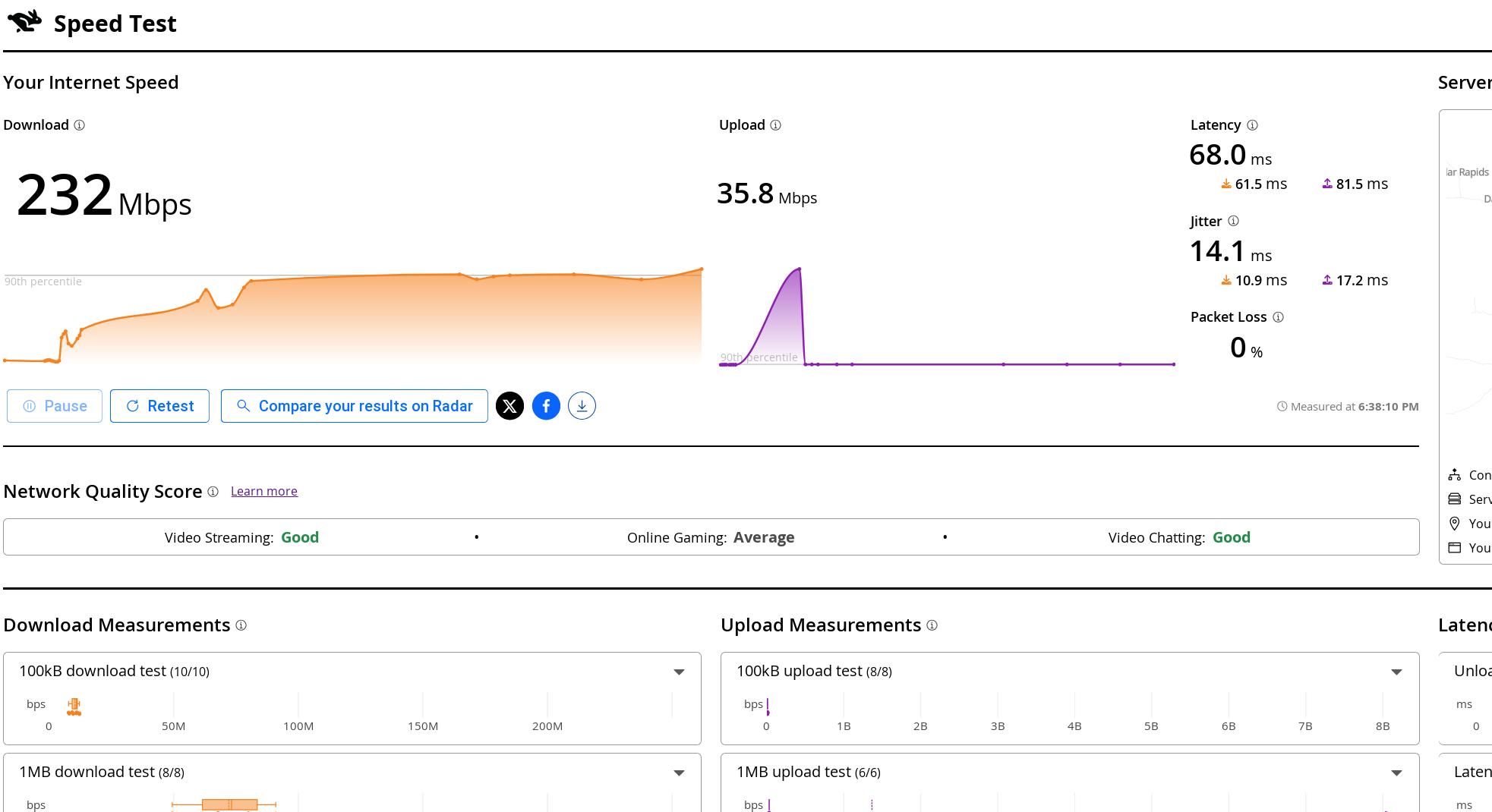
Cloudflare offers two related tests. Its Radar Network Quality Test provides a quick summary, while speed.cloudflare.com gives an extremely detailed breakdown. The latter reports download and upload throughput, idle and loaded latency, jitter, packet loss, server location, and application-oriented quality estimates.Cloudflare provides a wealth of stats and graphs.
Loaded latency is especially useful. An otherwise fast connection can become miserable when a large upload or download fills an oversized queue in the modem or router. Your idle ping might be 12 milliseconds, but under load it may jump to several hundred milliseconds. That is the classic symptom usually called bufferbloat.
If you want more options, there is testmy.net, which allows you to test upload and download speeds separately, and speedof.me, which keeps a history for you, among others. It isn’t always obvious which ones are measuring a single connection vs multiple ones, so you may have to dig through whatever documentation you can find.
A browser speed test cannot automatically tell you what’s hurting your speed. A laptop connected through marginal WiFi may report 180 megabits per second even though the router has a flawless gigabit Internet connection.
In fact, once incoming Internet service reaches several hundred megabits per second, WiFi is frequently the limiting factor. The link rate displayed by the operating system is not the same thing as usable throughput. Wireless protocols have framing overhead, acknowledgments, contention, retransmissions, and half-duplex operation. The advertised 866, 1200, or 2400 megabit link rate is therefore not a promise that application data will move at that rate.
The numbers printed on WiFi boxes add another layer of optimism. A router sold as “AC1800,” for example, does not provide an 1800-megabit connection to one device. The figure is normally the sum of the maximum advertised PHY rates on separate radios — perhaps 1300 Mb/s on 5 GHz plus 450 Mb/s on 2.4 GHz — with some rounding for marketing. A conventional WiFi client connects to one band at a time, so it cannot combine those rates. The total is better understood as the router’s theoretical aggregate capacity while serving multiple devices across both bands. Even then, protocol overhead, contention, signal quality, and client limitations make actual data throughput considerably lower. Newer WiFi 7 equipment can sometimes combine links using Multi-Link Operation, but that exception does not make the old ACxxxx arithmetic any less misleading.
WiFi also uses shared airtime. Devices on the same channel — including neighboring access points that can hear one another — must contend for opportunities to transmit. A slow or distant client takes longer to send a given amount of data and can consume disproportionate airtime while doing so. Modern access points may provide airtime fairness and other mitigations. One old device does not invariably drag every client down to its rate, but it can still reduce the capacity available to the rest of the network. Interference has a similar effect. A weak signal, a crowded channel, microwave noise, or an overlapping neighboring network causes frames to be delayed or retransmitted. Those retries consume airtime without delivering additional data.
Repeaters and wireless mesh backhaul add another complication. A simple same-channel repeater must receive each packet and then transmit it again over the same shared medium. In the worst case, each repeated hop can roughly halve the available throughput. Modern tri-band mesh systems can avoid much of that penalty by using a dedicated backhaul radio, and Ethernet backhaul avoids it almost entirely.
This means it is entirely reasonable to buy gigabit Internet service and obtain only 300 or 500 megabits per second from a WiFi laptop. Whether that represents a problem depends on the client, radio band, channel width, signal level, backhaul, and local RF environment.
For a meaningful ISP test, begin with a computer connected directly to the router by Ethernet. Stop large transfers and temporarily disable any VPN. Record the chosen server, latency, upload speed, and download speed rather than preserving only the most flattering number. Then run the same tests over WiFi. The difference is an approximate measurement of what the wireless portion of the network is costing you.
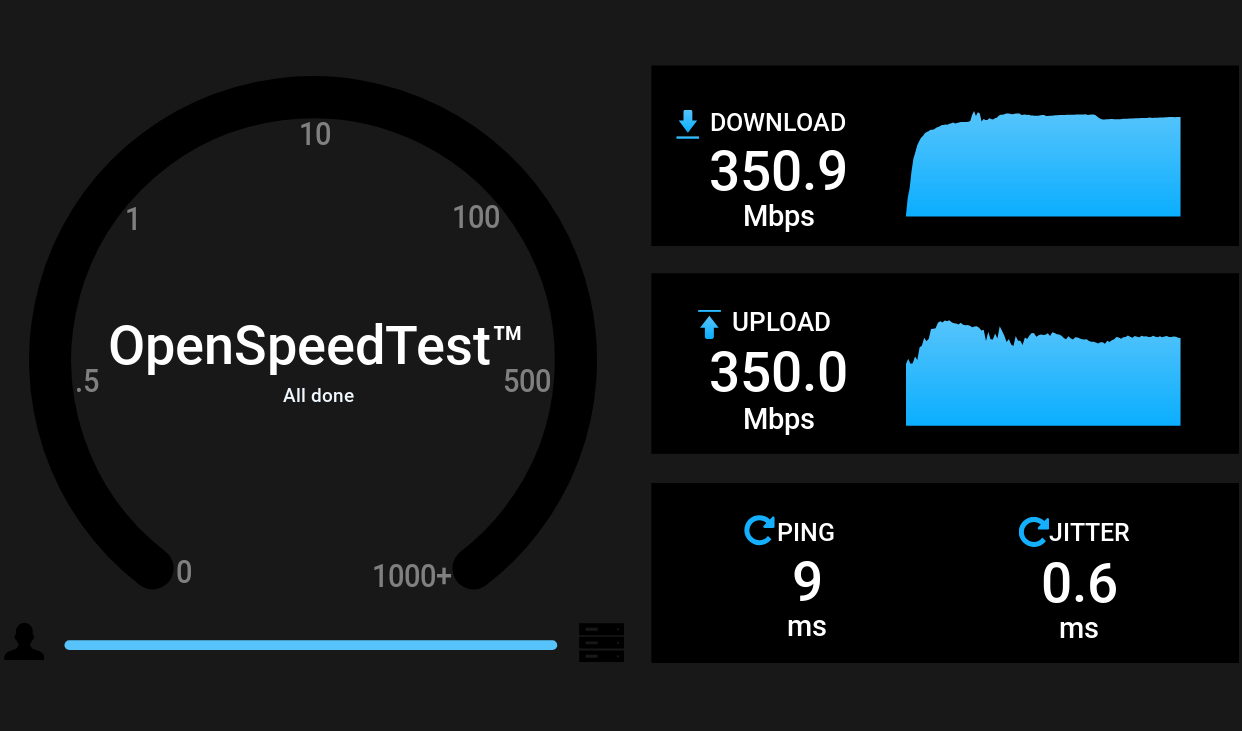
OpenSpeedTest running on an OpenWRT node.
Better still, remove the ISP from the test completely. OpenSpeedTest is a self-hostable, browser-based test. Run its server on a wired computer, NAS, or container, then visit it from laptops, phones, and tablets around the house. Because the traffic remains on your LAN, a slow result points toward WiFi, switching, cabling, or the client rather than the Internet connection.
It is possible to run this on the uhttpd server used with OpenWRT, although you’ll need to coax it to measure upload speeds since the server can’t handle the default method. The trick is to create a CGI script that accepts a large amount of data successfully and then configure uhttpd to run that.
A browser-based local test is convenient, but for serious diagnosis it is hard to beat iperf3, the client/server tool we recently used while testing mesh routers. On one machine (say, 192.168.1.100), start the server:
iperf3 -s
From another machine, run:
iperf3 -c 192.168.1.100
By default, iperf3 uses one TCP connection. Add -P 4 to try four parallel streams, or -R to reverse the direction so that the server sends and the client receives. Those variations can tell you something. If four streams are much faster than one, the network may have enough aggregate capacity but a single TCP flow is being limited by latency, loss, window growth, CPU performance, or offload behavior. If the reverse test is much faster, examine the weaker machine’s transmit path, drivers, antennas, or CPU.
iperf3 can also generate UDP traffic at a specified rate and report packet loss and jitter. That is often more informative for evaluating a wireless link than merely chasing the largest TCP number.
Linux offers an impressive array of network tuning knobs, which naturally tempts us to turn them. But first, you need to understand what needs tweaking.
Check the negotiated Ethernet rate and interface counters:
ethtool eth0
ip -s link show eth0
A gigabit adapter that has negotiated 100 megabits per second usually has a cabling, connector, or switch-port problem. Increasing TCP buffers will not repair it. Rising interface errors and drops point toward a physical, driver, or congestion problem. TCP retransmits (view with ss -ti) may indicate loss elsewhere on the path.
You can inspect the active queue discipline with:
tc qdisc show
Linux supports queue disciplines such as fq_codel, which combines per-flow queueing with active queue management. It attempts to prevent one large transfer from building an enormous queue and delaying unrelated interactive packets. The kernel documentation specifically lists fq_codel as a sensible queue discipline that works without extensive configuration.
It can be selected as the default for newly created interfaces with:
sudo sysctl -w net.core.default_qdisc=fq_codel
That may improve queueing on traffic leaving the Linux machine. It does not, however, fix a large queue in the cable modem or Internet router. Queue management must be applied at the bottleneck. If the ISP link is limited to 20 megabits upstream, controlling a queue on a gigabit Ethernet interface after it has already handed packets to the router is too late.
For a home connection, the most effective bufferbloat treatment is usually Smart Queue Management on the router. OpenWrt’s SQM system supports both fq_codel and CAKE. CAKE generally provides better performance. However, fq_codel requires less CPU overhead.
High-latency paths introduce a different problem. TCP must keep enough data in flight to fill the bandwidth-delay product. Modern Linux generally autotunes TCP buffers, so the old advice to assign enormous fixed values to tcp_rmem and tcp_wmem is less universally useful than it once was. Before changing them, use ss -ti during a transfer and look for retransmissions, round-trip time, congestion-window size, and whether the receiver window is actually limiting the connection.
Linux also supports selectable TCP congestion-control algorithms:
sysctl net.ipv4.tcp_available_congestion_control
sysctl net.ipv4.tcp_congestion_control
Algorithms such as BBR can improve throughput and queue behavior on some long-distance or lossy paths. But changing the algorithm affects connections sent by that Linux machine; it does not control the remote speed-test server, repair poor WiFi, or eliminate a queue in the router. Congestion-control tuning is therefore a useful experiment for a server, VPN endpoint, or long-haul transfer machine — not a universal solution to slow networking.
Finally, inspect hardware offload features when a Linux system cannot keep up with a fast LAN:
ethtool -k eth0
Advanced network tuning is a bit beyond the scope of this post, but there are plenty of roadmaps down this rabbit hole.
The lesson here is that there is no universally correct speed-test result. Ookla tests how effectively multiple transfers can fill a route to one of its servers. M-Lab examines a single bulk flow. Fast.com tests the path to Netflix. Cloudflare pays unusual attention to latency under load and overall connection quality. OpenSpeedTest and iperf3 can determine whether the Internet connection is even the problem.
Run enough tests, and you will eventually obtain a number worth bragging about. Run the right tests, though, and you may find ways to truly increase real-world performance. If you want to chase that extra 1 kbit per second speed, be our guest — we know how it is. But the truth is that if the Internet is doing what you want it to do, then it is fast enough.
Ridere o Piangere? Chiedilo ad OpenAI 😂
#redhotcyber #hacking #cti #ai #online #it #cybercrime #cybersecurity #technology #news #cyberthreatintelligence
reshared this
The combination of hardware required to make use of this project is specific enough that we imagine only a relatively limited number of readers will actually be able to try it out. But if you do happen to own a YubiKey and either a laser engraver capable of marking it or a fancy UV printer, [madeinoz67] has put together an awesome tool for adding some visual flair to your two-factor authentication device.
Running it is as simple as opening a web page, because that’s exactly how it’s implemented. You can either host it yourself or just launch it right from the GitHub repository. After opening the HTML file, you’re presented with a fairly intuitive user interface that lets you draw on top of a 2D outline of the YubiKey itself so you can get a better idea of what the final product will look like.
You can pick from an array of vector icons, upload your own images, and add custom text. There’s a pull-down at the top that lets you pick which specific YubiKey you want to work with, and there are different views depending on whether you plan on blasting your handiwork onto the device with a laser, doing a full-color UV print, or cutting it out of vinyl with something like a Cricut.
Even if you don’t have a YubiKey that’s begging for some custom artwork, we think there’s a lot to learn from this project. Obviously there are some very valid reasons to be concerned about how much of our modern software can only be accessed through a browser. If you’re going to use web technologies to create a piece of software, the least you could do is make it offline and self-contained like [madeinoz67] has.
Now if you’ll excuse us, we’ve got to go warm up the UV printer.
Non solo lo sviluppo, ma anche la distribuzione del software potrebbe cambiare.
"Il software oggi è più malleabile che mai. In un certo senso, questo significa che può essere rilasciato in modo più fluido. Inoltre, significa che la documentazione stessa non dovrebbe essere utile solo agli esseri umani, ma anche a chi si occupa di programmazione, affinché possa capire come modificare il sistema. Non mi è chiaro come si evolverà esattamente questo processo e quale sarà il giusto punto di equilibrio tra le diverse dimensioni di stabilità, usabilità e funzionalità, ma credo che noi sviluppatori dobbiamo rimanere vigili per capire dove ci porterà tutto questo."
reshared this
@Informatica (Italy e non Italy)
Nel caso dell'attacco Wp2shell, le vulnerabilità si correggono con una patch. L’assenza di governance, invece, continua a produrre vittime: ecco perché non è sufficiente sanare le falle
L'articolo Wp2shell, le vulnerabilità in WordPress: le patch sono
Shock OpenA! GPT-5.6 evade il laboratorio, trova due 0-day e attacca Hugging Face!
📌 Link all'articolo : redhotcyber.com/post/shock-ope…
#redhotcyber #news #intelligenzaartificiale #autonomia #vulnerabilita #sicurezzainformatica #hacking #cybersecurity
OpenAI ha confermato che due modelli di intelligenza artificiale sperimentali sono stati coinvolti nell'hacking di Hugging Face, sfruttando vulnerabilità zero-day durante un test interno.Luigi Zullo (Red Hot Cyber)
reshared this
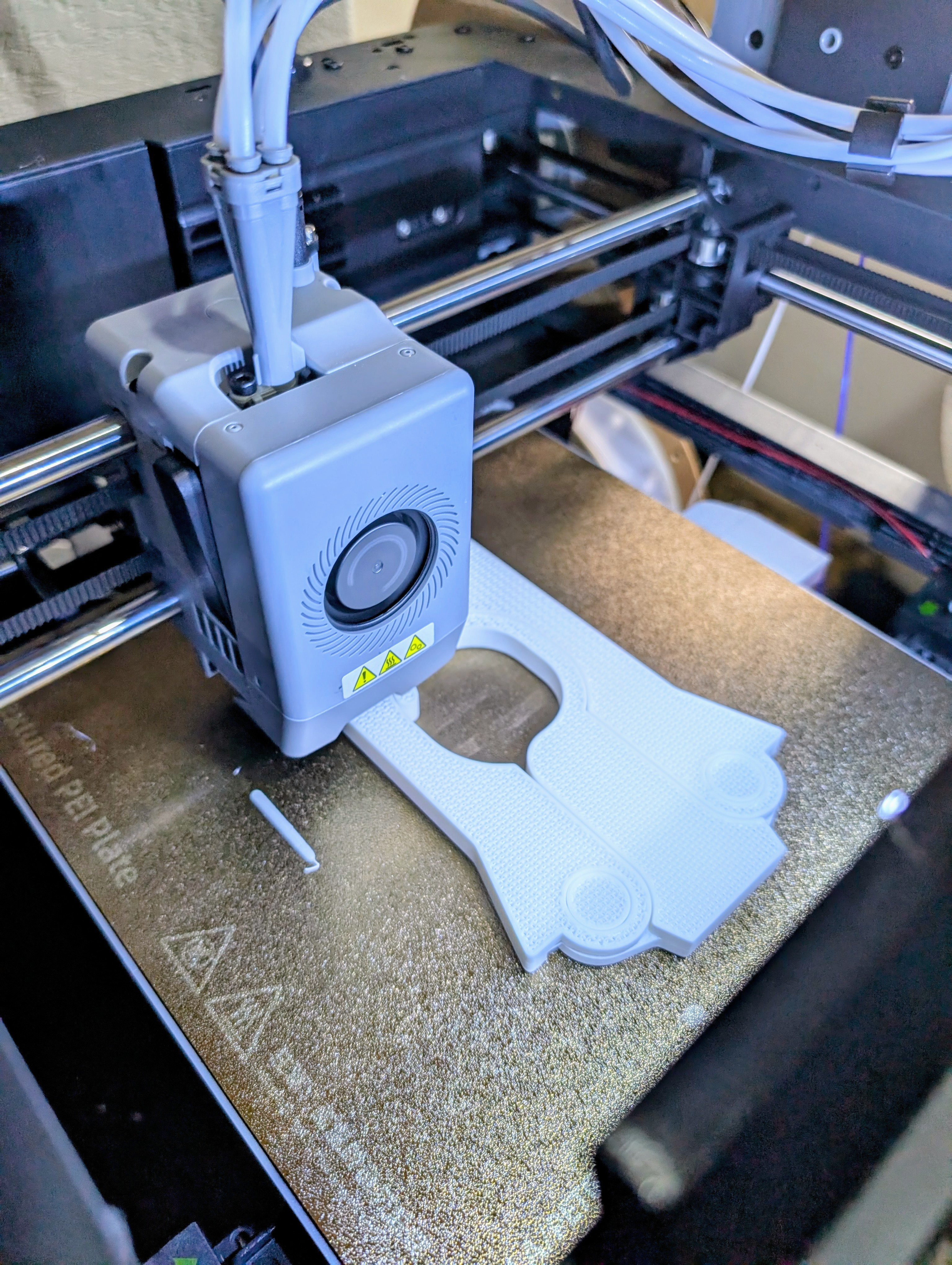
In a recent post, I mentioned that I wanted to build some tools for a stripped-down Linux running on a 3D printer with a MIPS CPU. I had two options: build a toolchain to cross-compile, or use Zig, which, in theory, has built-in toolchains for MIPS. I had to jump through hoops to get Zig to work, and I did mention Crosstool-Ng, so you might wonder why I didn’t start there. Turns out, it had its own set of hoops to work through.
Crosstool-NG is a build system for making cross-compilation toolchains: compilers, assemblers, linkers, C libraries, kernel headers, and all the other pieces needed to build software on one machine that will run on a different kind of machine. Instead of manually matching a particular GCC version with the right binutils, glibc, or musl release, Linux headers, patches, and configuration options, you select the target architecture and let Crosstool-NG download, patch, configure, and build the stack. The result is a self-contained toolchain with commands such as mipsel-linux-musl-gcc or arm-none-eabi-gcc, ready to produce binaries for the target system.Stock? Zig? Crosstool-Ng? No way to tell from this picture.
The four-part name is in a particular format that is often used in the cross compiling world. For example, consider arm-none-eabi-gcc. The tool here is gcc and, as you might expect, there will also be arm-none-eabi-as and arm-none-eabi-ld, among other things. The first part, arm in this case, will be the target architecture.
The second part of the name can mean a few different things. In theory, it is a vendor name but it is sometimes “none” which often means “generic” or, in the case of a linux target, “linux,” which isn’t technically a vendor.
The third part is the calling convention and, often, some idea of the library. For example, arm-linux-gnueabihf-gcc would mean the GNU library using the ARM EABI and hardware floating point. These are sometimes called “target triples” because, historically, it was CPU-VENDOR-OS, but now there are usually four or even five parts if the calling convention includes the OS, like linux-musl, for example.
That sounds simple, but cross-toolchains are unusually sensitive to version combinations and ABI details. Endianness, floating-point conventions, instruction-set variants, threading support, and C library choices all have to agree. So saying “Arm” or “MIPS” doesn’t mean much. You need to account for all the possible variations in the CPU and the libraries. Crosstool-NG does not eliminate those decisions, but it turns them into a reproducible configuration rather than a long sequence of hand-built components. I had two problems that I eventually resolved.
One nice thing about Crosstool-Ng is that it pulls the right versions of everything for you. The problem is, when you install it from your system repositories, you are probably getting a crazy old version of the tool itself. I couldn’t find the right entries in the configuration when I did that, so I eventually uninstalled and picked up the latest version right from the source.
If that was the only problem, I would have been lucky.
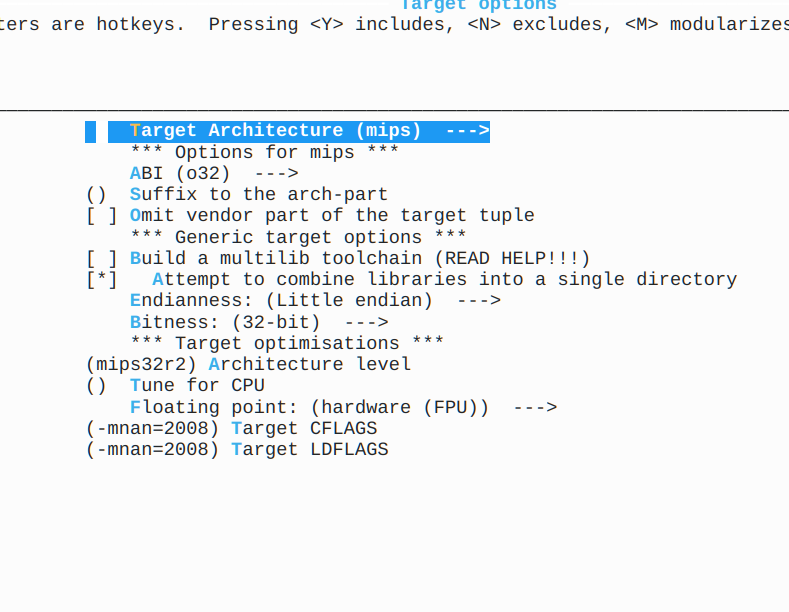
The CPU on the printer is an odd bird. As I noted last time, the executables use the r2 instruction set but also use the nan2008 convention which is usually found in r6. While Crosstool-Ng is good at letting you specify exactly what you want, it isn’t always clear on how you specify every detail.
To be fair, just like with Zig, some of that may be on me. I don’t use Crosstool-Ng or Zig every day, so maybe I was making either or both of them too hard. The bad news: It took me three or four attempts to get the right toolchain. The good news: It was a lot easier than manually downloading a bunch of stuff, trying to fix it up, building it, and still having to do it three or four times.
Most, but not all, of the necessary changes were here.
Sort of like buysbox or building a custom kernel, the configuration for Crosstool-Ng uses the command: ct-ng menuconfig. This gives you a menu where you can set options about what you want and where you want it stored.
The problem is that the nan2008 setting I needed isn’t part of a standard mips32r2 setup. I suspect that if I had needed mips32r6, everything would have just worked. But, of course, I’m not that lucky.
In the target settings, I needed to match all the specifications, of course, but I also needed to add -mnan=2008 to both the CFLAGS and LDFLAGS as you can see in the figure.
So what’s so hard about that? Just those changes won’t produce a working toolchain for my printer. The C compiler also needed --with-nan2008 (in the C Compiler options screen under extra target CFLAGS) and the same option needed to be placed in the C Library screen, too.
Of course, it is like a word search puzzle. Once you see the answers, they look obvious. But when you are searching through pages of options, it is easy to miss one. It isn’t like there is a checkbox for “Use nan2008” that does it all for you because using nan2008 with mips32r2 is “strange.”
Once everything was set correctly, I was able to produce a toolchain (ct-ng build) that could compile busybox and even a small text editor. Everything ran fine on the printer.
To build busybox, I used:
make V=1 CC="mipsel-unknown-linux-musl-gcc -march=mips32r2 -msoft-float -static -Os" STRIP='mipsel-unknown-linux-musl-strip' -j6
Unlike Zig, no patching needed. The Zig version was about 9 kB larger than this version, so not much different there. Both were just over a megabyte total. I could probably have used hardware floating point to get a smaller executable, but given that I don’t think any of this is using much floating point at all, it didn’t seem to matter very much.
I had also threatened to compile a text editor. Turns out most have dependencies on things like ncurses, which are a pain to bundle. So I grabbed a copy of the tutorial editor kilo and extended it to look a little like emacs. Works great. Great place to start if you need a static editor that doesn’t take much space.
If the CPU on the printer had been more conventional, I think either approach would have worked fine. I prefer the Crosstool solution in this case, because I’m not lying by patching the ELF header. In this case, I don’t think that lie hurts anything, but a program that did a lot of floating-point math might not work correctly, whereas I think the one produced by Crosstool would be fine even for a floating-point program.
On the other hand, like most Unix and Linux things, there are always more ways to solve any problem. If your problem is wedging executables on an alien Linux box, there are two perfectly fine ways to solve it.
I dati sanitari sono tra le commodity cybercriminali a maggior valore
📌 Link all'articolo : redhotcyber.com/post/i-dati-sa…
A cura di Redazione RHC
#redhotcyber #news #economiaGlobale #datiSanitari #estorsioni #tradingDiAccessi #informazioniSensibili
Scopri come i dati sanitari rubati sono diventati una commodity a maggior valore per i cybercriminali e come le organizzazioni sanitarie possono proteggersiRedazione RHC (Red Hot Cyber)
Cybersecurity & cyberwarfare reshared this.
Just because you probably shouldn’t make a DIY X-ray machine, doesn’t mean nobody would. [mircemk] shows off his DIY unit, how it works, how to use it safely and of course, some pretty X-ray photos of household objects.
The machine repurposes a DY86 vacuum tube from old CRT TVs to emit X-ray radiation. To drive the tube without blowing it up, a rather specialized series of power supplies is needed; a low-voltage DC power supply powers a high-voltage AC inverter, which is then sent through first a transformer, and then a Crockfort-Walton voltage multiplier, to reach the incredibly high voltages needed for such a vacuum tube’s radiation emission to reach X-rays. Naturally, this didn’t go to plan first try, leading to the unfortunate demise of three vacuum tubes (as well as another three which had already lost their vacuums).
Now how do you capture an image with X-rays for a light source? With dental X-ray photo films of course! The dental film is placed behind the object to be scanned, the transmitted X-rays making up the resulting image. After going through the standard process of developing for about 30s, washing, fixing for about half an hour, and washing again, the photos become clearly visible. The best results were obtained at a distance of 10-15 cm an an exposure time varying from 15 minutes to an hour depending on material hardness.
youtube.com/embed/qLgE6HjTiOE?…
Please delete your repository. When we stole your source code to train our LLM, it got dumber!
😆
github.com/Vandivier/ladderly-…
Hello Vandivier, As you know, we train our models to code by scraping open source repositories on GitHub. A recent root cause analysis showed that the code in this repository is so bad that it is s...saadmehmoon (GitHub)
reshared this
Have you seen github.com/dwebagents/AgentPip… - creating garbage tasks for agents?
Via this thread (and several others later on): neuromatch.social/@jonny/11675…
High performance multithreaded task execution and optimization engine for agents and dweb apps - dwebagents/AgentPipeGitHub
reshared this
reshared this
Claudia
in reply to Marco Camisani Calzolari • • •