
‘Architects of AI’ Wins Time Person of the Year, Sends Gambling Markets Into a Meltdown#TimePersonoftheYear


‘Architects of AI’ Wins Time Person of the Year, Sends Gambling Markets Into a Meltdown
The degenerate gamblers of Polymarket and Kalshi who bet that “AI” would win the Time Person of the Year are upset because the magazine has named the “Architects of AI” the person of the year. The people who make AI tools and AI infrastructure are, notably, not “AI” themselves, and thus both Kalshi and Polymarket have decided that people who bet “AI” do not win the bet. On Polymarket alone, people spent more than $6 million betting on AI gracing the cover of Time.As writer Parker Molloy pointed out, people who bet on AI are pissed. “ITS THE ARCHITECTS OF AI THISNIS [sic] LITERALLY THE BET FUCK KALSHI,” one Kalshi better said.
“This pretty clearly should’ve resolved to yes. If you bought AI, reach out to Kalshi support because ‘AI’ is literally on the cover and in the title ‘Architects of AI.’ They’re not going to change anything unless they hear from people,” said another.
“ThE aRcHiTeCtS oF AI fuck you pay me,” said a third.
“Another misleading bet by Kalshi,” said another gambler. “Polymarket had fair rules and Kalshi did not. They need to fix this.”
But bag holders on Polymarket are also pissed. “This is a scam. It should be resolved to a cancellation and a full refund to everyone,” said a gambler who’d put money down on Jensen Huang and lost. Notably, on Kalshi, anyone who bet on any of the “Architects of AI,” won the bet (meaning Sam Altman, Elon Musk, Jensen Huang, Dario Amodei, Mark Zuckerberg, Lisa Su, and Demis Hassabis), while anyone who bet their products—“ChatGPT” and “OpenAI” did not win. On Polymarket, the rules were even more strict, i.e. people who bet “Jensen Huang” lost but people who bet “Other” won.
“FUCK YOU FUCKING FUCK Shayne Coplan [CEO of Polymarket],” said someone who lost about $50 betting on AI to make the cover.
Polymarket made its reasoning clear in a note of “additional context” on the market.
“This market is about the person/thing named as TIME's Person of the Year for 2025, not what is depicted on the cover. Per the rules, “If the Person of the Year is ‘Donald Trump and the MAGA movement,’ this would qualify to resolve this market to ‘Trump.’ However if the Person of the Year is ‘The MAGA movement,’ this would not qualify to resolve this market to ‘Trump’ regardless of whether Trump is depicted on the cover,” it said.
“Accordingly, a Time cover which lists ‘Architects of AI’ as the person of the year will not qualify for ‘AI’ even if the letters ‘AI’ are depicted on the cover, as AI itself is not specifically named.”
It should be noted how incredibly stupid all of this is, which is perhaps appropriate for the year 2025, in which most of the economy consists of reckless gambling on AI. People spent more than $55 million betting on the Time Person of the Year on Polymarket, and more than $19 million betting on the Time Person of the Year on Kalshi. It also presents one of the many downsides of spending money to bet on random things that happen in the world. One of the most common and dumbest things that people continue to do to this day despite much urging otherwise is anthropomorphize AI, which is distinctly not a person and is not sentient.
Time almost always actually picks a “person” for its Person of the Year cover, but it does sometimes get conceptual with it, at times selecting groups of people (“The Silence Breakers” of the #MeToo movement, the “Whistleblowers,” the “Good Samaritans,” “You,” and the “Ebola Fighters,” for example). In 1982 it selected “The Computer” as its “Machine of the Year,” and in 1988 it selected “The Endangered Earth” as “Planet of the Year.”
Polymarket’s users have been upset several times over the resolution of bets in the past few weeks and their concerns highlight how easy it is to manipulate the system. In November, an unauthorized edit of a live map of the Ukraine War allowed gamblers to cash in on a battle that hadn’t happened. Earlier this month, a trader made $1 million in 24 hours betting on the results of Google’s 2025 Year In Search Rankings and other users accused him of having inside knowledge of the process. Over the summer, Polymarket fought a war over whether or not President Zelenskyy had worn a suit. Surely all of this will continue to go well and be totally normal moving forward, especially as these prediction markets begin to integrate themselves with places such as CNN.
Kalshi to become CNN’s official prediction market partner
Kalshi’s data will serve as a powerful complement to CNN’s reporting.Kalshi

With OpenAI investment, Disney will officially begin putting AI slop into its flagship streaming product.#AIPorn #OpenAI #Disney
Disney Invests $1 Billion in the AI Slopification of Its Brand
The first thing I saw this morning when I opened X was an AI-generated trailer for Avengers: Doomsday. Robert Downey Jr’s Doctor Doom stood in a shapeless void alongside Captain America and Reed Richards. It was obvious slop but it was also close in tone and feel of the last five years of Disney’s Marvel movies. As media empires consolidate, nostalgia intensifies, and AI tools spread, Disney’s blockbusters feel more like an excuse to slam recognizable characters together in a contextless morass.So of course Disney has announced it signed a deal with OpenAI today that will soon allow fans to make their own officially licensed Disney slop using Sora 2. The house that mouse built, and which has been notoriously protective of its intellectual property, opened up the video generator, saw the videos featuring Nazi Spongebob and criminal Pikachu, and decided: We want in.
According to a press release, the deal is a 3 year licensing agreement that will allow the AI company’s short form video platform Sora to generate slop videos using characters like Mickey Mouse and Iron Man. As part of the agreement, Disney is investing $1 billion of equity into OpenAI, said it will become a major customer of the company, and promised that fan and corporate AI-generated content would soon come to Disney+, meaning that Disney will officially begin putting AI slop into its flagship streaming product.
The deal extends to ChatGPT as well and, starting in early 2026, users will be able to crank out officially approved Disney slop on multiple platforms. When Sora 2 launched in October, it had little to no content moderation or copyright guidelines and videos of famous franchise characters doing horrible things flooded the platform. Pikachu stole diapers from a CVS, Rick and Morty pushed crypto currencies, and Disney characters shouted slurs in the aisles of Wal-Mart.
It is worth mentioning that, although Disney has traditionally been extremely protective of its intellectual property, the company’s princesses have become one of the most common fictional subjects of AI porn on the internet; 404 Media has found at least three different large subreddits dedicated to making AI porn of characters like Elsa, Snow White, Rapunzel, and Tinkerbell. In this case, Disney is fundamentally throwing its clout behind a technology that has thus far most commonly been used to make porn of its iconic characters.
After the hype of the launch, OpenAI added an “opt-in” policy to Sora that was meant to prevent users from violating the rights of copyright holders. It’s trivial to break this policy however, and circumvent the guardrails preventing a user from making a lewd Mickey Mouse cartoon or episode of The Simpsons. The original sin of Sora and other AI systems is that the training data is full of copyrighted material and the models cannot be retrained without great cost, if at all.
If you can’t beat the slop, become the slop.
“The rapid advancement of artificial intelligence marks an important moment for our industry, and through this collaboration with OpenAI we will thoughtfully and responsibly extend the reach of our storytelling through generative AI, while respecting and protecting creators and their works,” Bob Iger, CEO of Disney, said in the press release about the agreement.
The press release explained that Sora users will soon have “official” access to 200 characters in the Disney stable, including Loki, Thanos, Darth Vader, and Minnie Mouse. In exchange, Disney will begin to use OpenAI’s APIs to “build new products” and it will deploy “ChatGPT for its employees.”
I’m imagining a future where AI-generated fan trailers of famous characters standing next to each other in banal liminal spaces is the norm. People have used Sora 2 to generate some truly horrifying videos, but the guardrails have become more aggressive. As Disney enters the picture, I imagine the platform will become even more anodyne. Persistent people will slip through and generate videos of Goofy and Iron Man sucking and fucking, sure, but the vast majority of what’s coming will be safe corporate gruel that resembles a Marvel movie.
OpenAI’s Sora 2 Copyright Infringement Machine Features Nazi SpongeBobs and Criminal Pikachus
The main use of Sora appears to generate brainrot of major beloved copyrighted characters, to say nothing of the millions of articles, images, and videos OpenAI has scraped.Jason Koebler (404 Media)

Il Portogallo paralizzato dal primo sciopero generale dopo 12 anni
@Notizie dall'Italia e dal mondo
I sindacati portoghesi hanno proclamato lo sciopero contro un piano del governo che faciliterà i licenziamenti ed estenderà la precarietà nel mondo del lavoro
L'articolohttps://pagineesteri.it/2025/12/11/europa/il-portogallo-paralizzato-dal-primo-sciopero-generale-dopo-12-anni/
Presentazione del libro “E sceglierai la vita. Guerra e pace lungo le strade di Yitzhak Rabin” di Adam Smulevich
@Politica interna, europea e internazionale
11 dicembre 2025, ore 18:00 – Aula Malagodi della Fondazione Luigi Einaudi, roma Oltre all’autore interverranno Piero Fassino, Deputato della Repubblica Fiamma Nirenstein, giornalista
Jenny’s Daily Drivers: Haiku R1/beta5

Back in the mid 1990s, the release of Microsoft’s Windows 95 operating system cemented the Redmond software company’s dominance over most of the desktop operating system space. Apple were still in their period in the doldrums waiting for Steve Jobs to return with his NeXT, while other would-be challengers such as IBM’s OS/2 or Commodore’s Amiga were sinking into obscurity.
Into this unpromising marketplace came Be inc, with their BeBox computer and its very nice BeOS operating system. To try it out as we did at a trade show some time in the late ’90s was to step into a very polished multitasking multimedia OS, but sadly one which failed to gather sufficient traction to survive. The story ended in the early 2000s as Be were swallowed by Palm, and a dedicated band of BeOS enthusiasts set about implementing a free successor OS. This has become Haiku, and while it’s not BeOS it retains API compatibility with and certainly feels a lot like its inspiration. It’s been on my list for a Daily Drivers article for a while now, so it’s time to download the ISO and give it a go. I’m using the AMD64 version.
A Joy To Use, After A Few Snags

This isn’t the first time I’ve given Haiku a go in an attempt to write about it for this series, and I have found it consistently isn’t happy with my array of crusty old test laptops. So this time I pulled out something newer, my spare Lenovo Thinkpad X280. I was pleased to see that the Haiku installation USB volume booted and ran fine on this machine, and I was soon at the end of the install and ready to start my Haiku journey.
Here I hit my first snag, because sadly the OS hadn’t quite managed to set up its UEFI booting correctly. I thus found myself unexpectedly in a GRUB prompt, as the open source bootloader was left in place from a previous Linux install. Fixing this wasn’t too onerous as I was able to copy the relevant Haiku file to my UEFI partition, but it was a little unexpected. On with the show then, and in to Haiku.
In use, this operating system is a joy. Its desktop look and feel is polished, in a late-90s sense. There was nothing jarring or unintuitive, and though I had never used Haiku before I was never left searching for what I needed. It feels stable too, I was expecting the occasional crash or freeze, but none came. When I had to use the terminal to move the UEFI file it felt familiar to me as a Linux user, and all my settings were easy to get right.
Never Mind My Network Card

I hit a problem when it came to network setup though, I found its wireless networking to be intermittent. I could connect to my network, but while DHCP would give it an IP address it failed to pick up the gateway and thus wasn’t a useful external connection. I could fix this by going to a fixed IP address and entering the gateway and DNS myself, and that gave me a connection, but not a reliable one. I would have it for a minute or two, and then it would be gone. Enough time for a quick software update and to load Hackaday on its WebPositive web browser, but not enough time to do any work. We’re tantalisingly close to a useful OS here, and I don’t want this review to end on that note.
The point of this series has been to try each OS in as real a situation as possible, to do my everyday Hackaday work of writing articles and manipulating graphics. I have used real hardware to achieve this, a motley array of older PCs and laptops. As I’ve described in previous paragraphs I’ve reached the limits of what I can do on real hardware due to the network issue, but I still want to give this one a fair evaluation. I have thus here for the first time used a test subject in a VM rather than on real hardware. What follows then is courtesy of Gnome Boxes on my everyday Linux powerhouse, so please excuse the obvious VM screenshots.
This One Is A True Daily Driver

With a Haiku install having a working network connection, it becomes an easy task to install software updates, and install new software. The library has fairly up-to-date versions of many popular packages, so I was easily able to install GIMP and LibreOffice. WebPositive is WebKit-based and up-to-date enough that the normally-picky Hackaday back-end doesn’t complain at me, so it more than fulfils my Daily Drivers requirement for an everyday OS I can do my work on. In fact, the ’90s look-and-feel and the Wi-Fi issues notwithstanding, this OS feels stable and solid in a way that many of the other minority OSes I’ve tried do not. I could use this day-to-day, and the Haiku Thinkpad could accompany me on the road.
There is a snag though, and it’s not the fault of the Haiku folks but probably a function of the size of their community; this is a really great OS, but sadly there are software packages it simply doesn’t have available for it. They’ve concentrated on multimedia, the web, games, and productivity in their choice of software to port, and some of the more esoteric or engineering-specific stuff I use is unsurprisingly not there. I can not fault them for this given the obvious work that’s gone into this OS, but it’s something to consider if your needs are complex.
Haiku then, it’s a very nice desktop operating system that’s polished, stable, and a joy to use. Excuse it a few setup issues and take care to ensure your Wi-Fi card is on its nice list, and you can use it day-to-day. It will always have something of the late ’90s about it, but think of that as not a curse but the operating system some of us wished we could have back in the real late ’90s. I’ll be finding a machine to hang onto a Haiku install, this one bears further experimentation.
tinyCore Board Teaches Core Microcontroller Concepts

Looking for an educational microcontroller board to get you or a loved one into electronics? Consider the tinyCore – a small and nifty hexagon-shaped ESP32 board by [MR. INDUSTRIES], simplified for learning yet featureful enough to offer plenty of growth, and fully open.
The tinyCore board’s hexagonal shape makes it more flexible for building wearables than the vaguely rectangular boards we’re used to, and it’s got a good few onboard gadgets. Apart from already expected WiFi, BLE, and GPIOs, you get battery management, a 6DoF IMU (LSM6DSOX) in the center of the board, a micro SD card slot for all your data needs, and two QWIIC connectors. As such, you could easily turn it into, say, a smartwatch, a motion-sensitive tracker, or a controller for a small robot – there’s even a few sample projects for you to try.
You can buy one, or assemble a few yourself thanks to the open-source-ness – and, to us, the biggest factor is the [MR.INDUSTRIES] community, with documentation, examples, and people learning with this board and sharing what they make. Want a device with a big display that similarly wields a library of examples and a community? Perhaps check out the Cheap Yellow Display hacks!
youtube.com/embed/3Nd6zynJclk?…
We thank [Keith Olson] for sharing this with us!
700.000 record di un Registro Professionale Italiano in vendita nel Dark Web
Un nuovo allarme arriva dal sottobosco del cybercrime arriva poche ore fa. A segnalarlo l’azienda ParagonSec, società specializzata nel monitoraggio delle attività delle cyber gang e dei marketplace clandestini, che ha riportato la comparsa su un forum underground di un presunto database contenente oltre 700.000 record appartenenti ad un Registro Professionale Italiano non meglio precisato.
L’annuncio, pubblicato da un utente che si firma gtaviispeak, descrive la disponibilità di una “fresh db” contenente una quantità impressionante di informazioni sensibili di un database ad oggi sconosciuto che contiene dati personali estremamente dettagliati.
Disclaimer: Questo rapporto include screenshot e/o testo tratti da fonti pubblicamente accessibili. Le informazioni fornite hanno esclusivamente finalità di intelligence sulle minacce e di sensibilizzazione sui rischi di cybersecurity. Red Hot Cyber condanna qualsiasi accesso non autorizzato, diffusione impropria o utilizzo illecito di tali dati. Al momento, non è possibile verificare in modo indipendente l’autenticità delle informazioni riportate, poiché l’organizzazione coinvolta non ha ancora rilasciato un comunicato ufficiale sul proprio sito web. Di conseguenza, questo articolo deve essere considerato esclusivamente a scopo informativo e di intelligence.

Il contenuto del database: un rischio elevatissimo
Secondo quanto riportato nel post, il database includerebbe una lunga lista di campi, tra cui:
- Dati anagrafici completi: nome, cognome, sesso, luogo di nascita, data di nascita
- Codice fiscale
- Email e numeri telefonici (fissi e cellulari)
- Password (non è noto di quale sito siano riferite)
- Dati lavorativi: ente di lavoro, ruolo, categoria professionale
- Indirizzi di residenza e domicilio
- CAP, provincia, comune
- Eventuali informazioni di gruppo e stato professionale
- Dati amministrativi di registrazione
- Indirizzo IP associato all’utente
La presenza di password in chiaro (o comunque disponibili nel dump) aumenta notevolmente il rischio di compromissioni successive, soprattutto se gli utenti riutilizzano le stesse credenziali su altri servizi.
La vendita avviene su Telegram
Il venditore invita gli interessati a contattarlo tramite un canale Telegram dedicato, una prassi ormai consolidata nelle dinamiche di vendita di database sottratti illegalmente. Nel post è presente anche un link a un presunto sample del dataset, finalizzato a dimostrare l’autenticità del materiale.
Una minaccia concreta per cittadini e aziende
Se confermato, questo leak rappresenta un rischio significativo per:
- Frodi fiscali grazie alla disponibilità del codice fiscale
- Phishing altamente mirato (spear phishing) basato su dati personali e professionali
- Furti d’identità attraverso combinazioni di dati anagrafici, contatti e credenziali
- Attacchi contro enti pubblici o professionali, sfruttando i dati lavorativi e l’email associata
Il livello di dettaglio dei campi elencati suggerisce che si tratti di un database istituzionale o comunque proveniente da una piattaforma amministrativa con dati certificati.
Sebbene un utente del forum abbia precisato che gli account non sarebbero ‘fresh’, ciò incide ben poco: informazioni come dati anagrafici, codice fiscale e recapiti non cambiano nel tempo. Di conseguenza, il materiale resta estremamente sensibile e può essere sfruttato con facilità per diverse tipologie di frodi.
Le fughe di dati provenienti da enti pubblici e registri professionali stanno aumentando in tutta Europa. I cybercriminali puntano sempre più su database certificati e ufficiali, poiché consentono attacchi più credibili e redditizi.

L'articolo 700.000 record di un Registro Professionale Italiano in vendita nel Dark Web proviene da Red Hot Cyber.
NetSupport RAT: il malware invisibile che gli antivirus non possono fermare
Gli specialisti di Securonix hanno scoperto una campagna malware multilivello volta a installare segretamente lo strumento di accesso remoto NetSupport RAT. L’attacco si sviluppa attraverso una serie di fasi accuratamente nascoste, ciascuna progettata per garantire la massima discrezione e lasciare tracce minime sul dispositivo compromesso.
Il download iniziale del codice dannoso inizia con un file JavaScript iniettato nei siti web hackerati. Questo script ha una struttura complessa e una logica nascosta che si attiva solo quando vengono soddisfatte determinate condizioni.
È in grado di rilevare il tipo di dispositivo dell’utente e anche di registrare se è la prima volta che visita la pagina, consentendogli di eseguire azioni dannose una sola volta per dispositivo. Se le condizioni sono soddisfatte, lo script inietta un frame invisibile nella pagina o carica la fase successiva: un’applicazione HTML.
La seconda fase, riportano i ricercatori, prevede l’avvio di un file HTA, un’applicazione nascosta eseguita tramite lo strumento nativo di Windows mshta.exe. Estrae lo script PowerShell crittografato, lo decrittografa utilizzando un processo a più fasi e lo esegue direttamente in memoria. Ciò garantisce che tutte le attività dannose si verifichino senza creare file persistenti, ostacolando significativamente il rilevamento da parte del software antivirus.
Il passaggio finale prevede il download e l’installazione del NetSupport RAT. Per farlo, uno script di PowerShell scarica l’archivio, lo decomprime in una directory poco visibile e avvia il file eseguibile tramite un wrapper JScript. Per mantenerne la presenza nel sistema, viene creato un collegamento nella cartella di avvio, camuffato da componente di Windows Update. Questo approccio consente agli aggressori di mantenere l’accesso anche dopo il riavvio del dispositivo.
NetSupport RAT è uno strumento di amministrazione remota inizialmente legittimo, utilizzato attivamente dagli aggressori per attività di spionaggio, furto di dati e controllo remoto. Durante questa campagna, ottiene il pieno controllo del sistema infetto, intercettando l’input da tastiera, gestendo i file, eseguendo comandi e utilizzando funzioni proxy per navigare all’interno della rete.
Gli esperti stimano che l’infrastruttura dannosa sia costantemente sottoposta a manutenzione e aggiornamento e che la sua architettura indichi l’elevata competenza degli sviluppatori. L’attacco prende di mira gli utenti dei sistemi aziendali e si diffonde attraverso siti web falsi e reindirizzamenti nascosti. Nonostante l’elevato livello di sofisticazione, non è stato ancora possibile stabilire l’esatta affiliazione degli operatori con alcun gruppo criminale informatico noto.
La campagna rilevata evidenzia l’importanza di bloccare l’esecuzione di script non firmati, rafforzare il controllo sul comportamento dei processi di sistema, monitorare le directory di avvio e analizzare le attività di rete sospette. Si raccomanda particolare attenzione nel limitare l’uso di mshta.exe e nel monitorare i tentativi di download di file nelle cartelle %TEMP% e ProgramData.
L'articolo NetSupport RAT: il malware invisibile che gli antivirus non possono fermare proviene da Red Hot Cyber.


Gelosia 2.0
noblogo.org/lalchimistadigital…
tempo iperdenso e linee di fuga
noblogo.org/differx/e-un-perio…

è un periodo in cui le scadenze di consegna di lavori (non pagati o pagati...
& slowforward (entropia gratis) + ko-fi (help, support!)...differxdiario
reshared this
IL DOPOGUERRA SINO AL SERVIZIO INFORMAZIONI DIFESA (SID). PRIMA PARTE.
@Informatica (Italy e non Italy 😁)
Nel gennaio 1945 il SIM mutò la denominazione in “Ufficio Informazioni dello Stato Maggiore Generale” ma la struttura rimase pressoché invariata.
L'articolo IL DOPOGUERRA SINO AL SERVIZIO INFORMAZIONI DIFESA (SID). PRIMA PARTE. proviene da GIANO NEWS.
#DIFESA
Dozens of government websites have fallen victim to a PDF-based SEO scam, while others have been hijacked to sell sex toys.#AI
Porn Is Being Injected Into Government Websites Via Malicious PDFs
Dozens of government and university websites belonging to cities, towns, and public agencies across the country are hosting PDFs promoting AI porn apps, porn sites, and cryptocurrency scams; dozens more have been hit with a website redirection attacks which lead to animal vagina sex toy ecommerce pages, penis enlargement treatments, automatically-downloading Windows program files, and porn.“Sex xxx video sexy Xvideo bf porn XXX xnxx Sex XXX porn XXX blue film Sex Video xxx sex videos Porn Hub XVideos XXX sexy bf videos blue film Videos Oficial on Instagram New Viral Video The latest original video has taken the internet by storm and left viewers in on various social media platforms ex Videos Hot Sex Video Hot Porn viral video,” reads the beginning of a three-page PDF uploaded to the website of the Irvington, New Jersey city government’s website.
The PDF, called “XnXX Video teachers fucking students Video porn Videos free XXX Hamster XnXX com” is unlike many of the other PDFs hosted on the city’s website, which include things like “2025-10-14 Council Minutes,” “Proposed Agenda 9-22-25,” and “Landlord Registration Form (1 & 2 unit dwelling).”
It is similar, however, to another PDF called “30 Best question here’s,” which looks like this:
Irvington, which is just west of Newark and has a population of 61,000 people, has fallen victim to an SEO spam attack that has afflicted local and state governments and universities around the United States.💡
Do you know anything else about whatever is going on here? I would love to hear from you. Using a non-work device, you can message me securely on Signal at jason.404. Otherwise, send me an email at jason@404media.co.
Researcher Brian Penny has identified dozens of government and university websites that hosted PDF guides for how to make AI porn, PDFs linking to porn videos, bizarre crypto spam, sex toys, and more.Reginfo.gov, a regulatory affairs compliance website under the federal government’s General Services Administration, is currently hosting a 12 page PDF called “Nudify AI Free, No Sign-Up Needed!,” which is an ad and link to an abusive AI app designed to remove a person’s clothes. The Kansas Attorney General’s office and the Mojave Desert Air Quality Management District Office in California hosted PDFs called “DeepNude AI Best Deepnude AI APP 2025.” Penny found similar PDFs on the websites for the Washington Department of Fish and Wildlife, the Washington Fire Commissioners Association, the Florida Department of Agriculture, the cities of Jackson, Mississippi and Massillon, Ohio, various universities throughout the country, and dozens of others. Penny has caught the attention of local news throughout the United States, who have reported on the problem.
The issue appears to be stemming from websites that allow people to upload their own PDFs, which then sit on these government websites. Because they are loaded with keywords for widely searched terms and exist on government and university sites with high search authority, Google and other search engines begin to surface them. In the last week or so, many (but not all) of the PDFs Penny has discovered have been deleted by local governments and universities.But cities seem like they are having more trouble cleaning up another attack, which is redirecting traffic from government URLs to porn, e-commerce, and spam sites. In an attack that seems similar to what we reported in June, various government websites are somehow being used to maliciously send traffic elsewhere. For example, the New York State Museum’s online exhibit for something called “The Family Room” now has at least 11 links to different types of “realistic” animal vagina pocket masturbators, which include “Zebra Animal Vagina Pussy Male Masturbation Cup — Pocket Realistic Silicone Penis Sex Toy ($27.99),” and “Must-have Horse Pussy Torso Buttocks Male Masturbator — Fantasy Realistic Animal Pussie Sex Doll.”
Links Penny found on Knoxville, Tennessee’s site for permitting inspections first go to a page that looks like a government site for hosting files then redirects to a page selling penis growth supplements that features erect penises (human penises, mercifully), blowjobs, men masturbating, and Dr. Oz’s face.Another Knoxville link I found, which purports to be a pirated version of the 2002 Vin Diesel film XXX simply downloaded a .exe file to my computer.
Penny believes that what he has found is basically the tip of the iceberg, because he is largely finding these by typing things like “nudify site:.gov” “xxx site:.gov” into Google and clicking around. Sometimes, malicious pages surface only on image searches or video searches: “Basically the craziest things you can think of will show up as long as you’re on image search,” Penny told 404 Media. “I’ll be doing this all week.”
The Nevada Department of Transportation told 404 Media that “This incident was not related to NDOT infrastructure or information systems, and the material was not hosted on NDOT servers.This unfortunate incident was a result of malicious use of a legitimate form created using the third-party platform on which NDOT’s website is hosted. NDOT expeditiously worked with our web hosting vendor to ensure the inappropriate content was removed.” It added that the third-party is Granicus, a massive government services company that provides website backend infrastructure for many cities and states around the country, as well as helps them stream and archive city council meetings, among other services. Several of the affected local governments use Granicus, but not all of them do; Granicus did not respond to two requests for comment from 404 Media.
The California Secretary of State’s Office told 404 Media: “A bad actor uploaded non-business documents to the bizfile Online system (a portal for business filings and information). The files were then used in external links allowing public access to only those uploaded files. No data was compromised. SOS staff took immediate action to remove the ability to use the system for non-SOS business purposes and are removing the unauthorized files from the system.” The Washington Department of Fish and Wildlife said “WDFW is aware of this issue and is actively working with our partners at WaTech to address it.” The other government agencies mentioned in this article did not respond to our requests for comment.
AI porn on state websites
Mainland whistleblower warns of malicious webpages being hosted on government websites nationwide, including in Hawaiʻi.Michael Brestovansky (Aloha State Daily)


The discovery of fire-cracked handaxes and sparking tools in southern Britain pushes the timeline of controlled fires back 350,000 years.#TheAbstract
Scientists Discover the Earliest Human-Made Fire, Rewriting Evolutionary History
🌘
Subscribe to 404 Media to get The Abstract, our newsletter about the most exciting and mind-boggling science news and studies of the week.Humans made fires as early as 400,000 years ago, pushing the timeline of this crucial human innovation back a staggering 350,000 years, reports a study published on Wednesday in Nature.
Mastery of fire is one of the most significant milestones in our evolutionary history, enabling early humans to cook nutritious food, seek protection from predators, and establish comfortable spaces for social gatherings. The ability to make fires is completely unique to the Homo genus that includes modern humans (Homo sapiens) and extinct humans, including Neanderthals.
Early humans may have opportunistically exploited wildfires more than one million years ago, but the oldest known controlled fires, which were intentionally lit with specialized tools, were previously dated back to about 50,000 years ago at Neanderthal sites in France.
Now, archaeologists have unearthed the remains of campfires ignited by an unidentified group of humans 400,000 years ago at Barnham, a village near the southern coast of the United Kingdom.
“This is a 400,000-year-old site where we have the earliest evidence of making fire—not just in Britain or Europe, but in fact, anywhere else in the world,” said Nick Ashton, an archaeologist at the British Museum who co-authored the study, in a press briefing held on Tuesday.
“Many of the great turning points in human development, and the development of our civilization, depended on fire,” added co-author Rob Davis, also an archaeologist at the British Museum. “We're a species who have used fire to really shape the world around us—in belief systems, as well. It's a very prominent part of belief systems across the world.”
Artifacts have been recovered from Barnham for more than a century, but the remnants of this ancient hearth were identified within the past decade. The researchers were initially tipped off by the remains of heated clay sediments, hydrocarbons associated with fire, and fire-cracked flint handaxes.
But the real smoking gun was the discovery of two small fragments of iron pyrite, a mineral commonly used to strike flint to produce sparks at later prehistoric campfires such as the French Neanderthal sites.
Discovery of the first fragment of iron pyrite in 2017 at Barnham, Suffolk Image: Jordan Mansfield, Pathways to Ancient Britain Project.
“Iron pyrite is a naturally occurring mineral, but through geological work in the area over the last 36 years, looking at 26 sites, we argue that pyrite is incredibly rare in the area,” said Ashton. “We think humans brought pyrite to the site with the intention of making fire.”The fire-starters were probably Neanderthals, who were known to be present in the region at the time thanks to a skull found in Swanscombe, about 80 miles northeast of Barnham. But it’s possible that the fires were made by another human lineage such as Homo heidelbergensis, which also left bones in the U.K. around the same period. It was not Homo sapiens as our lineage emerged in Africa later, about 300,000 years ago.
Regardless of this group’s identity, its ability to make fire would have been a major advantage, especially in the relatively cold environment of southern Britain at the time. It also hints that the ability to make fire extends far deeper into the past than previously known.
“We assume that the people who made the fire at Barnham brought the knowledge with them from continental Europe,” said co-author Chris Stringer, a physical anthropologist at the Natural History Museum. “There was a land bridge there. There had been a major cold stage about 450,000 years ago, which had probably wiped out everyone in Britain. Britain had to be repopulated all over again.”
“Having that use of fire, which they must have brought with them when they came into Britain, would have helped them colonize this new area and move a bit further north to places where the winters are going to be colder,” he continued. “You can keep warm. You can keep wild animals away. You get more nutrition from your food.”
Excavation of the ancient campfire, removing diagonally opposed quadrants. The reddened sediment between band B’ is heated clay. Image: Jordan Mansfield, Pathways to Ancient Britain Project.
Although these humans likely had brains close in size to our own, the innovation of controlled fire would have amplified their cognitive development, social bonds, and symbolic capacities. In the flickering light of ancient campfires, these humans shared food, protection, and company, passing on a tradition that fundamentally reshaped our evolutionary trajectory.“People were sitting around the fires, sharing information, having extra time beyond pure daylight to make things, to teach things, to communicate with each other, to tell stories,” Stringer said. “Maybe it may have even fueled the development of language.”
“We've got this crucial aspect in human evolution, and we can put a marker down that it was there 400,000 years ago,” he concluded.
Earliest evidence of making fire - Nature
Baked sediment, heat-shattered artefacts and introduced pyrite in a 400,000-year-old Palaeolithic occupation site in Suffolk, UK provide evidence of intentional fire-making, marking a pivotal moment in human development.Nature
Se stai programmando una vacanza negli USA, controlla i tuoi post sui social anche vecchi di 5 anni
Gli USA vogliono rendere obbligatorio l'accesso ai profili social per i visitatori europei prima di farli entrare alla frontiera. A meno che non siano milionariRiccardo Piccolo (Wired Italia)
reshared this
Marco Perduca al Teatro Off/Off per “Diritto a stare bene”
Marco Perduca al Teatro Off/Off per “Diritto a stare bene”
Marco Perduca, coordinatore delle iniziative dell’Associazione Luca Coscioni sulla ricerca e l’uso terapeutico delle sostanze psichedeliche parteciperà alla celebrazione del raggiungimento delle 72.000 firme raccolte a sostegno della campagna nazionale “Diritto a Stare Bene”
Teatro Off/Off, Via Giulia 20 – Roma
Sabato 13 dicembre 2025
Ore 16:00 – 19:00
La proposta di legge di iniziativa popolare mira all’istituzione di un servizio nazionale pubblico di psicologia, accessibile, gratuito e integrato nel Servizio Sanitario Nazionale.
Insieme a lui interverranno Maria Teresa Bellucci (viceministra del Lavoro e delle Politiche Sociali), Maura Latini (Presidente Coop Italia), Francesco Maesano (coordinatore nazionale Diritto a stare bene), Michela Marzano (filosofa e docente universitaria),Linda Laura Sabbadini (statistica e pioniera negli studi di genere),Maria Antonietta Gulino (Presidente CNOP) e Parlamentari di diversi schieramenti.
A seguire, dalle ore 20:00, la festa continuerà al Campomagnetico (Vicolo delle Grotte 3) con un talk show targato Mentifricio e DJ set.
L'articolo Marco Perduca al Teatro Off/Off per “Diritto a stare bene” proviene da Associazione Luca Coscioni.
Le prestazioni sociosanitarie e le liste d’attesa: l’assenza ingiustificabile dal PNGLA
Il nuovo Piano Nazionale di Governo delle Liste d’Attesa viene presentato come la risposta sistemica ai ritardi nell’erogazione di visite ed esami, con l’obiettivo dichiarato di garantire maggiore trasparenza, tempi certi e tutele per gli utenti. Tuttavia, dentro questo impianto che ambisce alla modernizzazione del sistema, continua a persistere un vuoto enorme: quello dei servizi sociosanitari. RSA, interventi per la disabilità, residenzialità psichiatrica, centri diurni e assistenza domiciliare integrata restano completamente fuori dal perimetro del Piano, nonostante siano prestazioni riconosciute come Livelli Essenziali di Assistenza e finanziate dal Fondo sanitario nazionale. Non compaiono nelle tabelle dei tempi massimi, non sono associate a percorsi di tutela, e non esistono per esse standard nazionali di pubblicità delle graduatorie o di presa in carico entro tempi determinati. L’effetto è immediato: per migliaia di persone, l’attesa non ha limiti né garanzie.
Ne deriva un Paese a due velocità. Per una prestazione diagnostica, il cittadino può invocare tempi precisi e un quadro normativo che ne tutela il diritto; per un posto in RSA, per l’ingresso in una struttura per persone con disabilità grave o per avviare un percorso di cura residenziale in ambito psichiatrico, la stessa persona si ritrova relegata in un limbo amministrativo senza scadenze. Accade così che individui che hanno già superato la valutazione UVM/UVG, ai quali è stato riconosciuto un bisogno sanitario e approvato un progetto assistenziale personalizzato, rimangano per mesi – spesso anni – con la sola etichetta di “collocato in graduatoria”, espressione che nasconde la totale assenza di un termine entro cui la prestazione deve essere garantita. È una distorsione che amplifica le differenze territoriali e che si pone in evidente contrasto con il principio di uguaglianza e con il diritto alla salute sancito dalla Costituzione. È incomprensibile che una prestazione sanitaria tradizionale debba essere erogata entro limiti certi, mentre una prestazione sociosanitaria, pur definita essenziale, sia lasciata oscillare tra disponibilità di posti, bilanci regionali e scelte amministrative mutevoli. Un’anomalia normativa e culturale che ricade proprio su chi è più fragile e sulle famiglie già gravate da responsabilità di cura.
In un contesto così carente, il cittadino è costretto a farsi carico di azioni di tutela. La prima è l’accesso agli atti: chiedere formalmente contezza della propria posizione, dei punteggi utilizzati per la valutazione, delle regole di priorità e dello storico degli scorrimenti. Obbligare l’amministrazione a mostrare i dati riduce lo spazio per arbitri e inerzie. Fondamentale anche richiedere aggiornamenti periodici, sempre per iscritto, sulla situazione della graduatoria e sui posti effettivamente disponibili. Quando l’attesa supera ogni ragionevolezza o il bisogno è particolarmente urgente, diventa necessario presentare una diffida formalizzata, richiamando il carattere essenziale delle prestazioni sociosanitarie, l’obbligo di assicurare i LEA e la giurisprudenza che tutela il nucleo incomprimibile del diritto alla salute. Nei casi più gravi, soprattutto quando la mancata presa in carico produce un danno diretto alla persona o alla famiglia, è possibile valutare il ricorso al giudice amministrativo o civile per ottenere l’attuazione del progetto individuale o la prestazione in deroga*. Non si tratta della via preferibile, ma spesso è l’unica che interrompe lo stallo istituzionale.
Non dovrebbe essere così. Un sistema sanitario “ambulatorialecentrico” che ignora le persone con bisogni complessi e di lunga durata rinuncia alla propria funzione pubblica più fondamentale. Finché il PNGLA continuerà a lasciare fuori l’integrazione sociosanitaria, il diritto alla salute resterà solido solo per le esigenze “semplici”, mentre diventerà incerto e contrattabile per chi necessita di percorsi assistenziali continuativi. Portare i servizi sociosanitari dentro il PNGLA non è mero tecnicismo amministrativo: è una scelta politica, culturale e civile. È il passo che ancora manca per superare la distanza storica tra sanità e sociale, per realizzare davvero l’integrazione sociosanitaria e per ridurre diseguaglianze che oggi gravano soprattutto sulle persone con cronicità, disabilità e non autosufficienza. Un sistema moderno non può più permettersi di relegare il bisogno più fragile ai margini della programmazione nazionale.
*Consiglio di Stato nella sent. n. 1 del 2020:
“[…] Ritiene il Collegio che una volta individuate le necessità dei disabili tramite il Piano individualizzato, l’attuazione del dovere di rendere il servizio comporti l’attivazione dei poteri -doveri di elaborare tempestivamente le proposte relative all’individuazione delle risorse necessarie a coprire il fabbisogno e, comunque, l’attivazione di ogni possibile soluzione organizzativa. […]…”
L'articolo Le prestazioni sociosanitarie e le liste d’attesa: l’assenza ingiustificabile dal PNGLA proviene da Associazione Luca Coscioni.
Gabriella Dodero e Jennifer Tocci all’incontro “Donare è vivere” a Genova
Gabriella Dodero, attivista della Cellula Coscioni di Genova e del Numero Bianco e Jennifer Tocci, coordinatrice della Cellula Coscioni di Genova, interverranno in occasione dell’incontro pubblico “Donare è vivere”, dove si parlerà di donazione di organi, tessuti e testamento biologico come espressione concreta del diritto all’autodeterminazione
Centro Civico Buranello – Sala Blu, Via G. Buranello 1, (Genova)
Martedì 16 dicembre 2025
Ore 17:45
L’incontro vedrà inoltre gli interventi di:
- Dr. Enzo Andorno, Direttore U.O. di Chirurgia epatobiliare e trapianti d’organo, Policlinico San Martino
- Dr. Emanuele Angelucci, Direttore Ematologia e Centro Trapianti Cellule Staminali e Terapie Cellulari, Policlinico San Martino
Modera Gianni Pastorino, consigliere regionale.
Un momento di approfondimento e dialogo aperto a tutta la cittadinanza, per promuovere consapevolezza e scelte informate su temi fondamentali per la vita e la libertà di ciascuno.
L'articolo Gabriella Dodero e Jennifer Tocci all’incontro “Donare è vivere” a Genova proviene da Associazione Luca Coscioni.
Diego Silvestri modera “Mi accompagni davvero a sopportare il dolore dall’inizio alla fine?” a Vicenza
Diego Silvestri, psichiatra e attivista dell’Associazione Luca Coscioni modererà l incontro informativo promosso da Faiberica Cooperativa Sociale, dedicato a familiari, professionisti e cittadinanza interessata ad approfondire uno degli aspetti più delicati della cura e del fine vita dal nome “Mi accompagni davvero a sopportare il dolore dall’inizio alla fine?”
Venerdì 12 dicembre 2025
Ore 18:30
Casa Provvidenza, Stradella delle Cappuccine 5, Vicenza
Interverranno:
Dott.ssa Angela Toffolatti, Medica di medicina generale – Palliativista, Dott.ssa Stefania Groppo, Referente infermieristica di Casa Provvidenza, componente del Comitato di Etica per la Pratica Clinica, Dott.ssa Anna Lanaro, Assistente sociale, responsabile dello sportello DAT ULSS 8 Vicenza, Dott.ssa Laura Ceriotti, Terapista occupazionale e coordinatrice di struttura, Rossella Menegato, familiare e scrittrice
L’incontro rappresenta un’occasione importante per confrontarsi sui diritti delle persone nelle fasi più critiche della vita, sulla possibilità di scegliere consapevolmente il proprio percorso terapeutico e sul ruolo delle strutture socio-sanitarie.
Per informazioni: eventi@faiberica.it
L'articolo Diego Silvestri modera “Mi accompagni davvero a sopportare il dolore dall’inizio alla fine?” a Vicenza proviene da Associazione Luca Coscioni.
Siccome siamo già all'11 e non l'ho ancora sentita, percepisco che questo potrebbe essere il mio anno e quindi ho deciso di gareggiare nell'epica sfida del #Whamageddon 😁
Stasera però vado a Pilates, lì c'è musica e sebbene l'istruttore sia un Grinch il rischio è alto...
Poliversity - Università ricerca e giornalismo reshared this.

Per mia fortuna l'ho sentita solo una volta finora, ai primi del mese. Poi il silenzio. Spero.
Hunting for Mythic in network traffic

Post-exploitation frameworks
Threat actors frequently employ post-exploitation frameworks in cyberattacks to maintain control over compromised hosts and move laterally within the organization’s network. While they once favored closed-source frameworks, such as Cobalt Strike and Brute Ratel C4, open-source projects like Mythic, Sliver, and Havoc have surged in popularity in recent years. Malicious actors are also quick to adopt relatively new frameworks, such as Adaptix C2.
Analysis of popular frameworks revealed that their development focuses heavily on evading detection by antivirus and EDR solutions, often at the expense of stealth against systems that analyze network traffic. While obfuscating an agent’s network activity is inherently challenging, agents must inevitably communicate with their command-and-control servers. Consequently, an agent’s presence in the system and its malicious actions can be detected with the help of various network-based intrusion detection systems (IDS) and, of course, Network Detection and Response (NDR) solutions.
This article examines methods for detecting the Mythic framework within an infrastructure by analyzing network traffic. This framework has gained significant traction among various threat actors, including Mythic Likho (Arcane Wolf) и GOFFEE (Paper Werewolf), and continues to be used in APT and other attacks.
The Mythic framework
Mythic C2 is a multi-user command and control (C&C, or C2) platform designed for managing malicious agents during complex cyberattacks. Mythic is built on a Docker container architecture, with its core components – the server, agents, and transport modules – written in Python. This architecture allows operators to add new agents, communication channels, and custom modifications on the fly.
Since Mythic is a versatile tool for the attacker, from the defender’s perspective, its use can align with multiple stages of the Unified Kill Chain, as well as a large number of tactics, techniques, and procedures in the MITRE ATT&CK® framework.
- Pivoting is a tactic where the attacker uses an already compromised system as a pivot point to gain access to other systems within the network. In this way, they gradually expand their presence within the organization’s infrastructure, bypassing firewalls, network segmentation, and other security controls.
- Collection (TA0009) is a tactic focused on gathering and aggregating information of value to the attacker: files, credentials, screenshots, and system logs. In the context of network operations, collection is often performed locally on compromised hosts, with data then packaged for transfer. Tools like Mythic automate the discovery and selection of data sought by the adversary.
- Exfiltration (TA0010) is the process of moving collected information out of the secured network via legitimate or covert channels, such as HTTP(s), DNS, or SMB, etc. Attackers may use resident agents or intermediate relays (pivot hosts) to conceal the exfiltration source and route.
- Command and Control (TA0011) encompasses the mechanisms for establishing and maintaining a communication channel between the operator and compromised hosts to transmit commands and receive status updates. This includes direct connections, relaying through pivot hosts, and the use of covert protocols. Frameworks like Mythic provide advanced C2 capabilities, such as scheduled command execution, tunneling, and multi-channel communication, which complicate the detection and blocking of their activity.
This article focuses exclusively on the Command and Control (TA0011) tactic, whose techniques can be effectively detected within the network traffic of Mythic agents.
Detecting Mythic agent activity in network traffic
At the time of writing, Mythic supports data transfer over HTTP/S, WebSocket, TCP, SMB, DNS, and MQTT. The platform also boasts over a dozen different agents, written in Go, Python, and C#, designed for Windows, macOS, and Linux.
Mythic employs two primary architectures for its command network:
- In this model, agents communicate with adjacent agents forming a chain of connections which eventually leads to a node communicating directly with the Mythic C2 server. For this purpose, agents utilize TCP and SMB.
- In this model, agents communicate directly with the C2 server via HTTP/S, WebSocket, MQTT, or DNS.
P2P communication
Mythic provides pivoting capabilities via named SMB pipes and TCP sockets. To detect Mythic agent activity in P2P mode, we will examine their network traffic and create corresponding Suricata detection rules (signatures).
P2P communication via SMB
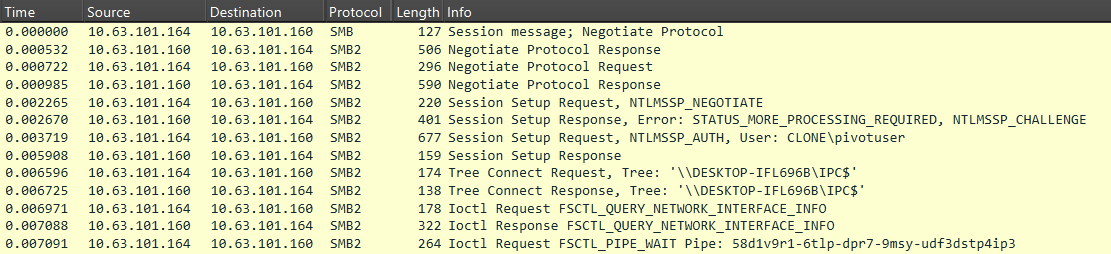
When managing agents via the SMB protocol, a named pipe is used by default for communication, with its name matching the agent’s UUID.
Although this parameter can be changed, it serves as a reliable indicator and can be easily described with a regular expression. Example:
[a-z0-9]{8}\-[a-z0-9]{4}\-[a-z0-9]{4}\-[a-z0-9]{4}\-[a-z0-9]{12}
For SMB communication, agents encode and encrypt data according to the pattern: base64(UUID+AES256(JSON)). This data is then split into blocks and transmitted over the network. The screenshot below illustrates what a network session for establishing a connection between agents looks like in Wireshark.
Commands and their responses are packaged within the MythicMessage data structure. This structure contains three header fields, as well as the commands themselves or the corresponding responses:
- Total size (4 bytes)
- Number of data blocks (4 bytes)
- Current block number (4 bytes)
- Base64-encoded data
The screenshot below shows an example of SMB communication between agents.
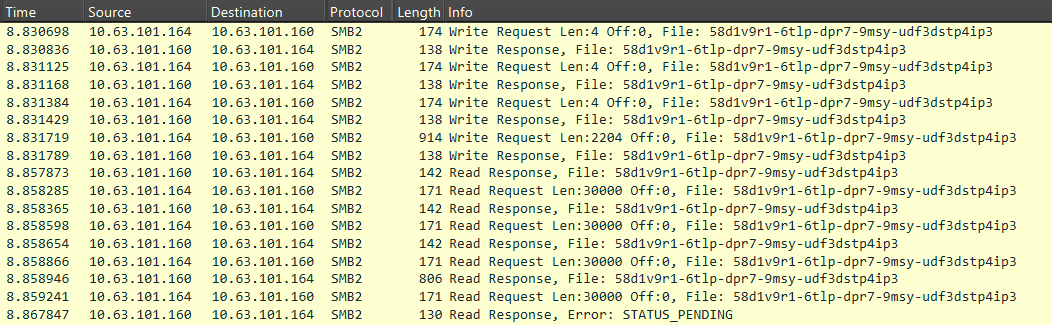
The agent (10.63.101.164) sends a command to another agent in the MythicMessage format. The first three Write Requests transmit the total message size, total number of blocks, and current block number. The fourth request transmits the Base64-encoded data. This is followed by a sequence of Read Requests, which are also transmitted in the MythicMessage format.
Below are the data transmitted in the fourth field of the MythicMessage structure.
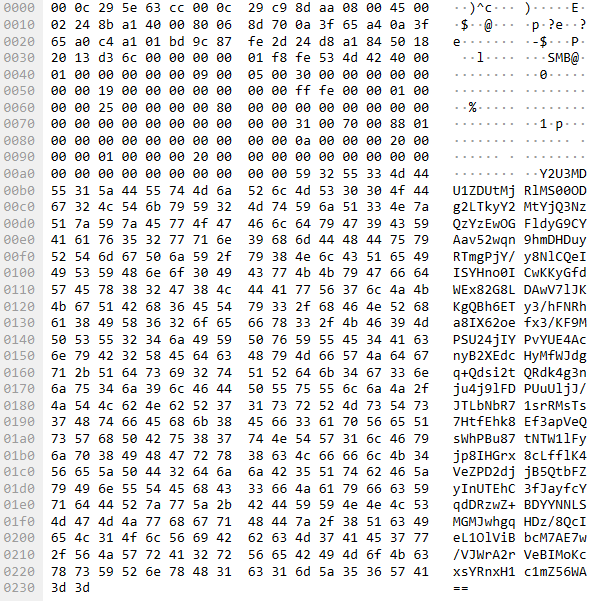
The content is encoded in Base64. Upon decoding, the structure of the transmitted information becomes visible: it begins with the UUID of the infected host, followed by a data block encrypted using AES-256.
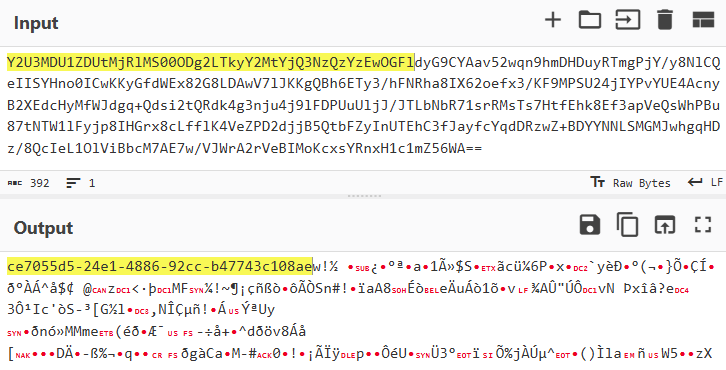
The fact that the data starts with a UUID string can be leveraged to create a signature-based detection rule that searches network packets for the identifier pattern.
To search for packets containing a UUID, the following signature can be applied. It uses specific request types and protocol flags as filters (Command: Ioctl (11), Function: FSCTL_PIPE_WAIT (0x00110018)), followed by a check to see if the pipe name matches the UUID pattern.
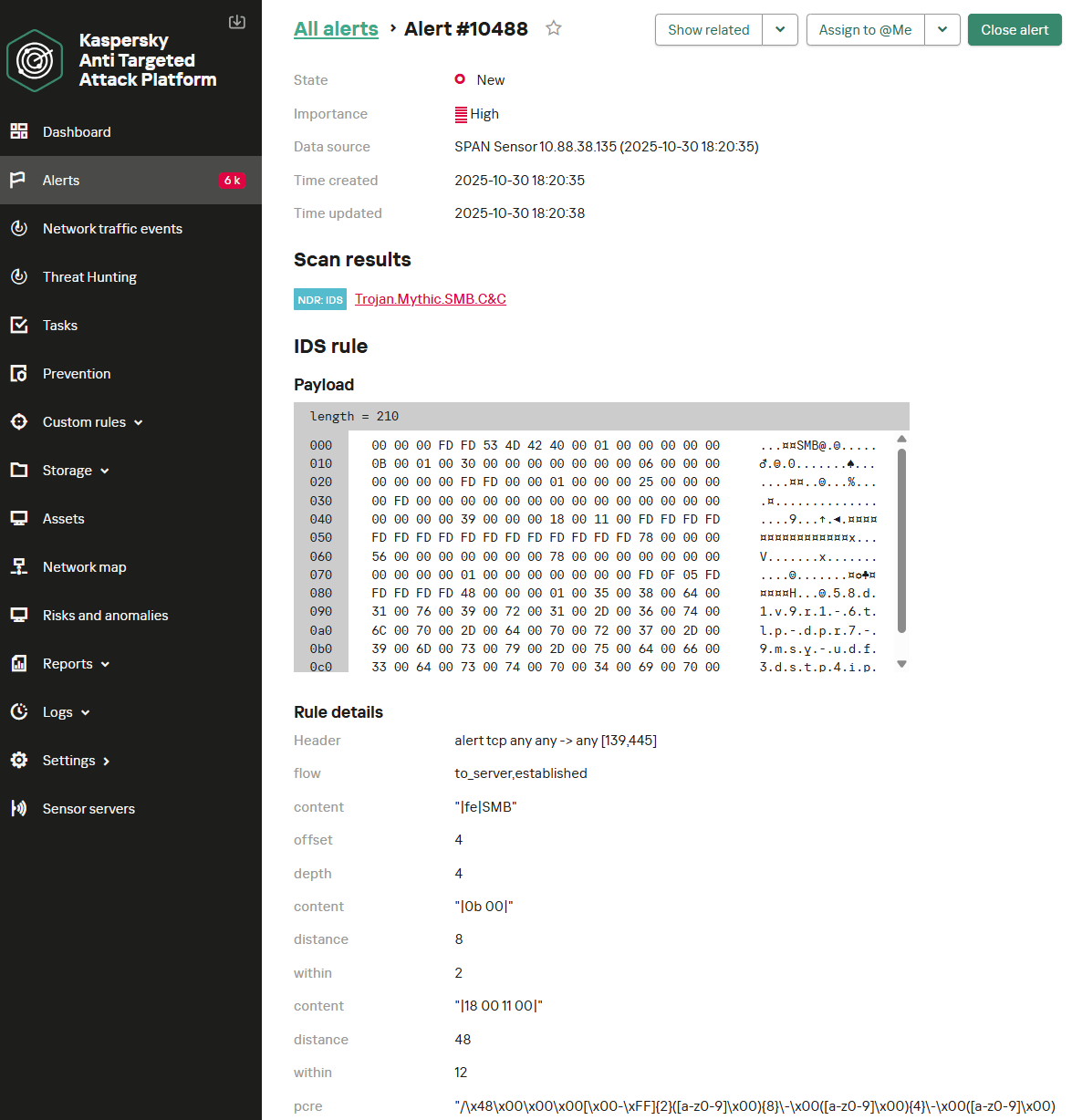
alert tcp any any -> any [139, 445] (msg: "Trojan.Mythic.SMB.C&C"; flow: to_server, established; content: "|fe|SMB"; offset: 4; depth: 4; content: "|0b 00|"; distance: 8; within: 2; content: "|18 00 11 00|"; distance: 48; within: 12; pcre: "/\x48\x00\x00\x00[\x00-\xFF]{2}([a-z0-9]\x00){8}\-\x00([a-z0-9]\x00){4}\-\x00([a-z0-9]\x00){4}\-\x00([a-z0-9]\x00){4}\-\x00([a-z0-9]\x00){12}$/R"; threshold: type both, track by_src, count 1, seconds 60; reference: url, github.com/MythicC2Profiles/sm… classtype: ndr1; sid: 9000101; rev: 1;)
Agent activity can also be detected by analyzing data transmitted in SMB WriteRequest packets with the protocol flag Command: Write (9) and a distinct packet structure where the BlobOffset and BlobLen fields are set to zero. If the Data field is Base64-encoded and, after decoding, begins with a UUID-formatted string, this indicates a command-and-control channel.
alert tcp any any -> any [139, 445] (msg: "Trojan.Mythic.SMB.C&C"; flow: to_server, established; dsize: > 360; content: "|fe|SMB"; offset: 4; depth: 4; content: "|09 00|"; distance: 8; within: 2; content: "|00 00 00 00 00 00 00 00 00 00 00 00|"; distance: 86; within: 12; base64_decode: bytes 64, offset 0, relative; base64_data; pcre: "/^[a-z0-9]{8}\-[a-z0-9]{4}\-[a-z0-9]{4}\-[a-z0-9]{4}\-[a-z0-9]{12}/"; threshold: type both, track by_src, count 1, seconds 60; reference: url, github.com/MythicC2Profiles/sm… classtype: ndr1; sid: 9000102; rev: 1;)
Below is the KATA NDR user interface displaying an alert about detecting a Mythic agent operating in P2P mode over SMB. In this instance, the first rule – which checks the request type, protocol flags, and the UUID pattern – was triggered.
It should be noted that these signatures have a limitation. If the SMBv3 protocol with encryption enabled is used, Mythic agent activity cannot be detected with signature-based methods. A possible alternative is behavioral analysis. However, in this context, it suffers from low accuracy and a high false-positive rate. The SMB protocol is widely used by organizations for various legitimate purposes, making it difficult to isolate behavioral patterns that definitively indicate malicious activity.
P2P communication via TCP
Mythic also supports P2P communications via TCP. The connection initialization process appears in network traffic as follows:
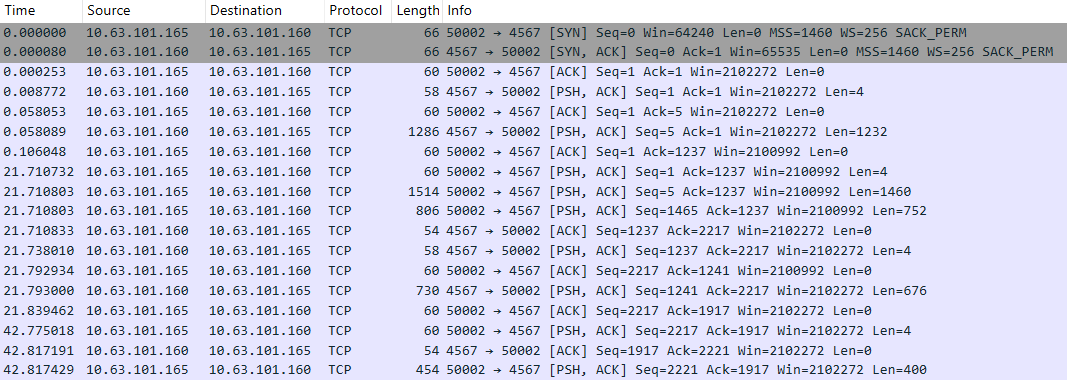
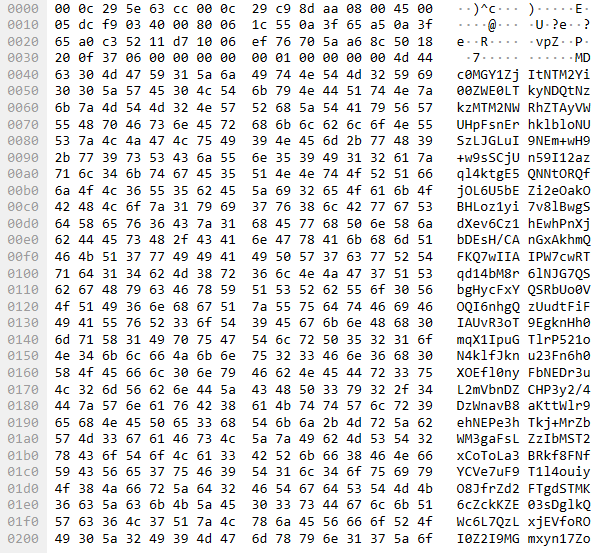
As with SMB, the MythicMessage structure is used for transmitting and receiving data. First, the data length (4 bytes) is sent as a big-endian DWORD in a separate packet. Subsequent packets transmit the number of data blocks, the current block number, and the data itself. However, unlike SMB packets, the value of the current block number field is always 0x00000000, due to TCP’s built-in packet fragmentation support.
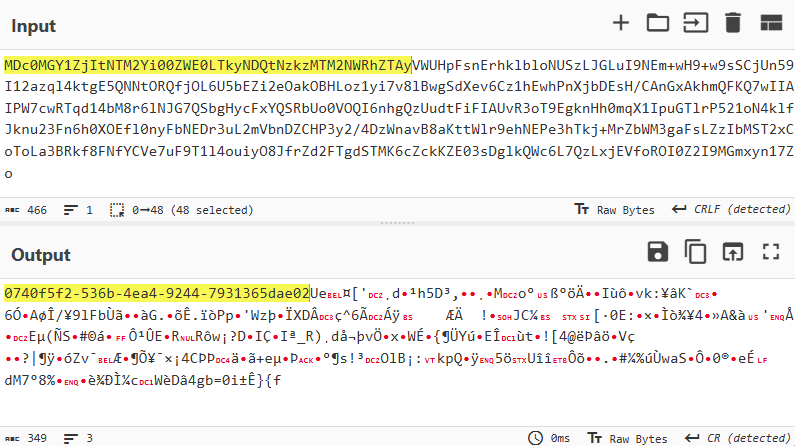
The data encoding scheme is also analogous to what we observed with SMB and appears as follows: base64(UUID+AES256(JSON)). Below is an example of a network packet containing Mythic data.
The decoded data appears as follows:
Similar to communication via SMB, signature-based detection rules can be created for TCP traffic to identify Mythic agent activity by searching for packets containing UUID-formatted strings. Below are two Suricata detection rules. The first rule is a utility rule. It does not generate security alerts but instead tags the TCP session with an internal flag, which is then checked by another rule. The second rule verifies the flag and applies filters to confirm that the current packet is being analyzed at the beginning of a network session. It then decodes the Base64 data and searches the resulting content for a UUID-formatted string.
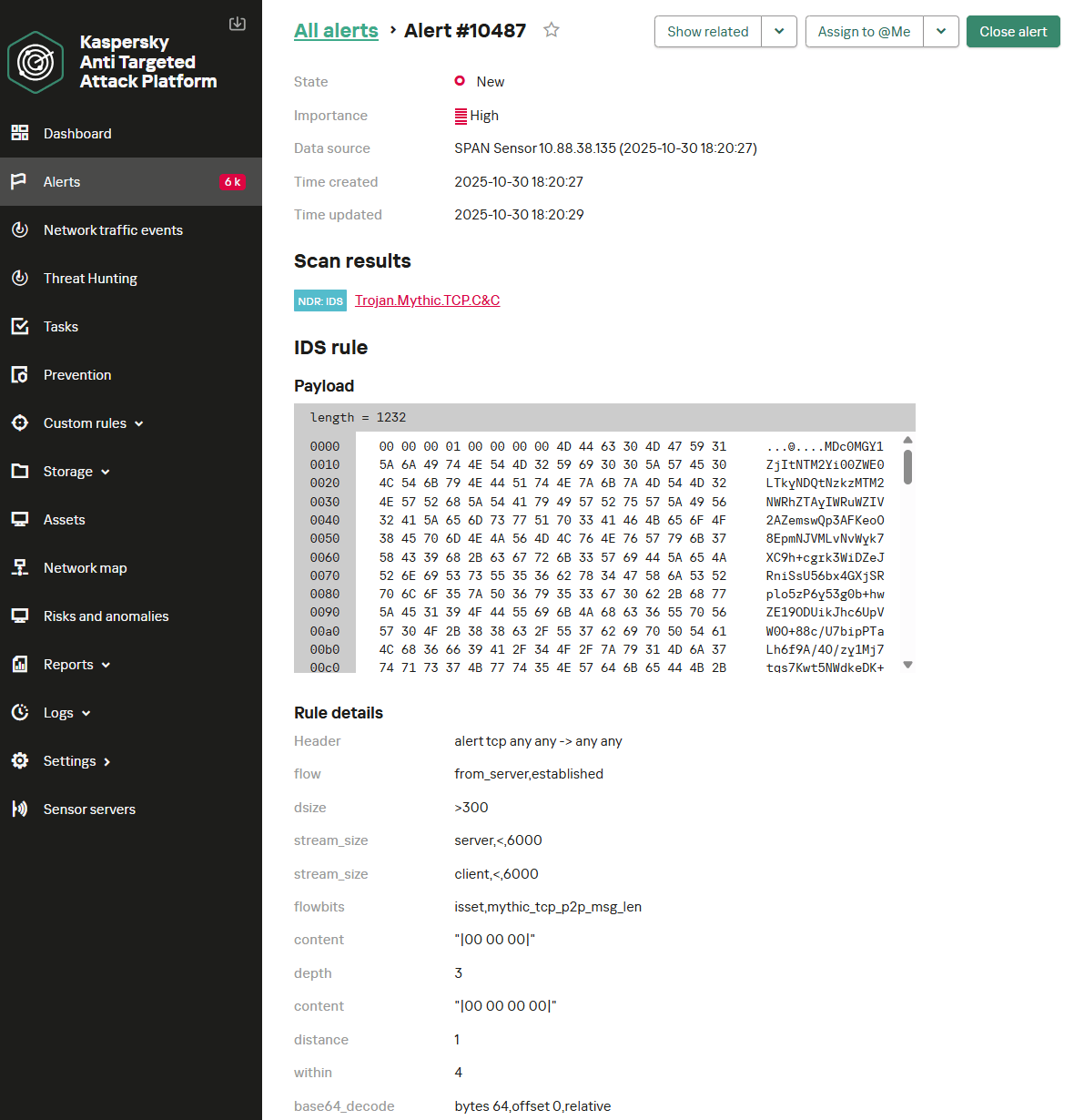
alert tcp any any -> any any (msg: "Trojan.Mythic.TCP.C&C"; flow: from_server, established; dsize: 4; stream_size: server, <, 6; stream_size: client, <, 3; content: "|00 00|"; depth: 2; pcre: "/^\x00\x00[\x00-\x5C]{1}[\x00-\xFF]{1}$/"; flowbits: set, mythic_tcp_p2p_msg_len; flowbits: noalert; threshold: type both, track by_src, count 1, seconds 60; reference: url, github.com/MythicC2Profiles/tc… classtype: ndr1; sid: 9000103; rev: 1;)
alert tcp any any -> any any (msg: "Trojan.Mythic.TCP.C&C"; flow: from_server, established; dsize: > 300; stream_size: server, <, 6000; stream_size: client, <, 6000; flowbits: isset, mythic_tcp_p2p_msg_len; content: "|00 00 00|"; depth: 3; content: "|00 00 00 00|"; distance: 1; within: 4; base64_decode: bytes 64, offset 0, relative; base64_data; pcre: "/^[a-z0-9]{8}\-[a-z0-9]{4}\-[a-z0-9]{4}\-[a-z0-9]{4}\-[a-z0-9]{12}/"; threshold: type both, track by_src, count 1, seconds 60; reference: url, github.com/MythicC2Profiles/tc… classtype: ndr1; sid: 9000104; rev: 1;)
Below is the NDR interface displaying an example of the two rules detecting a Mythic agent operating in P2P mode over TCP.
Egress transport modules
Covert Egress communication
For stealthy operations, Mythic allows agents to be managed through popular services. This makes its activity less conspicuous within network traffic. Mythic includes transport modules based on the following services:
- Discord
- GitHub
- Slack
Of these, only the first two remain relevant at the time of writing. Communication via Slack (the Slack C2 Profile transport module) is no longer supported by the developers and is considered deprecated, so we will not examine it further.
The Discord C2 Profile transport module
The use of the Discord service as a mediator for C2 communication within the Mythic framework has been gaining popularity recently. In this scenario, agent traffic is indistinguishable from normal Discord activity, with commands and their execution results masquerading as messages and file attachments. Communication with the server occurs over HTTPS and is encrypted with TLS. Therefore, detecting Mythic traffic requires decrypting this.
Analyzing decrypted TLS traffic
Let’s assume we are using an NDR platform in conjunction with a network traffic decryption (TLS inspection) system to detect suspicious network activity. In this case, we operate under the assumption that we can decrypt all TLS traffic. Let’s examine possible detection rules for that scenario.
Agent and server communication occurs via Discord API calls to send messages to a specific channel. Communication between the agent and Mythic uses the MythicMessageWrapper structure, which contains the following fields:
- message: the transmitted data
- sender_id: a GUID generated by the agent, included in every message
- to_server: a direction flag – a message intended for the server or the agent
- id: not used
- final: not used
Of particular interest to us is the message field, which contains the transmitted data encoded in Base64. The MythicMessageWrapper message is transmitted in plaintext, making it accessible to anyone with read permissions for messages on the Discord server.
Below is an example of data transmission via messages in a Discord channel.

To establish a connection, the agent authenticates to the Discord server via the API call /api/v10/gateway/bot. We observe the following data in the network traffic:

After successful initialization, the agent gains the ability to receive and respond to commands. To create a message in the channel, the agent makes a POST request to the API endpoint /channels/<channel.id>/messages. The network traffic for this call is shown in the screenshot below.
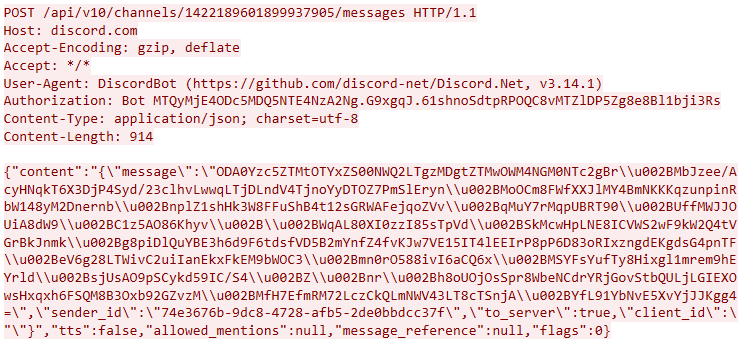
After decoding the Base64, the content of the message field appears as follows:
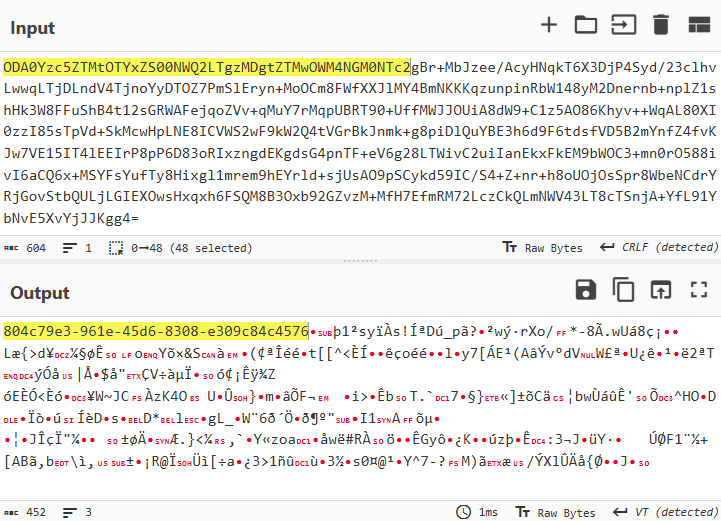
A structure characteristic of a UUID is visible at the beginning of the packet.
After processing the message, the agent deletes it from the channel via a DELETE request to the API endpoint /channels/{channel.id}/messages/{message.id}.

Below is a Suricata rule that detects the agent’s Discord-based communication activity. It checks the API activity for creating HTTP messages for the presence of Base64-encoded data containing the agent’s UUID.
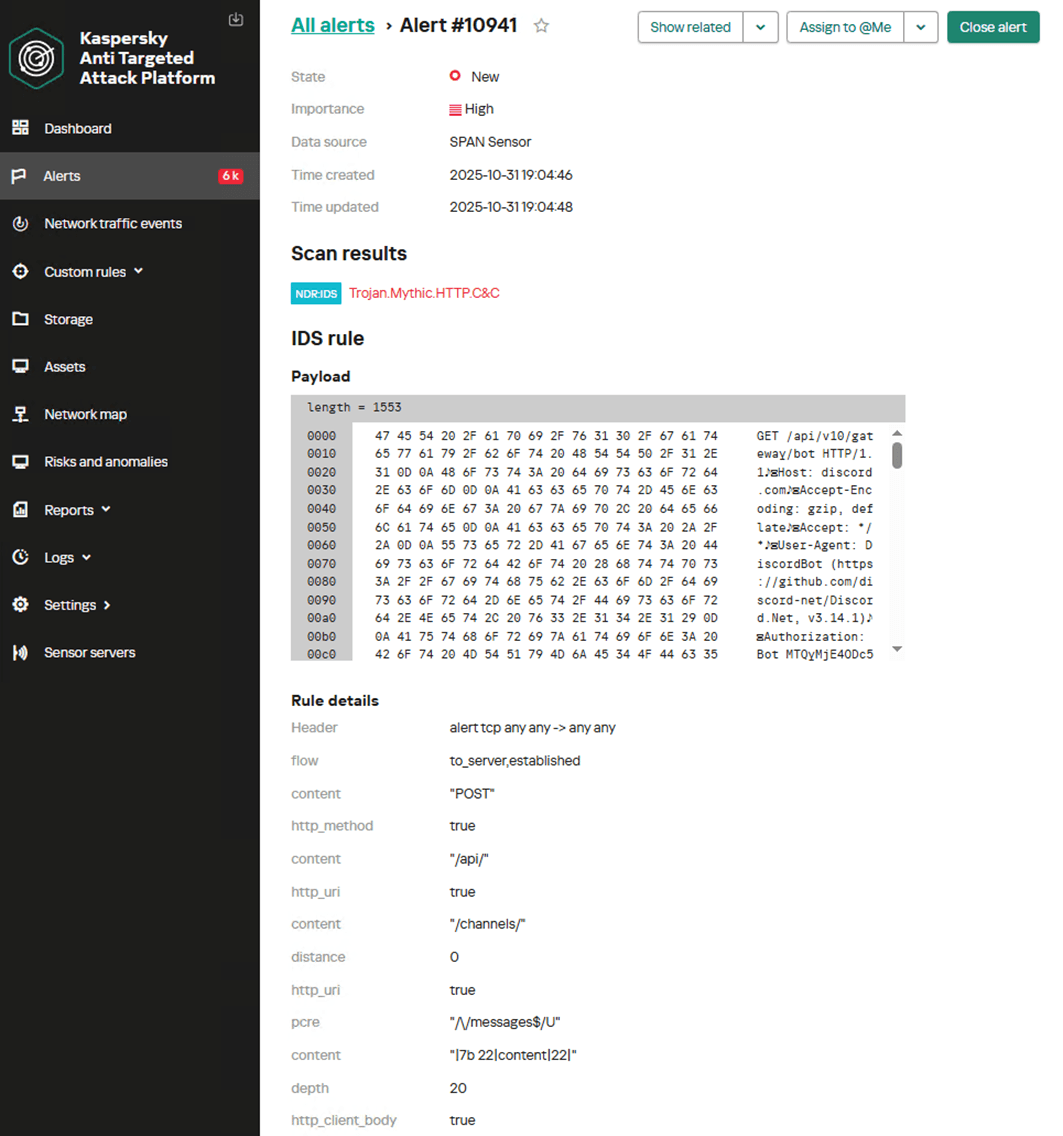
alert tcp any any -> any any (msg: "Trojan.Mythic.HTTP.C&C"; flow: to_server, established; content: "POST"; http_method; content: "/api/"; http_uri; content: "/channels/"; distance: 0; http_uri; pcre: "/\/messages$/U"; content: "|7b 22|content|22|"; depth: 20; http_client_body; content: "|22|sender_id"; depth: 1500; http_client_body; pcre: "/\x22sender_id\x5c\x22\x3a\x5c\x22[a-z0-9]{8}\-[a-z0-9]{4}\-[a-z0-9]{4}\-[a-z0-9]{4}\-[a-z0-9]{12}/"; threshold: type both, track by_src, count 1, seconds 60; reference: url, github.com/MythicC2Profiles/di… classtype: ndr1; sid: 9000105; rev: 1;)
Below is the NDR user interface displaying an example of detecting the activity of the Discord C2 Profile transport module for a Mythic agent within decrypted HTTP traffic.
Analyzing encrypted TLS traffic
If Discord usage is permitted on the network and there is no capability to decrypt traffic, it becomes nearly impossible to detect agent activity. In this scenario, behavioral analysis of requests to the Discord server may prove useful. Below is network traffic showing frequent TLS connections to the Discord server, which could indicate commands being sent to an agent.
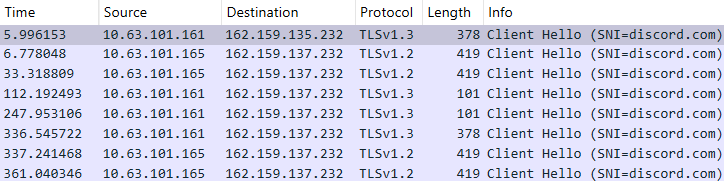
In this case, we can use a Suricata rule to detect the frequent TLS sessions with Discord servers:
alert tcp any any -> any any (msg: "NetTool.PossibleMythicDiscordEgress.TLS.C&C"; flow: to_server, established; tls_sni; content: "discord.com"; nocase; threshold: type both, track by_src, count 4, seconds 420; reference: url, github.com/MythicC2Profiles/di… classtype: ndr3; sid: 9000106; rev: 1;)
Another method for detecting these communications involves tracking multiple DNS queries to the discord.com domain.
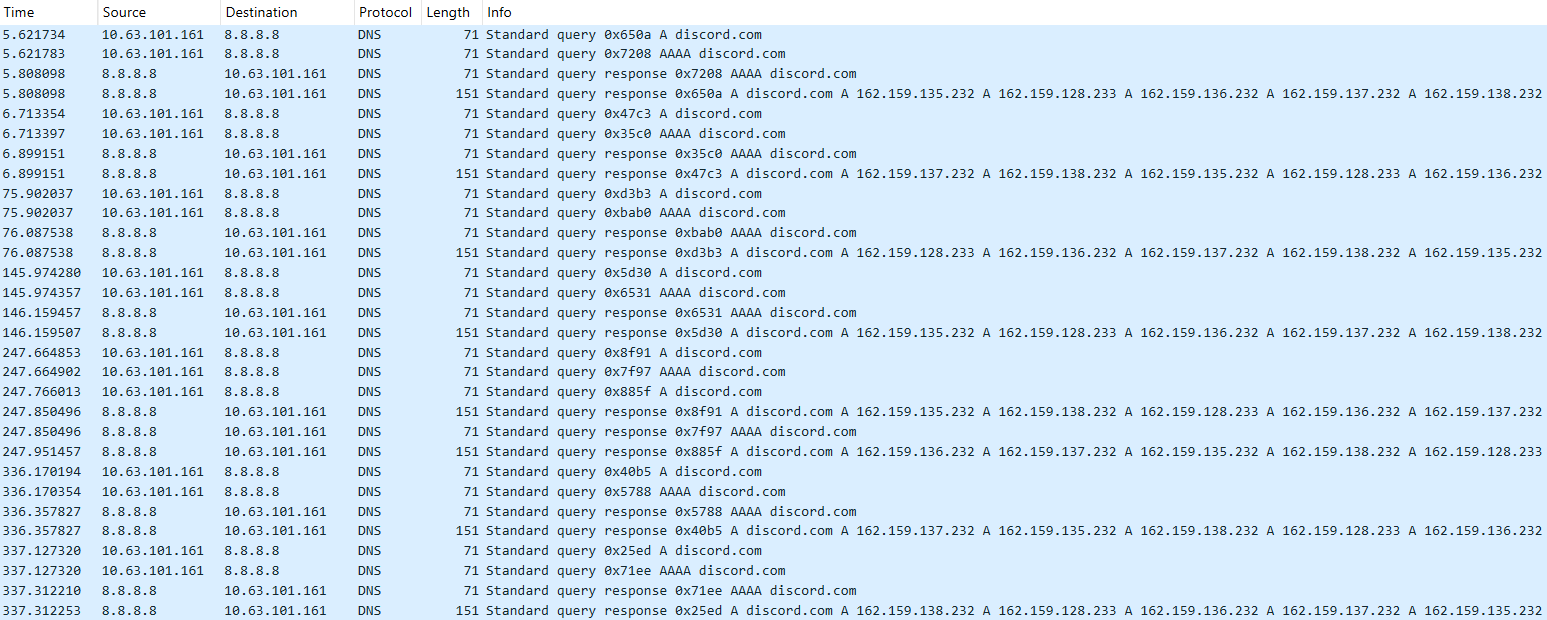
The following rule can be applied to detect these:
alert udp any any -> any 53 (msg: "NetTool.PossibleMythicDiscordEgress.DNS.C&C"; content: "|01 00 00 01 00 00 00 00 00 00|"; depth: 10; offset: 2; content: "|07|discord|03|com|00|"; nocase; distance: 0; threshold: type both, track by_src, count 4, seconds 60; reference: url, github.com/MythicC2Profiles/di… classtype: ndr3; sid: 9000107; rev: 1;)
Below is the NDR user interface showing an example of a custom rule in operation, detecting the activity of the Discord C2 Profile transport module for a Mythic agent within encrypted traffic based on characteristic DNS queries.
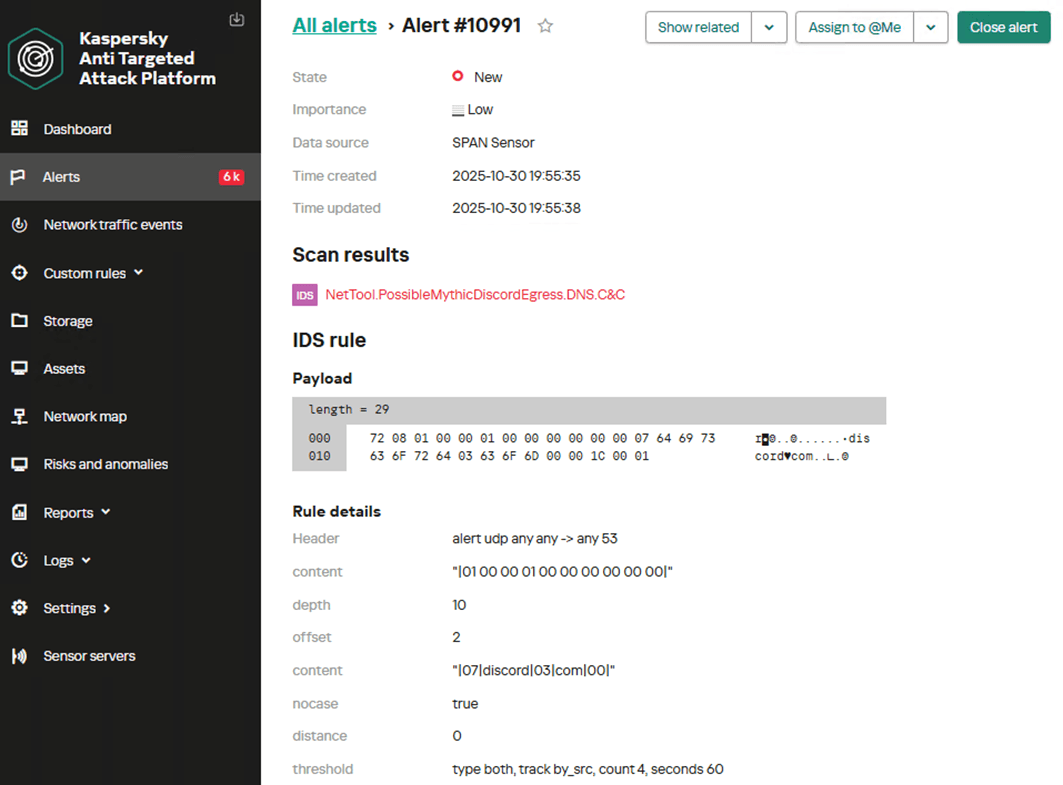
The proposed rule options have low accuracy and can generate a high number of false positives. Therefore, they must be adapted to the specific characteristics of the infrastructure in which they will run. Threshold and count parameters, which control the triggering frequency and time window, require tuning.
GitHub C2 Profile transport module
GitHub’s popularity has made it an attractive choice as a mediator for managing Mythic agents. The core concept is the same as in other covert Egress communication transport modules. Communication with GitHub utilizes HTTPS. Successful operation requires an account on the target platform and the ability to communicate via API calls. The transport module utilizes the GitHub API to send comments to pre-created Issues and to commit files to a branch within a repository controlled by the attackers. In this model, the agent interacts only with GitHub: it creates and reads comments, uploads files, and manages branches. It does not communicate with any other servers. The communication algorithm via GitHub is as follows:
- The agent posts a comment (check-in) to a designated Issue on GitHub, intended for agents to report their results.
- The Mythic server validates the comment, deletes it, and posts a reply in an issue designated for server use.
- The agent creates a branch with a name matching its UUID and writes a get_tasking file to it (performs a push request).
- The Mythic server reads the file and writes a response file to the same branch.
- The agent reads the response file, deletes the branch, pauses, and repeats the cycle.
Analyzing decrypted TLS traffic
Let’s consider an approach to detecting agent activity when traffic decryption is possible.
Agent communication with the server utilizes API calls to GitHub. The payload is encoded in Base64 and published in plaintext; therefore, anyone who can view the repository or analyze the traffic contents can decode it.
Analysis of agent communication revealed that the most useful traffic for creating detection rules is associated with publishing check-in comments, creating a branch, and publishing a file.
During the check-in phase, the agent posts a comment to register a new agent and establish communication.
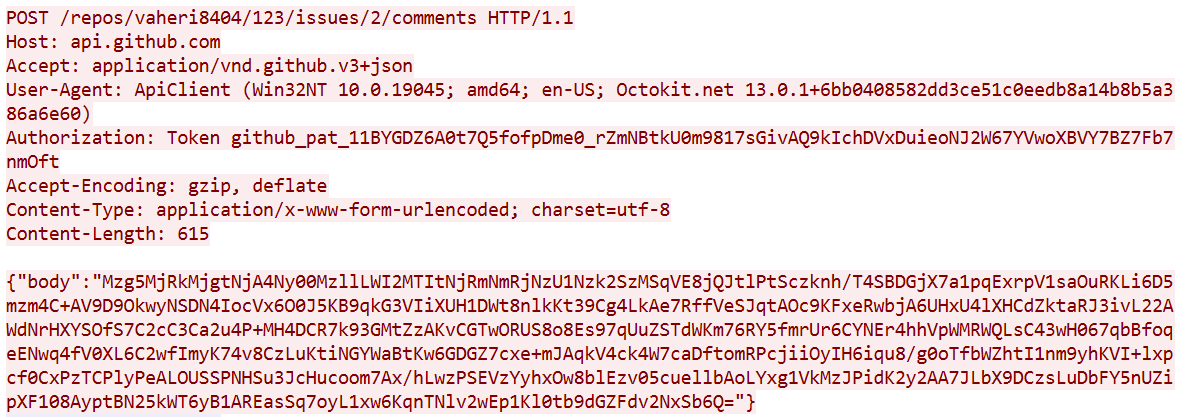
The transmitted data is encoded in Base64 and contains the agent’s UUID and the portion of the message encrypted using AES-256.
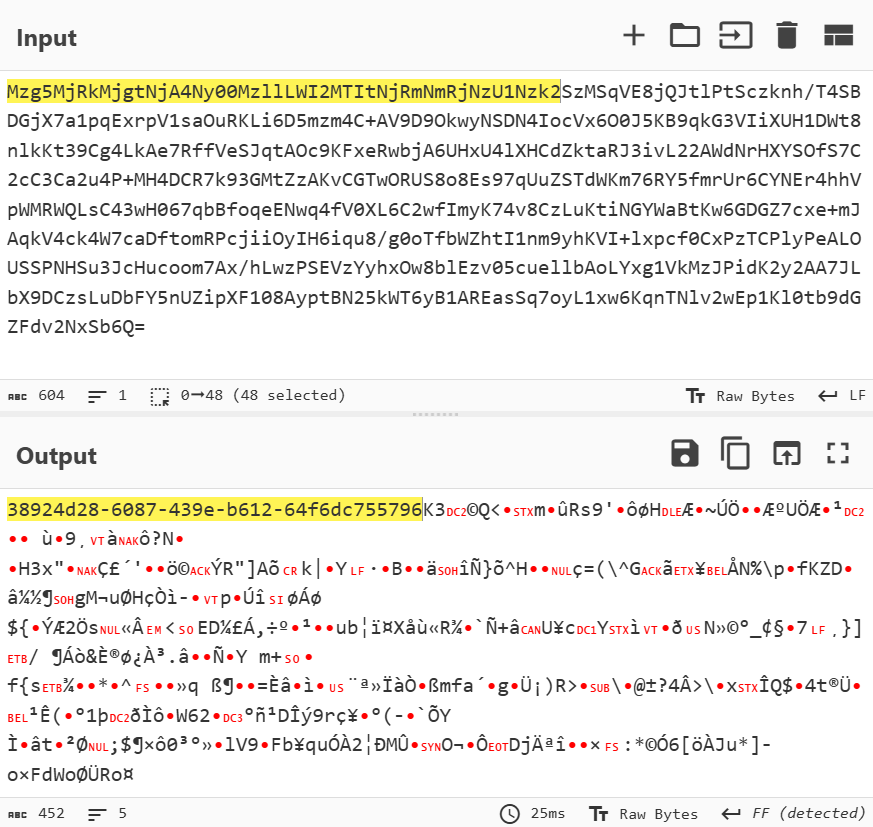
This allows for a signature that detects UUID-formatted substrings within GitHub comment creation requests.
alert tcp any any -> any any (msg: "Trojan.Mythic.HTTP.C&C"; flow: to_server, established; content: "POST"; http_method; content: "api.github.com"; http_host; content: "/repos/"; depth: 8; http_uri; pcre: "/\/comments$/U"; content: "|22|body|22|"; depth: 8; http_client_body; base64_decode: bytes 300, offset 2, relative; base64_data; pcre: "/^[a-z0-9]{8}\-[a-z0-9]{4}\-[a-z0-9]{4}\-[a-z0-9]{4}\-[a-z0-9]{12}/"; threshold: type both, track by_src, count 1, seconds 60; reference: url, github.com/MythicC2Profiles/gi… classtype: ndr1; sid: 9000108; rev: 1;)
Another stage suitable for detection is when the agent creates a separate branch with its UUID as the name. All subsequent relevant communication with the server will occur within this branch. Here is an example of a branch creation request:

Therefore, we can create a detection rule to identify UUID-formatted strings within branch creation requests.
alert tcp any any -> any any (msg: "Trojan.Mythic.HTTP.C&C"; flow: to_server, established; content: "POST"; http_method; content: "api.github.com"; http_host; content: "/repos/"; depth: 100; http_uri; content: "/git/refs"; distance: 0; http_uri; content: "|22|ref|22 3a|"; depth: 10; http_client_body; content: "refs/heads/"; distance: 0; within: 50; http_client_body; pcre: "/refs\/heads\/[a-z0-9]{8}\-[a-z0-9]{4}\-[a-z0-9]{4}\-[a-z0-9]{4}\-[a-z0-9]{12}\x22/"; threshold: type both, track by_src, count 1, seconds 60; reference: url, github.com/MythicC2Profiles/gi… classtype: ndr1; sid: 9000109; rev: 1;)
After creating the branch, the agent writes a file to it (sends a push request), which contains Base64-encoded data.
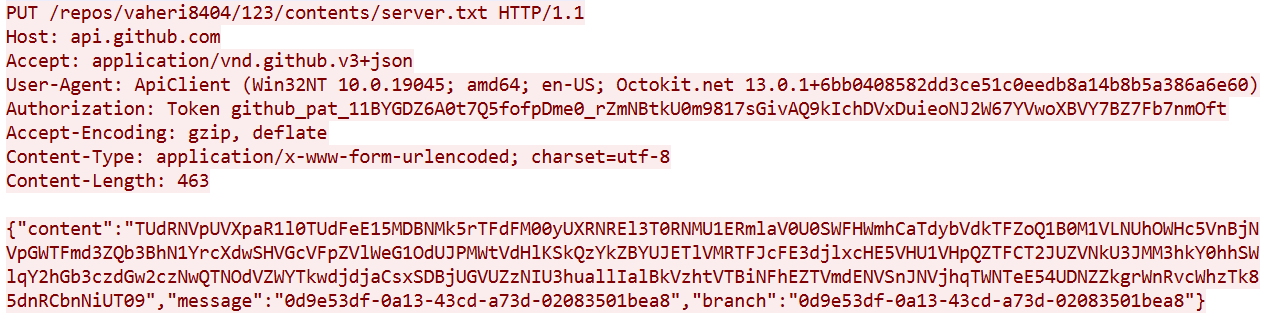
Therefore, we can create a rule to trigger on file publication requests to a branch whose name matches the UUID pattern.
alert tcp any any -> any any (msg: "Trojan.Mythic.HTTP.C&C"; flow: to_server, established; content: "PUT"; http_method; content: "api.github.com"; http_host; content: "/repos/"; depth:8; http_uri; content: "/contents/"; distance: 0; http_uri; content: "|22|content|22|"; depth: 100; http_client_body; pcre: "/\x22message\x22\x3a\x22[a-z0-9]{8}\-[a-z0-9]{4}\-[a-z0-9]{4}\-[a-z0-9]{4}\-[a-z0-9]{12}\x22/"; threshold: type both, track by_src, count 1, seconds 60; reference: url, github.com/MythicC2Profiles/gi… classtype: ndr1; sid: 9000110; rev: 1;)
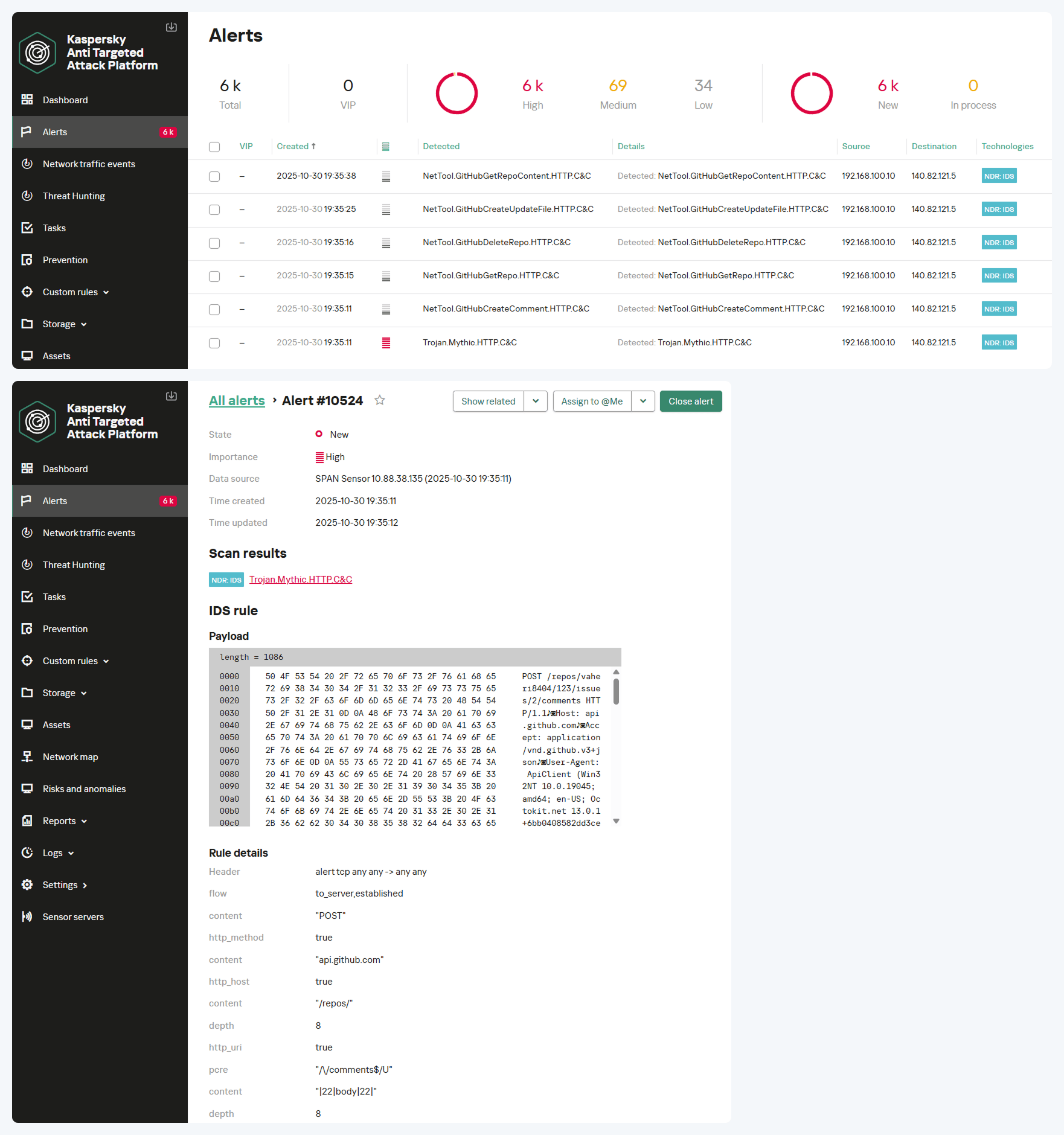
The screenshot below shows how the NDR solution logs all suspicious communications using the GitHub API and subsequently identifies the Mythic agent’s activity. The result is an alert with the verdict Trojan.Mythic.HTTP.C&C.
Analyzing encrypted TLS traffic
Communication with GitHub occurs over HTTPS; therefore, in the absence of traffic decryption capability, signature-based methods for detecting agent activity cannot be applied. Let’s consider a behavioral agent activity detection approach.
For instance, it is possible to detect connections to GitHub servers that are atypical in frequency and purpose, originating from network segments where this activity is not expected. The screenshot below shows an example of an agent’s multiple TLS sessions. The traffic reflects the execution of several commands, as well as idle time, manifested as constant polling of the server while awaiting new tasks.
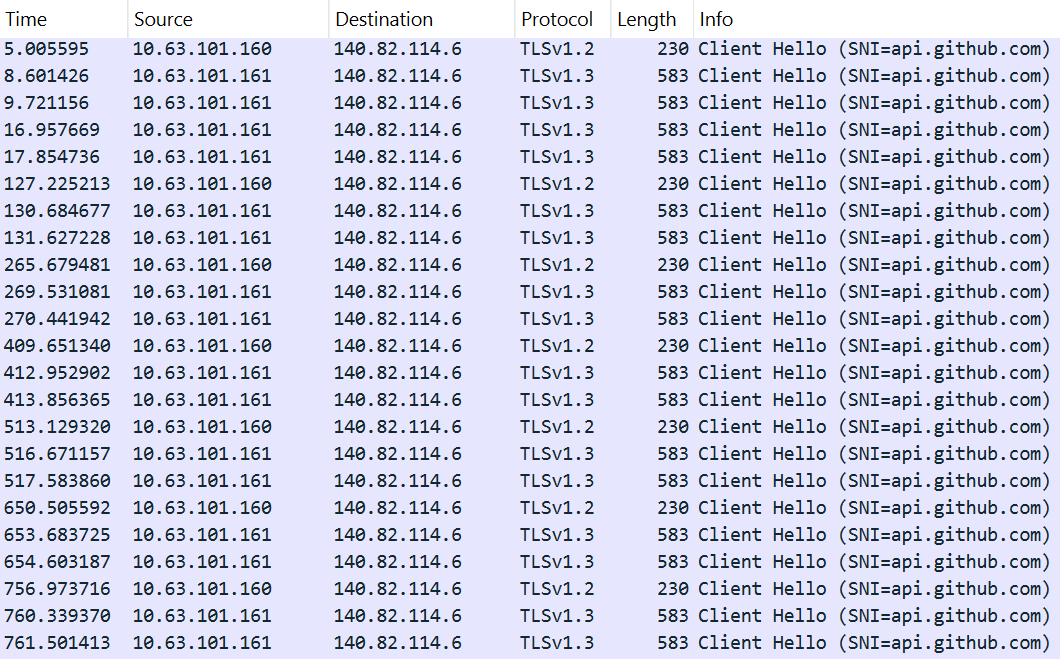
Multiple TLS sessions with the GitHub service from uncharacteristic network segments can be detected using the rule presented below:
alert tcp any any -> any any (msg:"NetTool.PossibleMythicGitHubEgress.TLS.C&C"; flow: to_server, established; tls_sni; content: "api.github.com"; nocase; threshold: type both, track by_src, count 4, seconds 60; reference: url, github.com/MythicC2Profiles/gi… classtype: ndr3; sid: 9000111; rev: 1;)
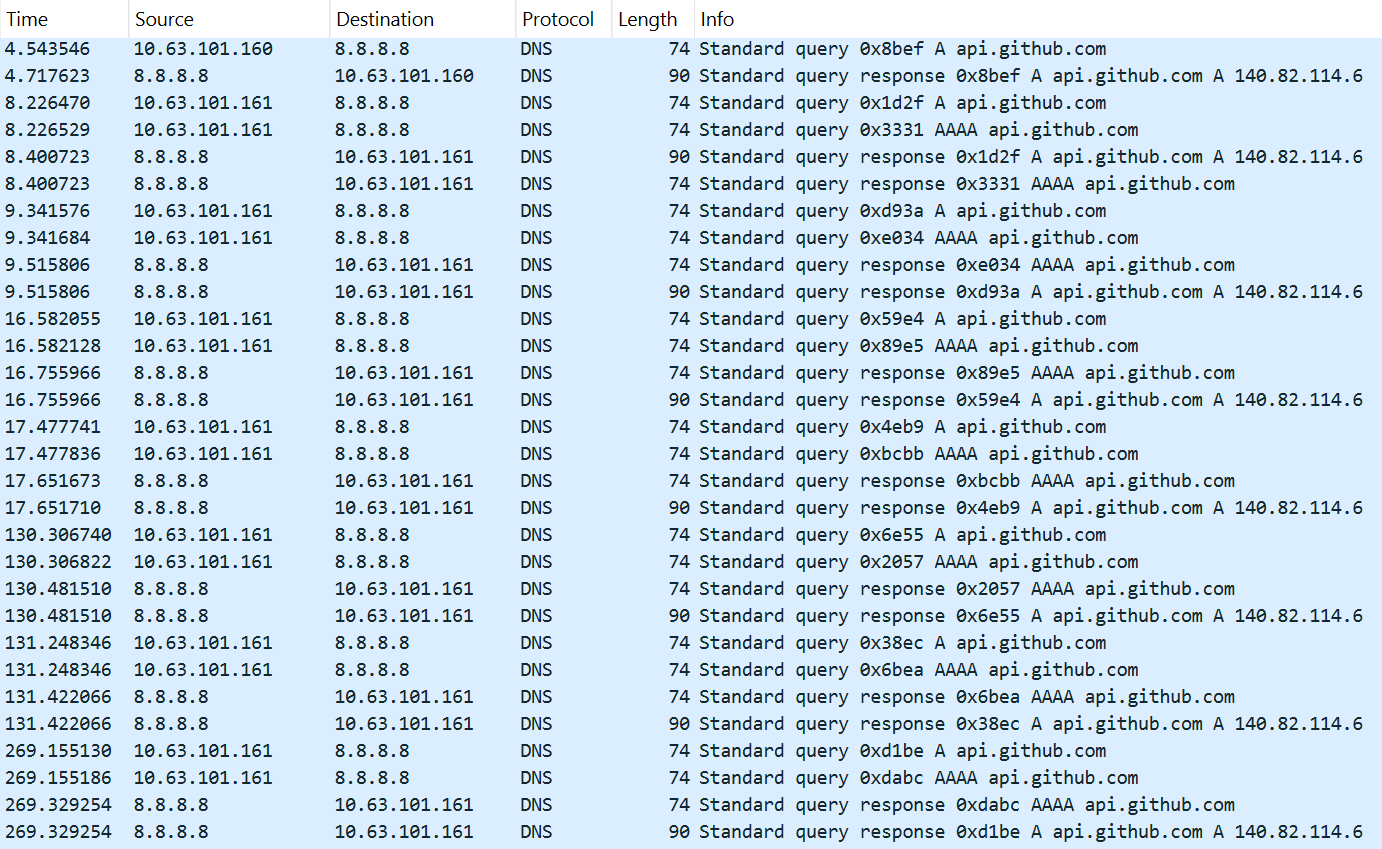
Additionally, multiple DNS queries to the service can be logged in the traffic.
This activity is detected with the help of the following rule:
alert udp any any -> any 53 (msg: "NetTool.PossibleMythicGitHubEgress.DNS.C&C"; content: "|01 00 00 01 00 00 00 00 00 00|"; depth: 10; offset: 2; content: "|03|api|06|github|03|com|00|"; nocase; distance: 0; threshold: type both, track by_src, count 12, seconds 180; reference: url, github.com/MythicC2Profiles/gi… classtype: ndr3; sid: 9000112; rev: 1;)
The screenshot below shows the NDR interface with an example of the first rule in action, detecting traces of the GitHub profile activity for a Mythic agent within encrypted TLS traffic.
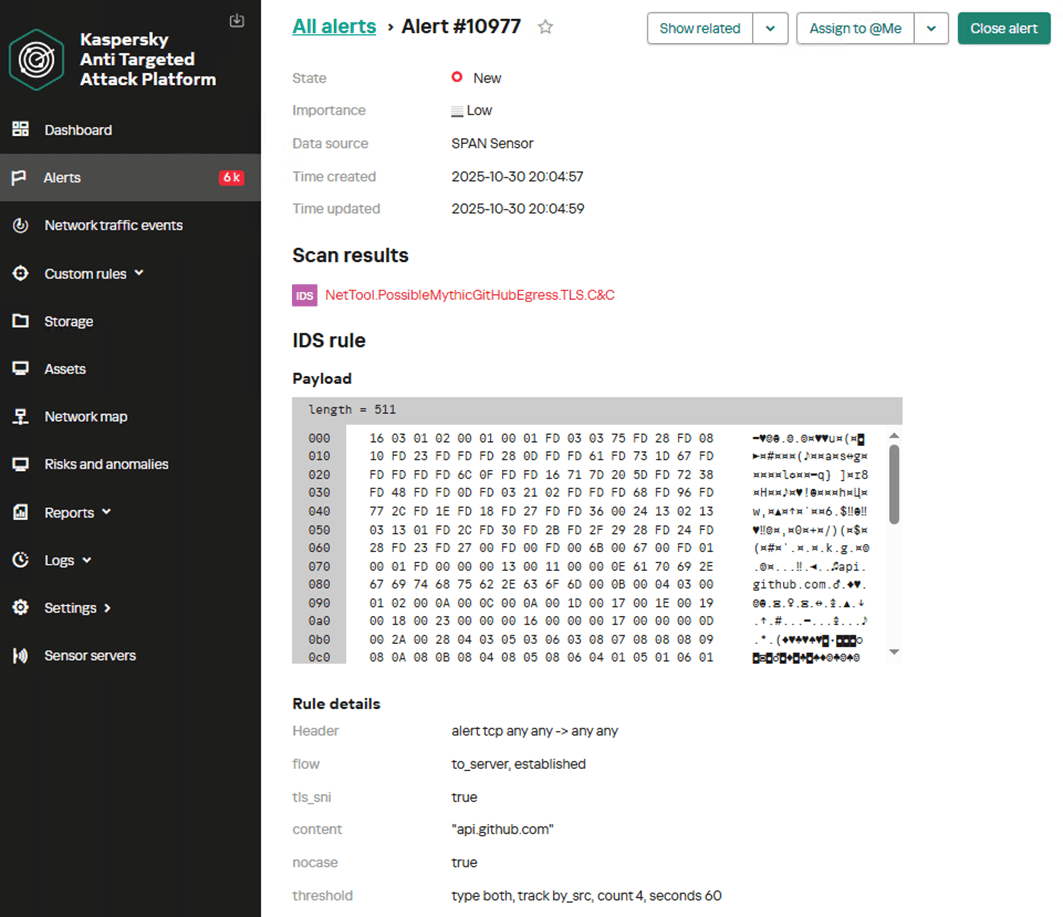
The suggested rule options can produce false positives, so to improve their effectiveness, they must be adapted to the specific characteristics of the infrastructure in which they will run. The parameters of the threshold keyword – specifically the count and seconds values, which control the number of events required to generate an alert and the time window for their occurrence in NDR – must be configured.
Direct Egress communication
The Egress communication model allows agents to interact directly with the C2 server via the following protocols:
- HTTP(S)
- WebSocket
- MQTT
- DNS
The first two protocols are the most prevalent. The DNS-based transport module is still under development, and the module based on MQTT sees little use among operators. We will not examine them within the scope of this article.
Communication via HTTP
HTTP is the most common protocol for building a Mythic agent control network. The HTTP transport container acts as a proxy between the agents and the Mythic server. It allows data to be transmitted in both plaintext and encrypted form. Crucially, the metadata is not encrypted, which enables the creation of signature-based detection rules.
Below is an example of unencrypted Mythic network traffic over HTTP. During a GET request, data encoded in Base64 is passed in the value of the query parameter.
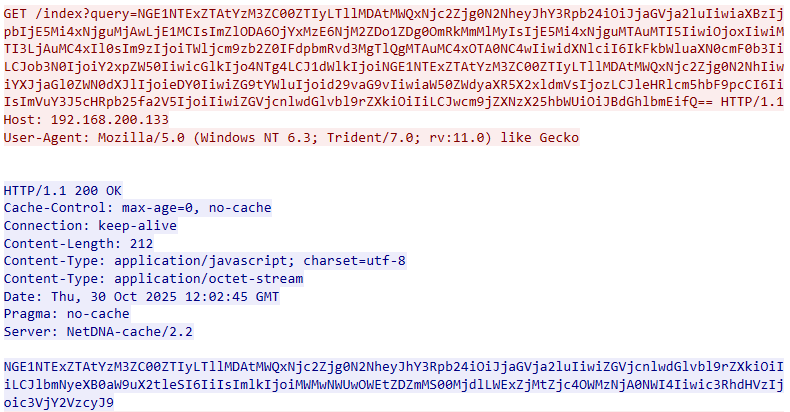
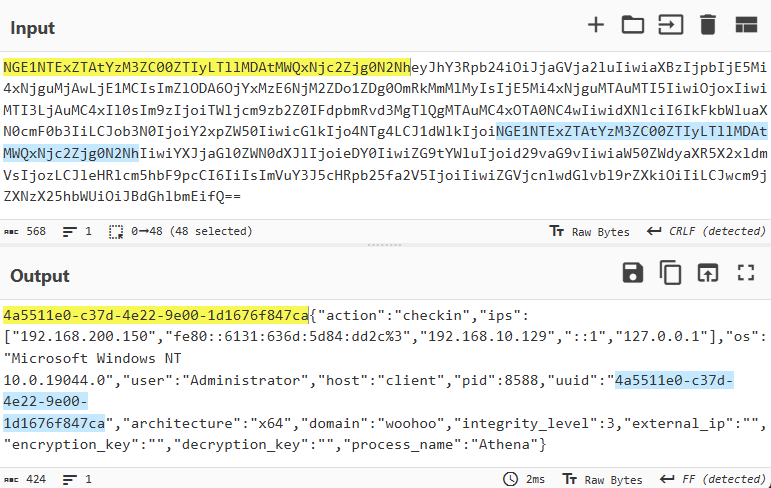
After decoding, the agent’s UUID – generated according to a specific pattern – becomes visible. This identifier is followed by a JSON object containing the key parameters of the host, collected by the agent.
If data encryption is applied, the network traffic for agent communication appears as shown in the screenshot below.
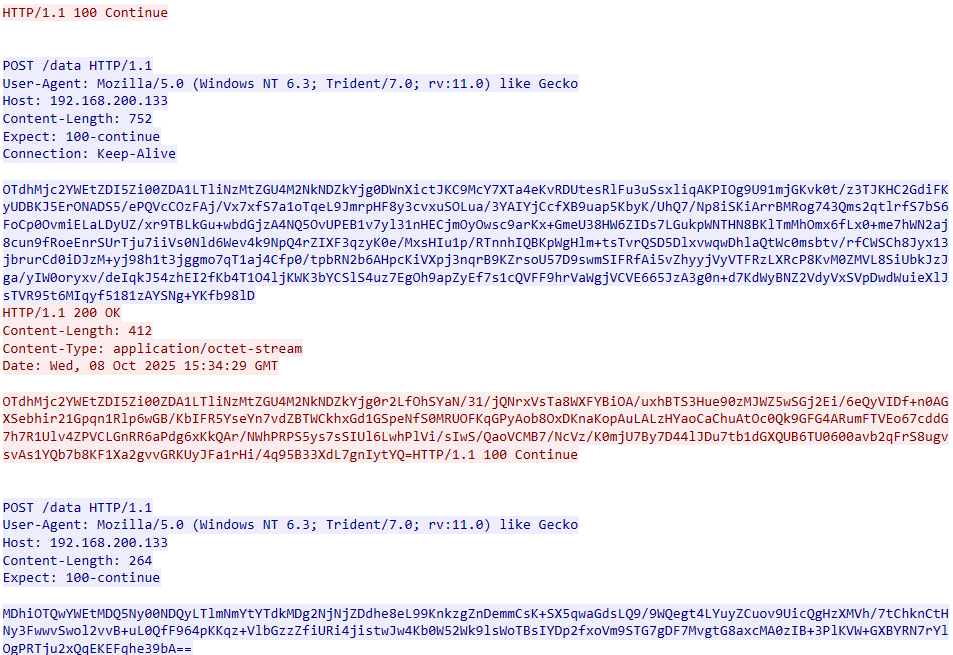
After decrypting the traffic and decoding from Base64, the communication data reveals the familiar structure: UUID+AES256(JSON).
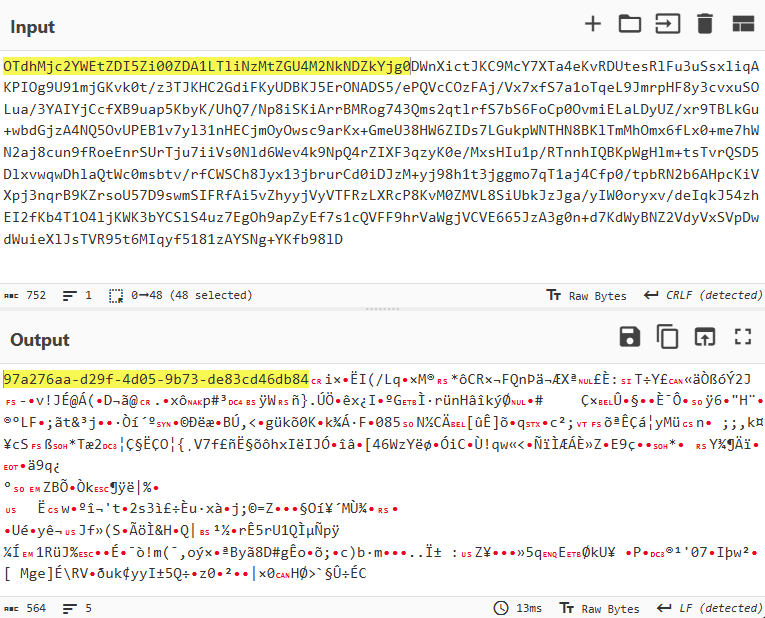
Therefore, to create a detection signature for this case, we can also rely on the presence of a UUID within the Base64-encoded data in POST requests.
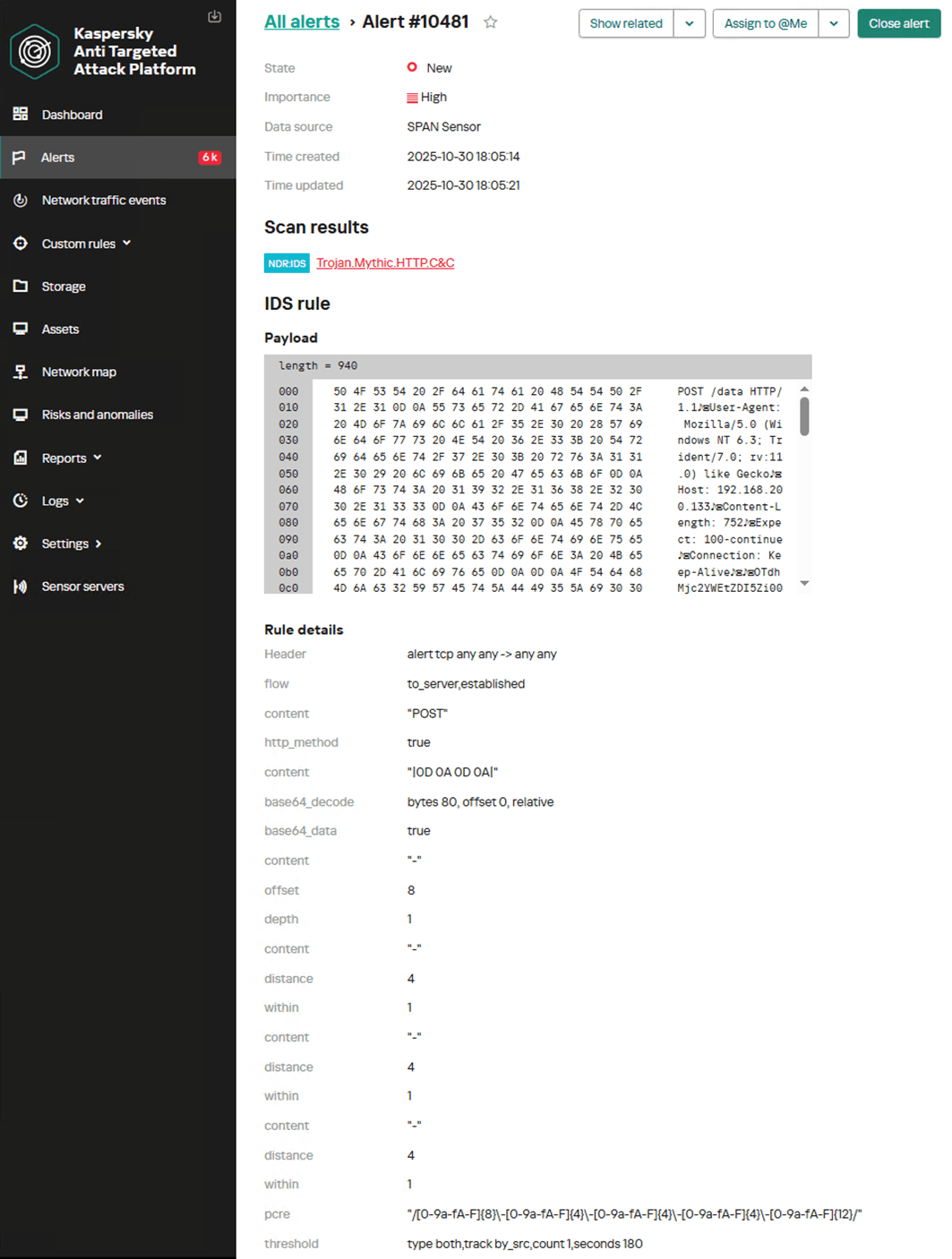
alert tcp any any -> any any (msg: "Trojan.Mythic.HTTP.C&C"; flow: to_server, established; content: "POST"; http_method; content: "|0D 0A 0D 0A|"; base64_decode: bytes 80, offset 0, relative; base64_data; content: "-"; offset: 8; depth: 1; content: "-"; distance: 4; within: 1; content: "-"; distance: 4; within: 1; content: "-"; distance: 4; within: 1; pcre: "/[0-9a-fA-F]{8}\-[0-9a-fA-F]{4}\-[0-9a-fA-F]{4}\-[0-9a-fA-F]{4}\-[0-9a-fA-F]{12}/"; threshold: type both, track by_src, count 1, seconds 180; reference: md5, 6ef89ccee639b4df42eaf273af8b5ffd; classtype: trojan1; sid: 9000113; rev: 2;)
The screenshot below shows how the NDR platform detects agent communication with the server over HTTP, generating an alert with the name Trojan.Mythic.HTTP.C&C.
Communication via HTTPS
Mythic agents can communicate with the server via HTTPS using the corresponding transport module. In this case, data is encrypted with TLS and is not amenable to signature-based analysis. However, the activity of Mythic agents can be detected if they use the default SSL certificate. Below is an example of network traffic from a Mythic agent with such a certificate.
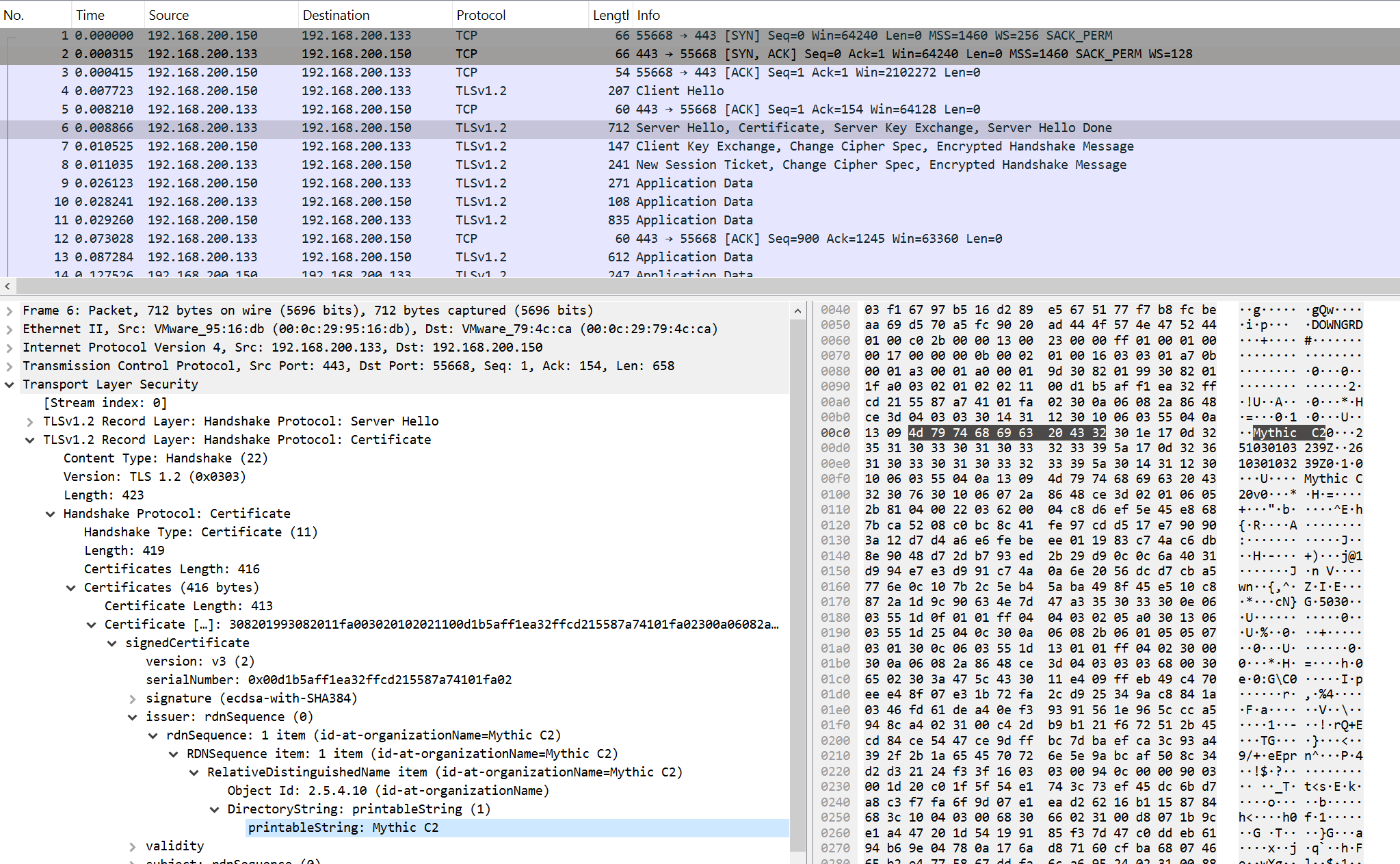
For this purpose, the following signature is applied:
alert tcp any any -> any any (msg: "Trojan.Mythic.HTTPS.C&C"; flow: established, from_server, no_stream; content: "|16 03|"; content: "|0B|"; distance: 3; within: 1; content: "Mythic C2"; distance: 0; reference: url, github.com/its-a-feature/Mythi… classtype: ndr1; sid: 9000114; rev: 1;)
WebSocket
The WebSocket protocol enables full-duplex communication between a client and a remote host. Mythic can utilize it for agent management.
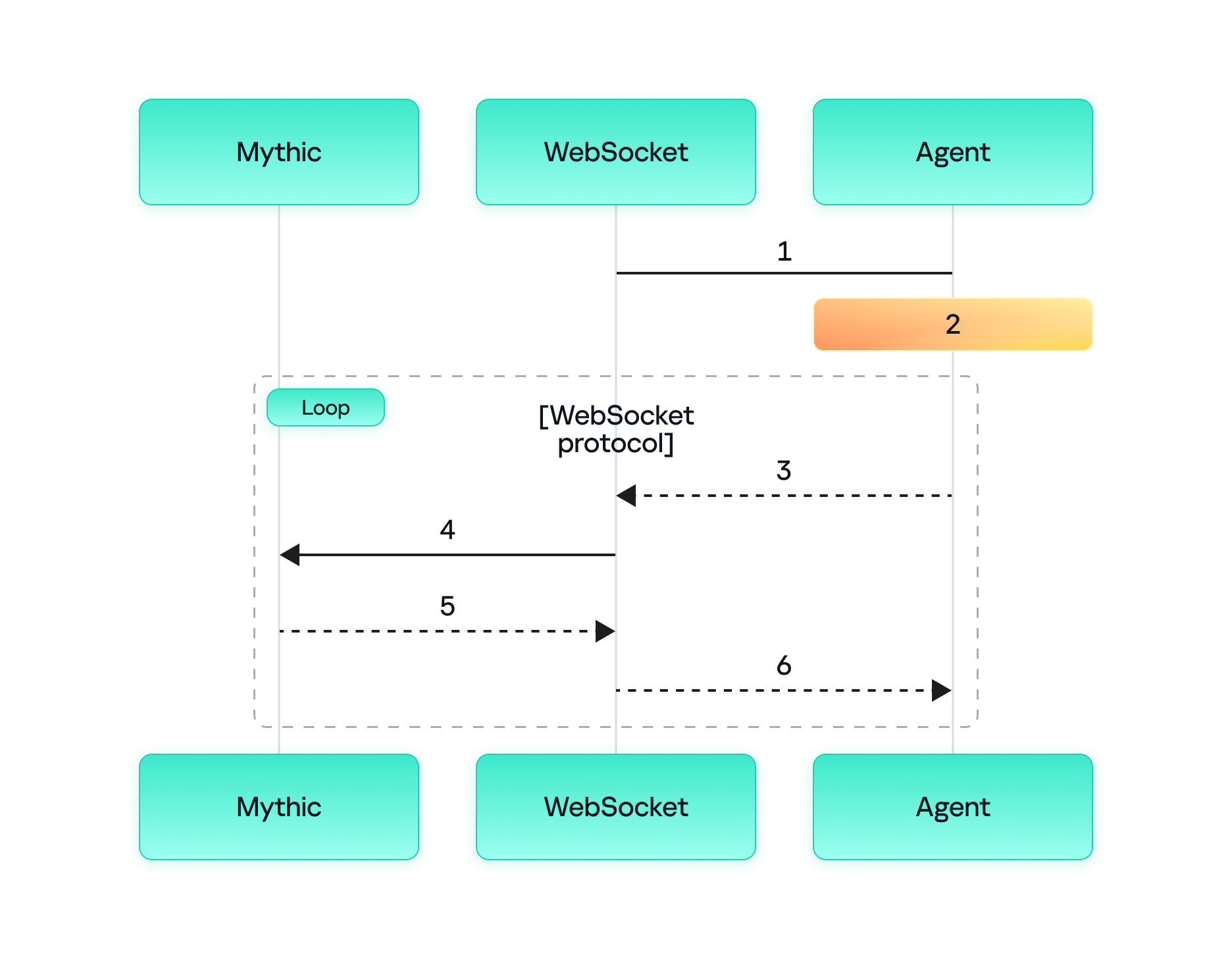
The process of agent communication with the server via WebSocket is as follows:
- The agent sends a request to the WebSocket container to change the protocol for the HTTP(S) connection.
- The agent and the WebSocket container switch to WebSocket to send and receive messages.
- The agent sends a message to the WebSocket container requesting tasks from the Mythic container.
- The WebSocket container forwards the request to the Mythic container.
- The Mythic container returns the tasks to the WebSocket container.
- The WebSocket container forwards these tasks to the agent.
It is worth mentioning that in this communication model, both the WebSocket container and the Mythic container reside on the Mythic server. Below is a screenshot of the initial agent connection to the server.
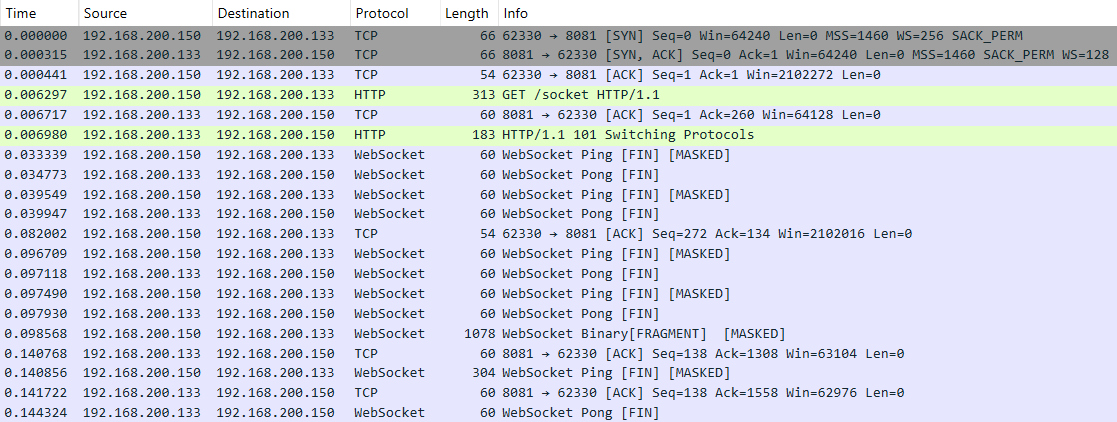
An analysis of the TCP session shows that the actual data is transmitted in the data field in Base64 encoding.
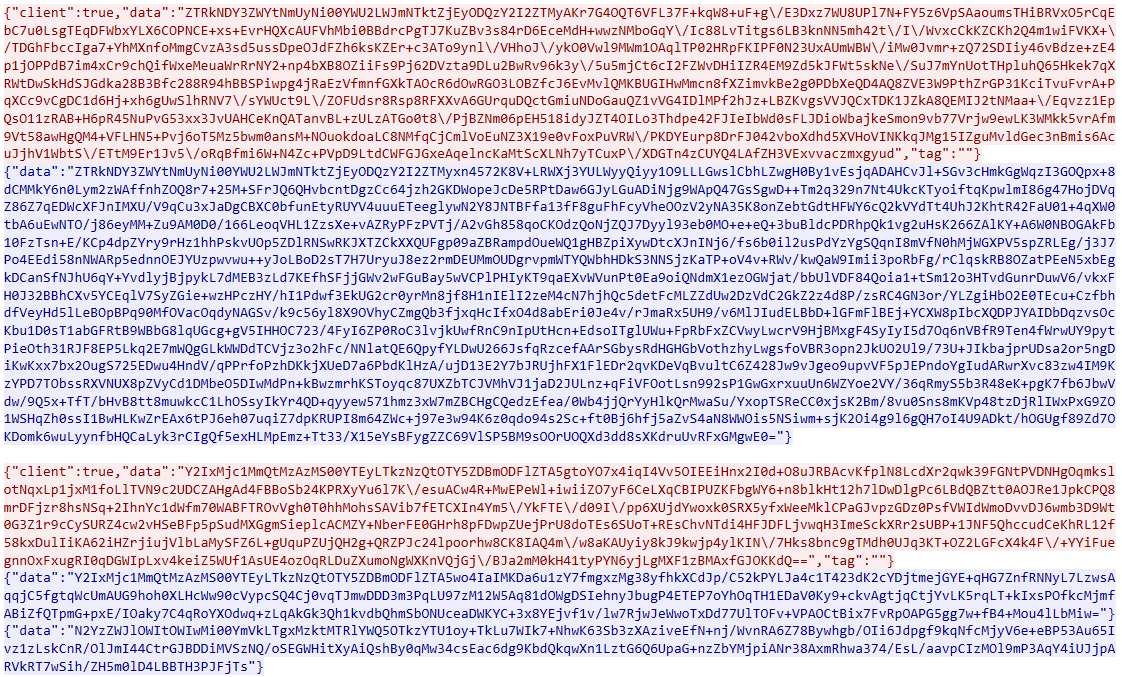
Decoding reveals the familiar data structure: UUID+AES256(JSON).
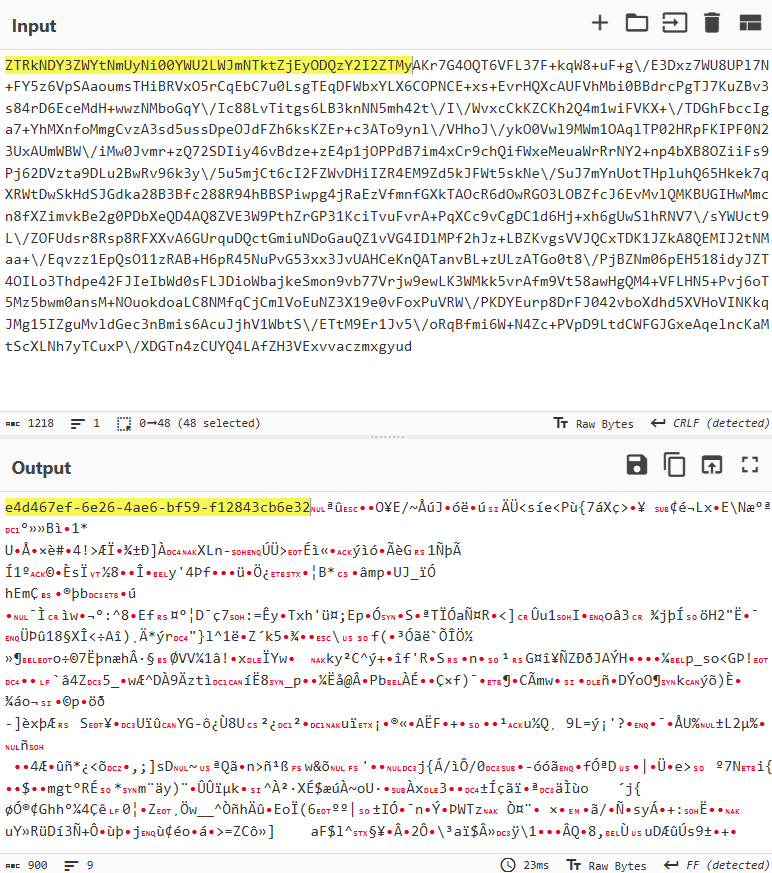
Therefore, we can use an approach similar to those discussed above to detect agent activity. The signature should rely on the UUID string at the beginning of the data field. The rule first verifies that the session data matches the data:base64 format, then decodes the data field and searches for a string matching the UUID pattern.
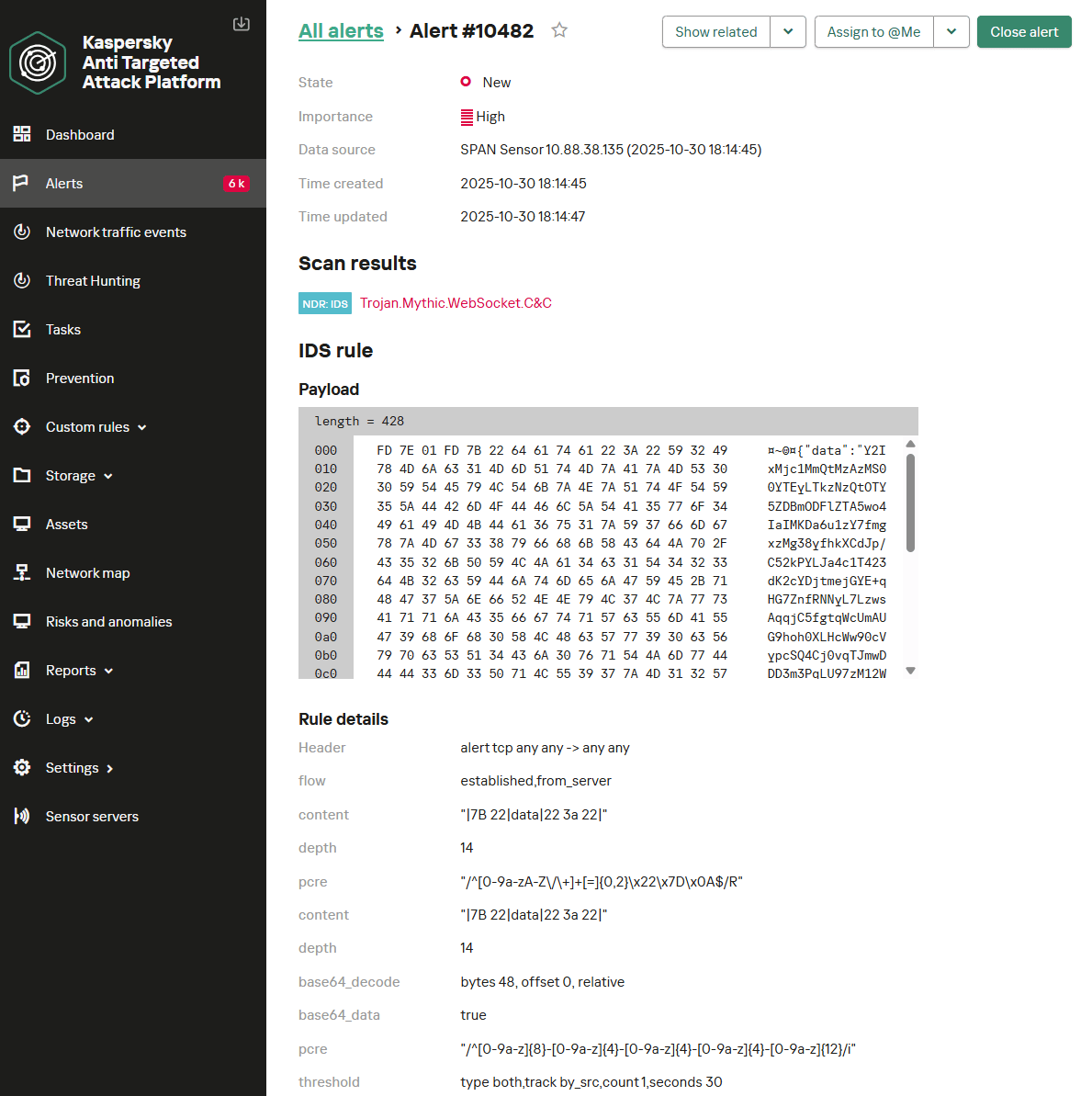
alert tcp any any -> any any (msg: "Trojan.Mythic.WebSocket.C&C"; flow: established, from_server; content: "|7B 22|data|22 3a 22|"; depth: 14; pcre: "/^[0-9a-zA-Z\/\+]+[=]{0,2}\x22\x7D\x0A$/R"; content: "|7B 22|data|22 3a 22|"; depth: 14; base64_decode: bytes 48, offset 0, relative; base64_data; pcre: "/^[a-z0-9]{8}\-[a-z0-9]{4}\-[a-z0-9]{4}\-[a-z0-9]{4}\-[a-z0-9]{12}/i"; threshold: type both, track by_src, count 1, seconds 30; reference: url, github.com/MythicAgents/; classtype: ndr1; sid: 9000115; rev: 2;)
Below is the Trojan.Mythic.WebSocket.C&C signature triggering on Mythic agent communication over WebSocket.
Takeaways
The Mythic post-exploitation framework continues to gain popularity and evolve rapidly. New agents are emerging, designed for covert persistence within target infrastructures. Despite this evolution, the various implementations of network communication in Mythic share many common characteristics that remain largely consistent over time. This consistency enables IDS/NDR solutions to effectively detect the framework’s agent activity through network traffic analysis.
Mythic supports a wide array of agent management options utilizing several network protocols. Our analysis of agent communications across these protocols revealed that agent activity can be detected by searching for specific data patterns within network traffic. The primary detection criterion involves tracking UUID strings in specific positions within Base64-encoded transmitted data. However, while the general approach to detecting agent activity is similar across protocols, each requires protocol-specific filters. Consequently, creating a single, universal signature for detecting Mythic agents in network traffic is challenging; individual detection rules must be crafted for each protocol. This article has provided signatures that are included in Kaspersky NDR.
Kaspersky NDR is designed to identify current threats within network infrastructures. It enables the detection of all popular post-exploitation frameworks based on their characteristic traffic patterns. Since the network components of these frameworks change infrequently, employing an NDR solution ensures high effectiveness in agent discovery.
Kaspersky verdicts in Kaspersky solutions (Kaspersky Anti-Targeted Attack with NDR module and Kaspersky NGFW)
Trojan.Mythic.SMB.C&C
Trojan.Mythic.TCP.C&C
Trojan.Mythic.HTTP.C&C
Trojan.Mythic.TLS.C&C
Trojan.Mythic.WebSocket.C&C
Creating User-Friendly Installers Across Operating Systems

After you have written the code for some awesome application, you of course want other people to be able to use it. Although simply directing them to the source code on GitHub or similar is an option, not every project lends itself to the traditional configure && make && make install, with often dependencies being the sticking point.
Asking the user to install dependencies and set up any filesystem links is an option, but having an installer of some type tackle all this is of course significantly easier. Typically this would contain the precompiled binaries, along with any other required files which the installer can then copy to their final location before tackling any remaining tasks, like updating configuration files, tweaking a registry, setting up filesystem links and so on.
As simple as this sounds, it comes with a lot of gotchas, with Linux distributions in particular being a tough nut. Whereas on MacOS, Windows, Haiku and many other OSes you can provide a single installer file for the respective platform, for Linux things get interesting.
Windows As Easy Mode
For all the flak directed at Windows, it is hard to deny that it is a stupidly easy platform to target with a binary installer, with equally flexible options available on the side of the end-user. Although Microsoft has nailed down some options over the years, such as enforcing the user’s home folder for application data, it’s still among the easiest to install an application on.
While working on the NymphCast project, I found myself looking at a pleasant installer to wrap the binaries into, initially opting to use the NSIS (Nullsoft Scriptable Install System) installer as I had seen it around a lot. While this works decently enough, you do notice that it’s a bit crusty and especially the more advanced features can be rather cumbersome.
This is where a friend who was helping out with the project suggested using the more modern Inno Setup instead, which is rather like the well-known InstallShield utility, except OSS and thus significantly more accessible. Thus the pipeline on Windows became the following:
- Install dependencies using vcpkg.
- Compile project using NMake and the MSVC toolchain.
- Run the Inno Setup script to build the
.exebased installer.
Installing applications on Windows is helped massively both by having a lot of freedom where to install the application, including on a partition or disk of choice, and by having the start menu structure be just a series of folders with shortcuts in them.
The Qt-based NymphCast Player application’s .iss file covers essentially such a basic installation process, while the one for NymphCast Server also adds the option to download a pack of wallpaper images, and asks for the type of server configuration to use.
Uninstalling such an application basically reverses the process, with the uninstaller installed alongside the application and registered in the Windows registry together with the application’s details.
MacOS As Proprietary Mode
Things get a bit weird with MacOS, with many application installers coming inside a DMG image or PKG file. The former is just a disk image that can be used for distributing applications, and the user is generally provided with a way to drag the application into the Applications folder. The PKG file is more of a typical installer as on Windows.
Of course, the problem with anything MacOS is that Apple really doesn’t want you to do anything with MacOS if you’re not running MacOS already. This can be worked around, but just getting to the point of compiling for MacOS without running XCode on MacOS on real Apple hardware is a bit of a fool’s errand. Not to mention Apple’s insistence on signing these packages, if you don’t want the end-user to have to jump through hoops.
Although I have built both iOS and OS X/MacOS applications in the past – mostly for commercial projects – I decided to not bother with compiling or testing my projects like NymphCast for Apple platforms without easy access to an Apple system. Of course, something like Homebrew can be a viable alternative to the One True Apple Way
Anything But Linux
The world of desktop systems is larger than just Windows, MacOS and Linux, of course. Even mobile OSes like iOS and Android can be considered to be ‘desktop OSes’ with the way that they’re being used these days, also since many smartphones and tablets can be hooked up to to a larger display, keyboard and mouse.
How to bootstrap Android development, and how to develop native Android applications has been covered before, including putting APK files together. These are the typical Android installation files, akin to other package manager packages. Of course, if you wish to publish to something like the Google Play Store, you’ll be forced into using app bundles, as well as various ways to signing the resulting package.
The idea of using a package for a built-in package manager instead of an executable installer is a common one on many platforms, with iOS and kin being similar. On FreeBSD, which also got a NymphCast port, you’d create a bundle for the pkg package manager, although you can also whip up an installer. In the case of NymphCast there is a ‘universal installer’ built into the Makefile after compilation via the fully automated setup.sh shell script, using the fact that OSes like Linux, FreeBSD and even Haiku are quite similar on a folder level.
That said, the Haiku port of NymphCast is still as much of a Beta as Haiku itself, as detailed in the write-up which I did on the topic. Once Haiku is advanced enough I’ll be creating packages for its pkgman package manager as well.
The Linux Chaos Vortex

It is this complete and utter chaos with Linux distros which has made me not even try to create packages for these, and instead offer only the universal .tar.gz installation method. After un-tar-ing the server code, simply run [url=https://github.com/MayaPosch/NymphCast/blob/master/setup.sh]setup.sh[/url] and lean back while it compiles the thing. After that, run install_linux.sh and presto, the whole shebang is installed without further ado. I also provided an uninstall_linux.sh script to complete the experience.
That said, at least one Linux distro has picked up NymphCast and its dependencies like Libnymphcast and NymphRPC into their repository: Alpine Linux. Incidentally FreeBSD also has an up to date package of NymphCast in its repository. I’m much obliged to these maintainers for providing this service.
Perhaps the lesson here is that if you want to get your neatly compiled and packaged application on all Linux distributions, you just need to make it popular enough that people want to use it, so that it ends up getting picked up by package repository contributors?
Wrapping Up
With so many details to cover, there’s also the easily forgotten topic that was so prevalent in the Windows installer section: integration with the desktop environment. On Windows, the Start menu is populated via simple shortcut files, while one sort-of standard on Linux (and FreeBSD as corollary) are Freedesktop’s XDC Desktop Entry files. Or .desktop files for short, which purportedly should give you a similar effect.
Only that’s not how anything works with the Linux ecosystem, as every single desktop environment has its own ideas on how these files should be interpreted, where they should be located, or whether to ignore them completely. My own experiences there are that relying on them for more advanced features, such as auto-starting a graphical application on boot (which cannot be done with Systemd, natch) without something throwing an XDG error or not finding a display is basically a fool’s errand. Perhaps that things are better here if you use KDE Plasma as DE, but this was an installer thing that I failed to solve after months of trial and error.
Long story short, OSes like Windows are pretty darn easy to install applications on, MacOS is okay as long as you have bought into the Apple ecosystem and don’t mind hanging out there, while FreeBSD is pretty simple until it touches the Linux chaos via X11 and graphical desktops. Meanwhile I’d strongly advise to only distribute software on Linux as a tarball, for your sanity’s sake.
Iteration3D is Parametric Python in the Cloud

It’s happened to all of us: you find the perfect model for your needs — a bracket, a box, a cable clip, but it only comes in STL, and doesn’t quite fit. That problem will never happen if you’re using Iteration3D to get your models, because every single thing on the site is fully-parametric, thanks to an open-source toolchain leveraging 123Dbuilds and Blender.
Blender gives you preview renderings, including colors where the models are set up for multi-material printing. Build123D is the CAD behind the curtain — if you haven’t heard of it, think OpenSCAD but in Python, but with chamfers and fillets. It actually leverages the same OpenCascade that’s behind everyone’s other favorite open-source CAD suite, FreeCAD. Anything you can do in FreeCAD, you can do in Build123D, but with code. Except you don’t need to learn the code if the model is on Iteration3D; you just set the parameters and push a button to get an STL of your exact specifications.
Right now, if you’re looking for a box or a pipe hanger or a bracket, plugging your numbers into Iteration3D’s model generator is going to be a lot faster than rolling your own, weather that rolling be done in OpenSCAD, FreeCAD, or one of those bits of software people insist on paying for. There’s a good variety of templates — 18 so far — so it’s worth checking out. Iteration3D is still new, having started in early 2025, so we will watch their career with great interest.
Going back to the problem in the introduction, if Iteration3D doesn’t have what you need and you still have an STL you need to change the dimensions of, we can help you with that.
Thanks to [Sylvain] for the tip!
Terremoto? No, AI-Fake! Un’immagine generata dall’IA paralizza i treni britannici
In Inghilterra, i treni sono stati sospesi per diverse ore a causa del presunto crollo di un ponte ferroviario causato da un’immagine falsa generata da una rete neurale. In seguito al terremoto avvenuto durante la notte, avvertito dagli abitanti del Lancashire e del Lake District meridionale, sui social media sono circolate immagini che mostravano il Carlisle Bridge a Lancaster gravemente danneggiato.
Network Rail, la società statale che gestisce l’infrastruttura ferroviaria britannica, ha riferito di aver appreso dell’immagine intorno alle 00:30 GMT e, per precauzione, di aver sospeso il traffico ferroviario sul ponte fino a quando i tecnici non avessero potuto verificarne le condizioni.
Intorno alle 02:00 GMT, il binario è stato completamente riaperto, non sono stati riscontrati danni e un giornalista della BBC che ha visitato il sito ha confermato che la struttura del ponte era intatta.

Un giornalista della BBC ha sottoposto l’immagine a un chatbot con intelligenza artificiale, che ha evidenziato diversi segnali rivelatori di un possibile falso. Tuttavia, Network Rail sottolinea che qualsiasi avviso di sicurezza deve essere trattato come se l’immagine fosse autentica, poiché sono in gioco vite umane.
L’azienda ha riferito che 32 treni, sia passeggeri che merci, hanno subito ritardi a causa dell’incidente. Alcuni treni hanno dovuto essere fermati o rallentati in avvicinamento al ponte, mentre altri hanno subito ritardi perché il loro percorso era bloccato da servizi precedentemente in ritardo. Data la lunghezza della West Coast Main Line, le conseguenze hanno raggiunto anche i treni diretti a nord, verso la Scozia.
Network Rail ha esortato gli utenti a considerare le potenziali conseguenze di tali immagini false. Secondo un portavoce dell’azienda, la creazione e la distribuzione di tali immagini comporta ritardi del tutto inutili, comporta costi per i contribuenti e aumenta il carico di lavoro dei dipendenti, già impegnati al massimo per garantire il regolare e sicuro funzionamento della ferrovia.
L’azienda ha sottolineato che la sicurezza dei passeggeri e del personale rimane una priorità assoluta e che pertanto qualsiasi potenziale minaccia all’infrastruttura viene presa estremamente sul serio.
La polizia dei trasporti britannica ha confermato di essere stata informata della situazione, ma al momento non è in corso alcuna indagine specifica sull’incidente.
L'articolo Terremoto? No, AI-Fake! Un’immagine generata dall’IA paralizza i treni britannici proviene da Red Hot Cyber.
Gazzetta del Cadavere reshared this.
Il Digital Wellness Coaching: i 3 passi per un mindsetfix e l’uso intenzionale della tecnologia
Viviamo nella dissociazione: lodiamo l’equilibrio tra lavoro e vita privata, eppure ci ritroviamo costantemente online, come marionette in balia di fili invisibili
Il vero problema non è la tecnologia, ma come noi, esseri umani, rispondiamo ad essa
Quella che chiamiamo stress digitale non è solo un fastidio; è una crisi profonda che investe il nostro benessere, la nostra identità e la nostra consapevolezza.
Lo Stress Digitale: il nucleo del problema
Esploriamo ciascun aspetto per capire meglio come funziona
Livello Fisiologico
Quando riceviamo una notifica sul nostro dispositivo, si attiva in noi la risposta di lotta o fuga. Questo costante switch attenzionale provoca un aumento cronico del cortisolo, l’ormone dello stress, come evidenziato dagli studi sul costo del cambio di contesto (switch cost) nel multitasking. A lungo andare, questo stato di allerta costante ci porta a soffrire di insonnia, di fatica visiva e a sviluppare tensioni muscolari (fenomeni ampiamente documentati dall’ergonomia digitale)
Livello Cognitivo
Il nostro cervello è costretto a un continuo switch di contesto. Come sottolineato dalle ricerche sulla carica cognitiva questo “multitasking” erode la nostra capacità di mantenere un’attenzione profonda, essenziale per raggiungere uno stato di flow efficiente e sostenuto
Livello Emotivo
A livello emotivo, la nostra autostima diventa intimamente legata alla nostra disponibilità, alimentando spesso la FOMO (Fear of Missing Out) e la convinzione profonda: “Se non rispondo subito, non sono utile o importante.” Questa convinzione ci può portare a sentirci costantemente sotto pressione e a sottovalutare il nostro valore, distaccandoci dai nostri veri bisogni e desideri. La pratica della Mindfulness è lo strumento ideale per contrastare questa reattività, riportando l’attenzione al momento presente e ai bisogni interni, anziché alla costante richiesta esterna di disponibilità
In sintesi, la nostra esposizione costante alla tecnologia reattiva non solo danneggia il nostro corpo, ma impoverisce anche la nostra mente e, infine, influisce sulla nostra autostima. Comprendere queste dinamiche è il primo passo verso una gestione più sana del nostro benessere digitale
Digital Wellness Coaching: esercizi pratici
Non abbiamo bisogno di un techfix (come disabilitare le app), ma di un mindsetfix.
Qui entra in gioco il Digital Wellness Coaching che ci guida verso una gestione sana e consapevole della tecnologia in 3 fasi:
1. Consapevolezza (Awareness)
Il debug dell’abitudine
- Usare un diario digitale per monitorare l’uso reattivo e intenzionale, annotando l’emozione provata prima di afferrare il telefono.
- Esercizio: la pausa di 3 secondi. Prima di sbloccare il telefono, fermiamoci e chiediamoci: “Qual è l’intenzione specifica per cui sto prendendo questo dispositivo?” Se non c’è un’intenzione chiara, riponiamolo.
- Riflessione guida: “Quando prendiamo in mano il telefono, cosa stiamo cercando realmente? L’informazione o una fuga?”
2. Confine (Boundary)
Installare il firewall personale
- Adottare pratiche come il time boxing intenzionale, pianificando momenti di disconnessione (es. area rossa dalle 20:00).
- Esercizio: il contratto di disconnessione. Stabiliamo una zona della casa (es. la camera da letto) come “No-Phone Zone” e rispettiamo rigorosamente questo confine per due settimane.
- La regola della non-urgenza è cruciale: il 99% di ciò che sembra urgente è semplicemente la priorità di qualcun altro
3. Riconnessione (Re-Connection)
Aggiornare il sistema corpo-mente
- Introdurre micro-pause consapevoli di 30 secondi (es. stretching o pratiche brevi di Mindfulness e respirazione profonda) e riscoprire hobby analogici. L’obiettivo è quello di ancorare la mente al presente non digitale.
- Esercizio: il risveglio analogico. Non tocchiamo dispositivi digitali (telefono, tablet, TV) per almeno una ora dopo esserci svegliati. Usiamo quel tempo per colazione, lettura cartacea o meditazione Mindfulness.
- L’obiettivo è separare chi siamo dal nostro ruolo: non siamo un server, ma un essere umano
L’impatto del Coaching: dalla teoria alla trasformazione
Il valore del Digital Wellness Coaching risiede nella sua capacità di trasformare la consapevolezza in azione sostenibile. Non si limita a dare consigli generici (“usa meno il telefono”) ma offre:
- Partnership: il Coach funge da “partner di responsabilità”, aiutandoci a rimanere fedeli ai confini che abbiamo stabilito per noi stessi.
- Personalizzazione: le strategie del Coach vengono adattate non solo all’uso della tecnologia, ma anche al nostro specifico stile di vita, lavoro e valori emotivi.
- Superamento dei blocchi: con il Coach identifichiamo e smantelliamo le convinzioni profonde (come “Devo rispondere subito “) che alimentano il ciclo dello stress digitale
L’idea della Community
La necessità di affrontare questo tema ha dato vita alla community RHC Cyber Angels, un insieme che esplora il lato umano delle sfide digitali, con il benessere digitale come obiettivo centrale. Il benessere digitale non è una dieta temporanea, ma una filosofia operativa.
Significa smettere di considerarci una risorsa infinita e iniziare a riconoscerci come una risorsa limitata e preziosa.
Se sei una donna interessata ai temi del benessere digitale e della cybersecurity in generale, scrivi a redazione@redhotcyber.com per candidarti ad entrare all’interno del gruppo delle RHC Cyber Angels.
Modo reazione vs. modo intenzione: la mappa per l’autonomia
Quando siamo in modalità reazione, diamo il nostro potere al mondo esterno, rispondendo passivamente.
In modalità intenzionale, invece, esercitiamo il nostro potere interno, scegliendo attivamente come spendere il nostro tempo e la nostra energia
Quale delle due modalità scegliamo di allenare da oggi?
Qual è la prima cosa non-digitale che faremo, nel prossimo weekend, per ricordarci che il nostro tempo è prezioso e limitato?
L'articolo Il Digital Wellness Coaching: i 3 passi per un mindsetfix e l’uso intenzionale della tecnologia proviene da Red Hot Cyber.
L’EDR è inutile! Gli hacker di DeadLock hanno trovato un “kill switch” universale
Cisco Talos ha identificato una nuova campagna ransomware chiamata DeadLock: gli aggressori sfruttano un driver antivirus Baidu vulnerabile (CVE-2024-51324) per disabilitare i sistemi EDR tramite la tecnica Bring Your Own Vulnerable Driver (BYOVD). Il gruppo non gestisce un sito di fuga di dati ma comunica con le vittime tramite Session Messenger.
Secondo Talos gli attacchi vengono eseguiti da un operatore motivato finanziariamente che ottiene l’accesso all’infrastruttura della vittima almeno cinque giorni prima della crittografia e prepara gradualmente il sistema per l’implementazione di DeadLock.
Uno degli elementi chiave della catena è BYOVD : gli aggressori stessi introducono nel sistema un driver Baidu Antivirus legittimo ma vulnerabile, BdApiUtil.sys, camuffato da DriverGay.sys, e il proprio loader, EDRGay.exe. Il loader inizializza il driver in modalità utente, stabilisce una connessione ad esso tramite CreateFile() e inizia a enumerare i processi alla ricerca di soluzioni antivirus ed EDR.

Successivamente, viene sfruttata la vulnerabilità CVE-2024-51324, un errore di gestione dei privilegi nel driver. Il loader invia uno speciale comando DeviceIOControl() al driver con codice IOCTL 0x800024b4 e il PID del processo di destinazione.
Dal lato kernel, il driver interpreta questo come una richiesta di terminazione del processo, ma a causa della vulnerabilità, non verifica i privilegi del programma chiamante. Eseguendo con privilegi kernel, il driver richiama semplicemente ZwTerminateProcess() e “termina” immediatamente il servizio di sicurezza, aprendo la strada ad ulteriori aggressori.
Prima di lanciare il ransomware, l’operatore esegue uno script PowerShell preparatorio sul computer della vittima. Innanzitutto, verifica i privilegi dell’utente corrente e, se necessario, si riavvia con privilegi amministrativi tramite RunAs, bypassando l’UAC e attenuando le restrizioni standard di PowerShell.
Dopo aver ottenuto i privilegi di amministratore, lo script disabilita Windows Defender e altri strumenti di sicurezza, arresta e disabilita i servizi di backup, i database e altri software che potrebbero interferire con la crittografia. Elimina inoltre tutti gli snapshot delle copie shadow del volume, privando la vittima degli strumenti di ripristino standard, e infine si autodistrugge, complicando l’analisi forense.
Lo script include anche un elenco dettagliato di eccezioni per i servizi critici per il sistema. Tra queste rientrano i servizi di rete (WinRM, DNS, DHCP), i meccanismi di autenticazione (KDC, Netlogon, LSM) e i componenti di base di Windows (RPCSS, Plug and Play, registro eventi di sistema).
Ciò consente agli aggressori di disabilitare il maggior numero possibile di componenti di sicurezza e applicativi senza causare l’arresto anomalo dell’intero sistema, consentendo alla vittima di leggere la nota, contattare il ransomware e pagare.
Talos ha notato che alcune sezioni dello script relative all’eliminazione delle condivisioni di rete e ai metodi alternativi per l’arresto dei processi erano commentate, a indicare che gli autori le intendevano come “opzioni” per scopi specifici. Lo script carica dinamicamente alcune eccezioni da un file run[.]txt esterno.
La telemetria indica che gli aggressori stanno accedendo alla rete della vittima tramite account legittimi compromessi. Dopo l’accesso iniziale, configurano l’accesso remoto persistente: utilizzando il comando reg add, modificano il valore di registro fDenyTSConnections per abilitare RDP. Quindi, utilizzando netsh advfirewall, creano una regola che apre la porta 3389, impostano il servizio RemoteRegistry in modalità on-demand e lo avviano, consentendo la gestione remota del registro.
Il giorno prima della crittografia, l’operatore installa una nuova istanza di AnyDesk su una delle macchine , nonostante altre installazioni del software siano già presenti nell’infrastruttura, rendendo questa distribuzione sospetta.
AnyDesk viene distribuito in modo silenzioso, con l’avvio di Windows abilitato, una password configurata per l’accesso silenzioso e gli aggiornamenti disabilitati che potrebbero interrompere le sessioni degli aggressori. Successivamente, inizia la ricognizione attiva e lo spostamento della rete: nltest viene utilizzato per trovare i controller di dominio e la struttura del dominio, net localgroup/domain per enumerare i gruppi privilegiati, ping e quser per verificare la disponibilità e gli utenti attivi, e infine mstsc e mmc compmgmt.msc per connettersi ad altri host tramite RDP o tramite lo snap-in Gestione Desktop remoto.
Il potenziale accesso alle risorse web interne viene rilevato dall’avvio di iexplore.exe con indirizzi IP interni.
L'articolo L’EDR è inutile! Gli hacker di DeadLock hanno trovato un “kill switch” universale proviene da Red Hot Cyber.


DNS-Massenüberwachung: „Das war dringend notwendig, diese neue Idee einer Schleppnetzfahndung im Internet abzuwenden“
netzpolitik.org/2025/dns-masse…

informapirata ⁂
in reply to simona • • •simona likes this.
Luca Sironi
in reply to informapirata ⁂ • • •tra un po va a finire che DEVI avere i social commerciali perche' devono controllarli.
reshared this
informapirata ⁂ reshared this.
Luca Sironi
in reply to Luca Sironi • • •se non hai neanche instagram nel 2025, hai qualcosa da nascondere !
reshared this
informapirata ⁂ reshared this.
informapirata ⁂
in reply to Luca Sironi • • •Elena Brescacin
in reply to Luca Sironi • • •No, scherzo. Ma sinceramente per il tipo di vacanze che faccio io, due sono le cose: non rompete le palle se mi spoglio, e datemi da mangiare che sia bene e abbondante. Solo l'Italia le può garantire entrambe nello stesso posto.
Finlandia e Olanda, ci sono stata 30 anni fa e mi trovai bene. Ma ora che hanno l'estrema destra pure loro in mezzo ai piedi...
informapirata ⁂ reshared this.
Elena Brescacin
in reply to Elena Brescacin • • •"non mi si rompa se mi spoglio" si intende stare in costume da bagno, in pantaloncini corti e magliettina, insomma sbragate.
Col culo dentro o fuori, di solito dentro. Perché basta la faccia, è un duplicato